16
Model Three - Operation Manual
LEVEL
4 JKL
LIMIT
3 GHI
TILT
2 DEF
AUTO
1 ABC
SCAN
5 MNO
SPECT
6 PQR
SET
7 STU
4 JKL
FILE
8 VWX
P
MN
HUM
9 YZ*
FCN
0
7 S
QAM
.
F
1
A
F
2
I
D
F
3
Y
VW
__
MODEL THREEMODEL THREE
F
1
F
2
F
3
LEVEL
4 JKL
LIMIT
3 GHI
TILT
2 DEF
AUTO
1 ABC
SCAN
5 MNO
SPECT
6 PQR
SET
7 STU
FILE
8 VWX
HUM
9 YZ*
FCN
0
QAM
.
__
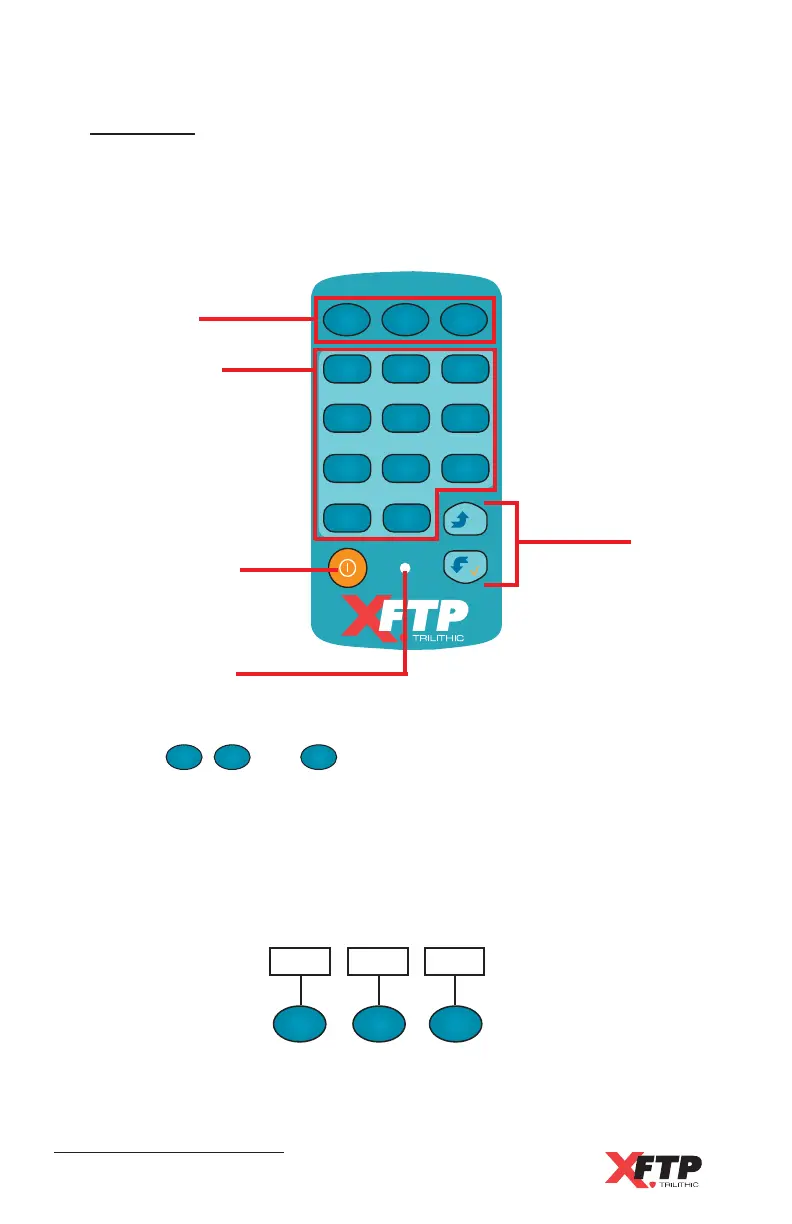
Soft buttons
11 primary and
secondary function
buttons
ON / OFF button
Charge indicator
Arrow
buttons
Soft Buttons
The
F
1
F
1
,
F
2
, and
F
3
keys are used to access various functions within the display
menus. On specific displays, three boxes appear at the bottom of
the display. These boxes correspond to the three soft keys and
provide additional commands such as ENTER, EXIT, SCALE,
REF, movement arrows, etc. (see the individual function displays
for more information).
Key Pad
The key pad consists of the various buttons to access the Model
Three’s functions. There are 11 function buttons, two arrow buttons
(up and down), the power on/off button, and three “soft buttons” that
enable you to perform functions shown on the display.
F
1
F
1
F
2
F
3
FREQ MAX
T



 To Next Page