TRIMBLE TMX-2050 DISPLAY CABLING GUIDE
5 – Connecting the Field-IQ Crop Input Control Systems
49
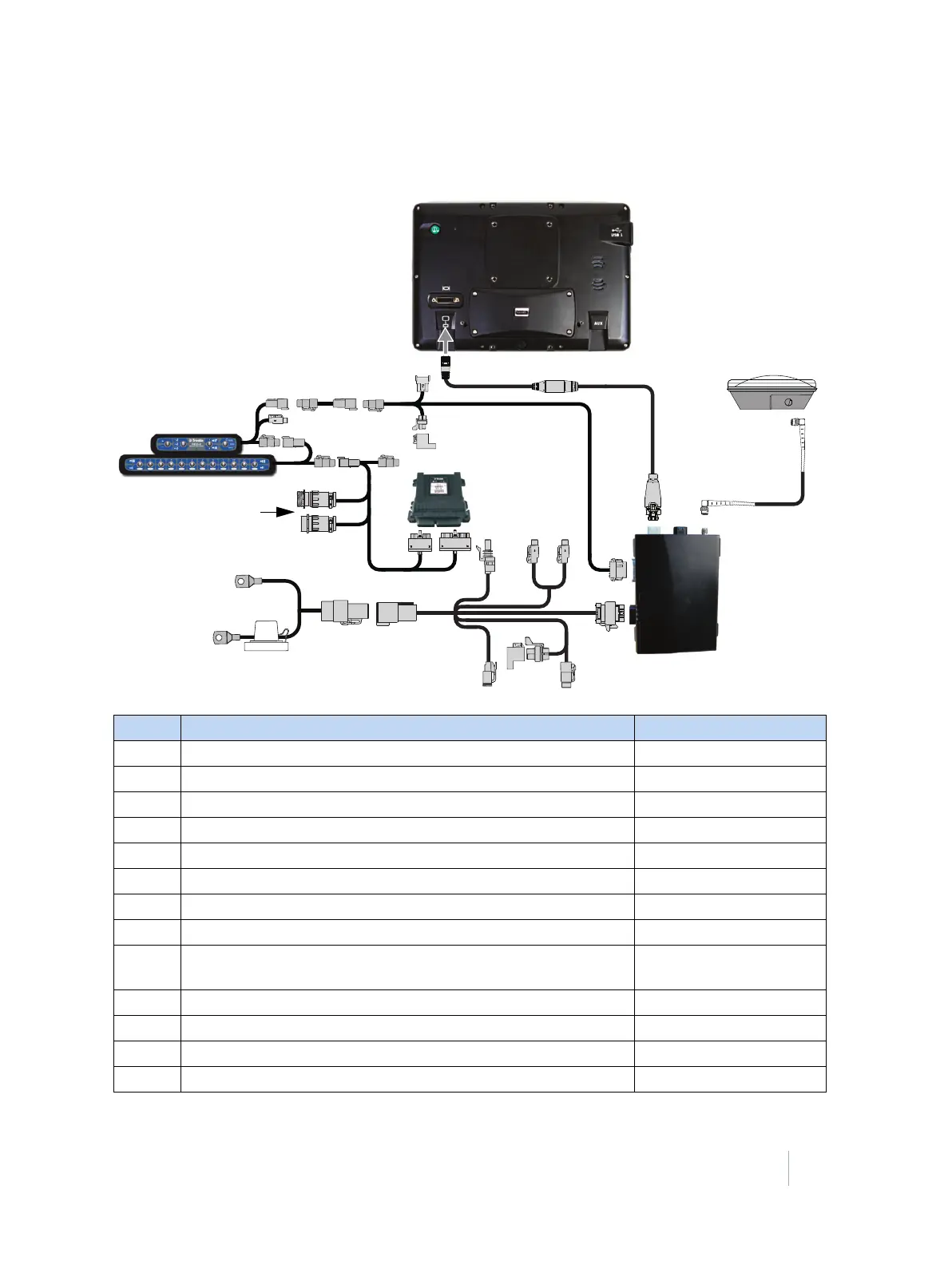
Field-IQ Rate and Section Control to EZ-Boom harness
This figure shows how to connect the display with the Field-IQ rate and section control system to the
EZ-Boom harness:
Item Description Trimble part number
❶ TMX-2050 display 96700-00
❷ TM-200 Module to display cable 93843
❸ TM-200 Module 95060-00
❹ TM-200 Module power and I/O cable connected to port B 92676
❺ TM-200 Module battery cable 92905
❻ AG-25 GNSS antenna to TM-200 Module cable 50449
❼ AG-25 GNSS antenna 77038-01
❽ Display to Field-IQ cable 75834
❾ Autopilot Steering Sensor Extension and Field-IQ Switch Box
Extension Cable Assembly
55656
❿ Field-IQ master switch box 75050-01
⓫ 12-section switch box (optional) 75060-01
⓬ Field-IQ product / section control module - EZ-Boom® replacement 75503
⓭ Rate and Section Control module 75774-00



 To Next Page