90
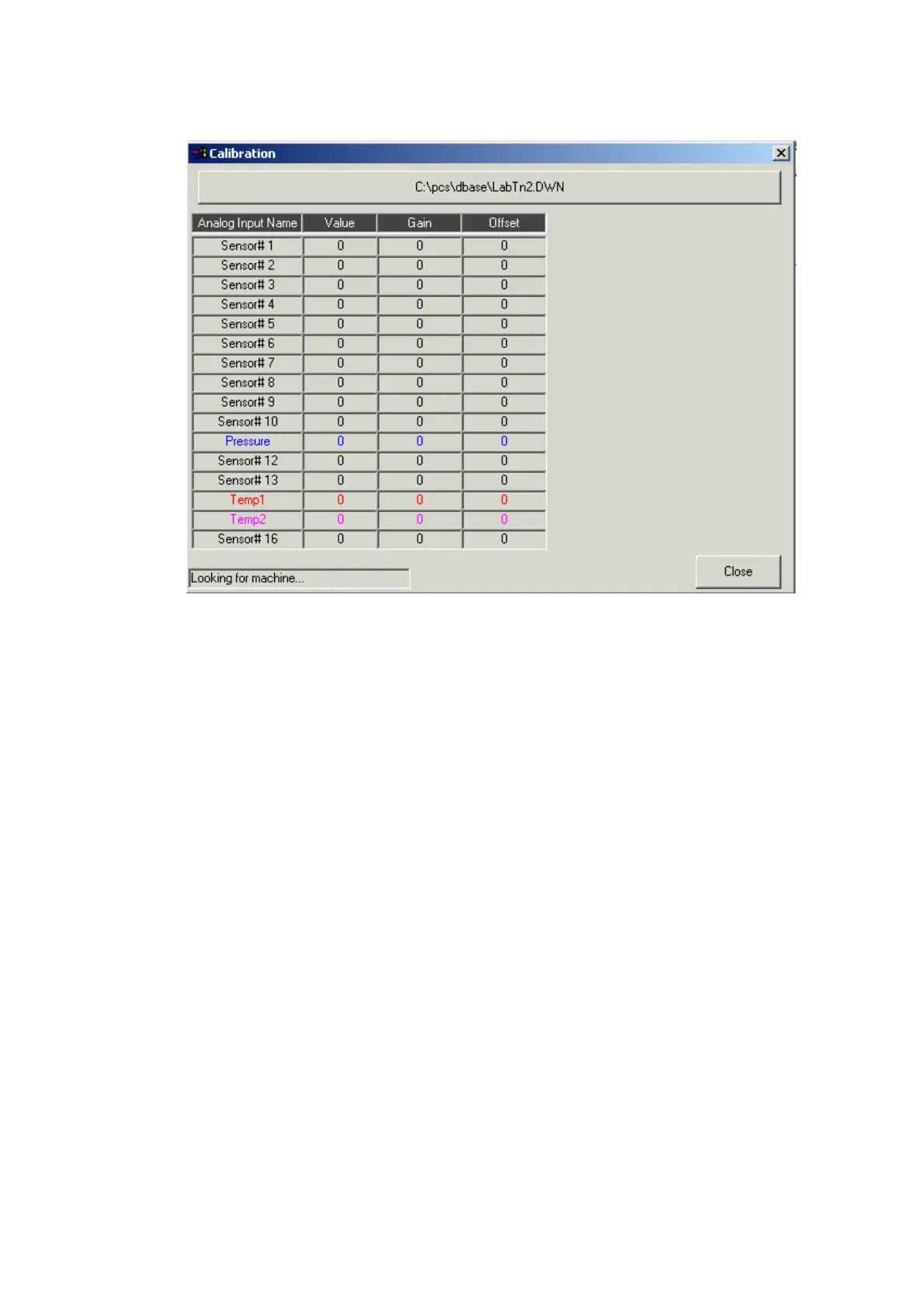
Calibration window
The calibration window will try to connect with the PCS Target platform. The
connection tasks are:
♦ Check if target connected. On status bar displayed: "Looking for
machine…".
♦ Upload all 16 Analog inputs gain and offset values. On status bar
displayed: "Uploading Gain & Offset…".
♦ Uploading analog inputs values. On Status bar displayed: "Connected".
This task performing periodical every 500 milliseconds, this allow real
time refreshing of the analog inputs values.
Type File button
This button allow select target type file (in example file is:
"C:\pcs\dbase\LabTn2.DWN"). Pressing this button will display 'Open file'
dialog box. If program will find same file name in ADMC directory, in Inputs
table, Analog inputs names will be displayed in color.
When program connected, double click on one of the inputs table rows, will
display calibration tool. With this tool you can calibrate selected analog input.


 To Next Page
 Loading...