91
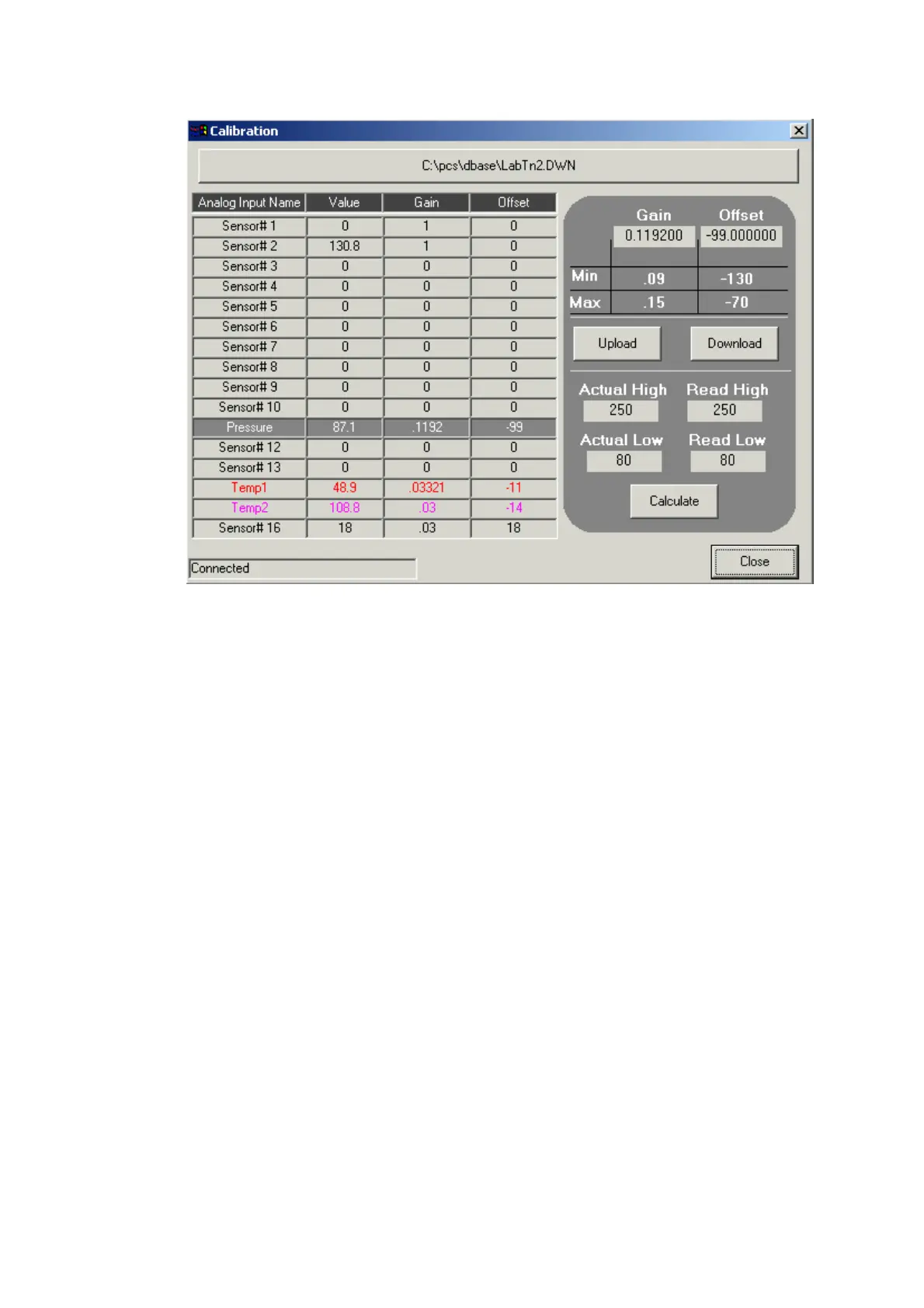
Calibration tool description
Gain text box – use for manual inserting of the Gain value.
Offset text box – use for manual inserting of the Offset value.
Min and Max – limits for gain and offset values. If ADMC compatible type
file not found, Min and Max labels will show "N/A".
Note: When Min and Max are N/A, you must be very careful, because the
gain and offset values not limited at this case and may be inserted wrong
gain or offset value.
Upload button – Press this button to upload gain and offset values from the
target platform. All 16 analog inputs gain and offset values will be uploaded.
Download button – Press this button to download Gain and Offset of the
current selected analog input. The values displayed in Gain and offset text
boxes will be downloaded. If Inserted values are wrong, relevant error message
will be displayed and download operation will be aborted.
Calculation
Calculate Gain and Offset values by inserting 4 values: Actual High, Actual
Low, Read High and Read Low to the formula. For more information about
Gain and offset calculation see User Manual supplied with PCS Target
platform. Pressing 'Calculate' button will calculate new Gain and Offset values.
The new values will be displayed in the Gain and Offset text boxes.


 To Next Page
 Loading...