EasyManua.ls Logo

Tuttnauer EA - How to Change the Parameters

Tuttnauer EA
72 pages
Print Icon
To Next Page IconTo Next Page
To Previous Page IconTo Previous Page
Loading...
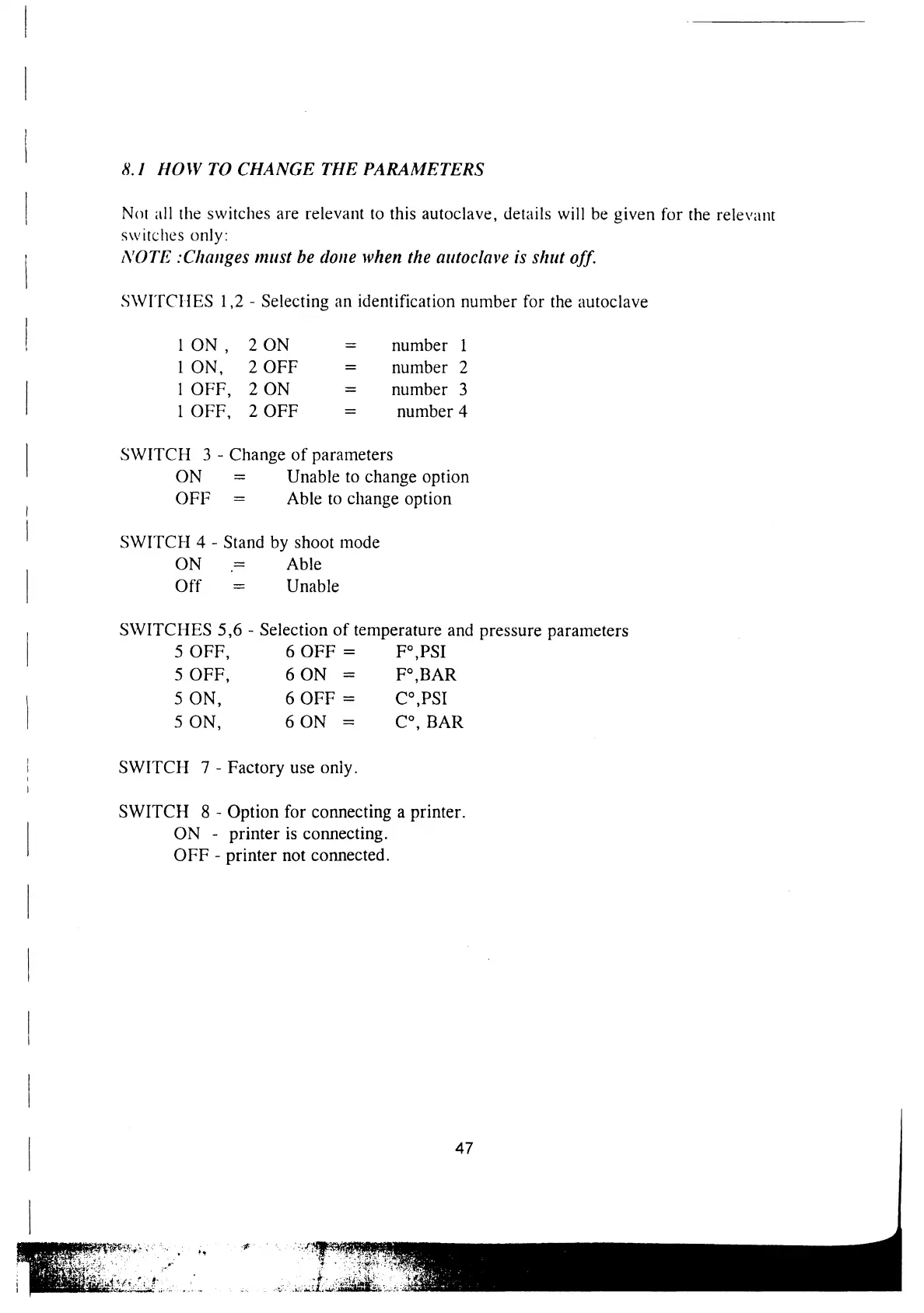
8.1
HOW
TO
CHANGE
THE
PARAMETERS
|
Not
all
the
switches
are
relevant
to
this
autoclave,
details
will
be
given
for
the
relevant
switches
only:
|
NOTE
:Changes
must
be
done
when
the
autoclave
ts
shut
off.
SWITCHES
1,2
-
Selecting
an
identification
number
for the
autoclave
|
1ON
,
20N
=
number
1
ION,
2
OFF
=
number
2
|
|
OFF,
2
ON
=
number
3
1
OFF,
2
OFF
=
number
4
|
SWITCH
3
-
Change
of
parameters
ON
=
Unable
to
change
option
|
OFF
=
Able
to
change
option
|
SWITCH
4
-
Stand
by
shoot
mode
ON
=
Able
|
Off
=
Unable
SWITCHES
5,6
-
Selection
of
temperature
and
pressure
parameters
5
OFF,
6
OFF
=
F°,
PSI
5
OFF,
6ON
=
F*
BAR
S
ON,
6
OFF
=
C*
PSI
|
5
ON,
6ON
=
C°,
BAR
SWITCH
7
-
Factory
use only.
SWITCH
8
-
Option
for
connecting
a
printer.
|
ON
-
printer
is
connecting.
OFF
-
printer
not
connected.
|
|
47

Related product manuals