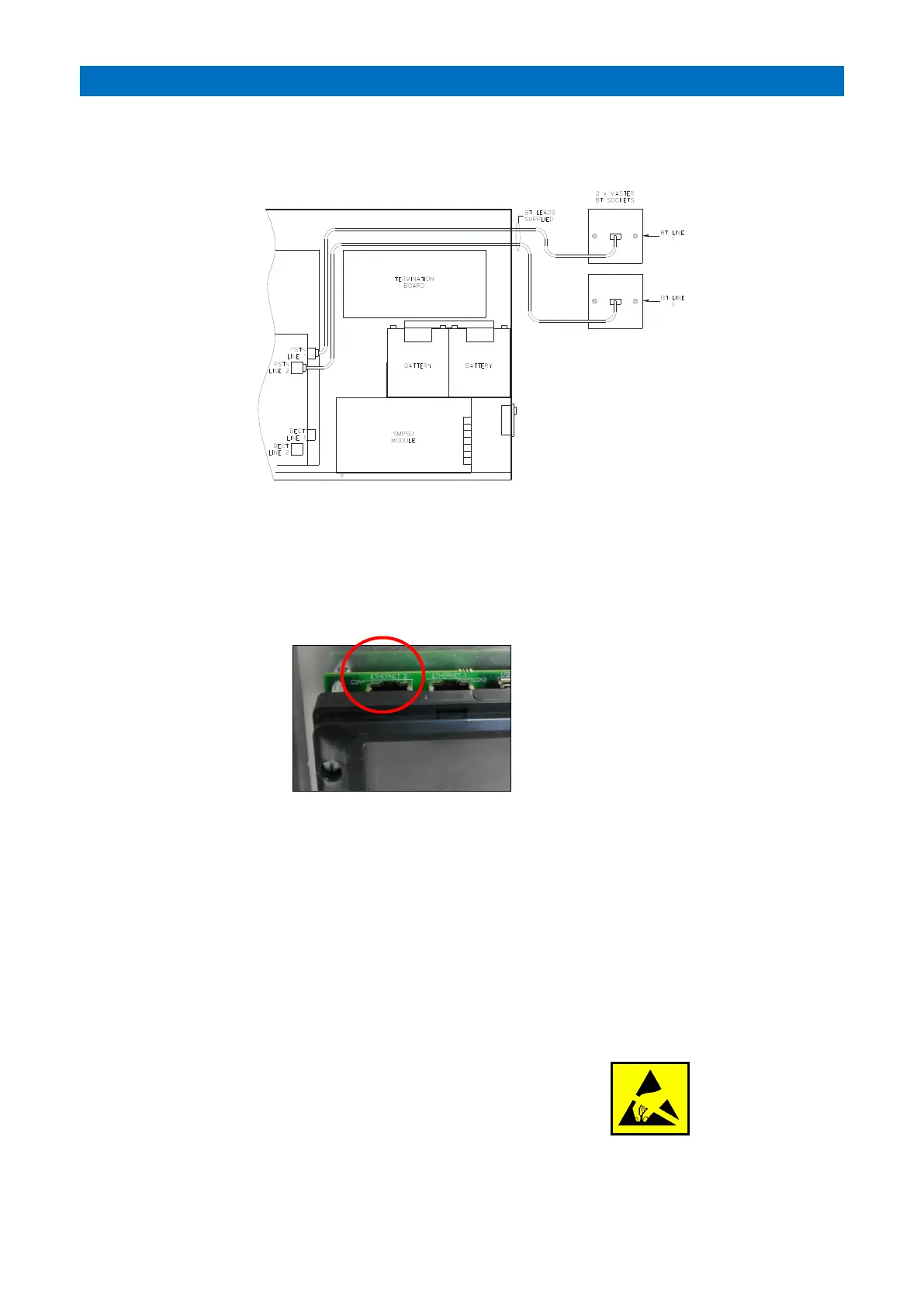
TELEPHONE LINE CONNECTION
The 2 Telecom leads provided with the Advent XT2 controller are used to connect the PSTN1 & PSTN2 ports to the
master sockets provided by telephone company.
The 2 RJ11 leads provided with the Matrix IP-PBX are used to connect the DECT 1 & DECT2 ports to the IP-PBX CO1 &
CO2 lines. If the DECT requires access to an external telephone line, then this should be connected to the IP-PBX CO3.
If a PBX is not fitted, then up to 4 standard telephones (REN 1) can be connected per DECT port.
ETHERNET CONNECTION
The Ethernet 2 port (CON4) on the XT2 Controller should be connected to an ADSL router if offsite calls are being
reported to a digital IP-ARC.
The following must be specified when setting-up the Ethernet connection to a digital ARC;
1. A static IP address and corporate network termination point within close proximity to the Advent XT2 Controller*.
2. A static IP address and corporate network termination point within close proximity to the ARC and the additional
SIP Server.
*Note: the static IP addresses at both locations should be assigned to allow IP communication between the Advent
XT2 system and the ARC SIP Server.
3. The network connection between these two locations should also support VOIP, i.e. SIP messaging and an RTP
audio stream requiring a 100Kb bandwidth. The communication between the Advent XT2 system and the ARC SIP
Server uses “Simple” SIP messaging and the “G711 aLaw codec”.
4. It is recommended to configure Quality of Service for VOIP calls between the Advent XT2 system and the ARC SIP
Server.
MICRO SD CARD
Switch off the mains supply and disconnect the battery before removing
the SD card. Push down to release the SD card mechanical latch, to refit
push down until the latch clicks into place.
ATTENTION: Electrostatic Sensitive Device - observe precautions for handling.
Only use a Swissbit industrial Micro SD card type: SFSD1024N1BN1TO-E-DF-161-STD



 To Next Page