EasyManua.ls Logo

Tynetec Advent XT2 - Answering a Call

Tynetec Advent XT2
63 pages
Print Icon
To Next Page IconTo Next Page
To Previous Page IconTo Previous Page
Loading...
Doc No. FM0804 issue 4 Page 9
7. CONTROLLER INSTALLATION
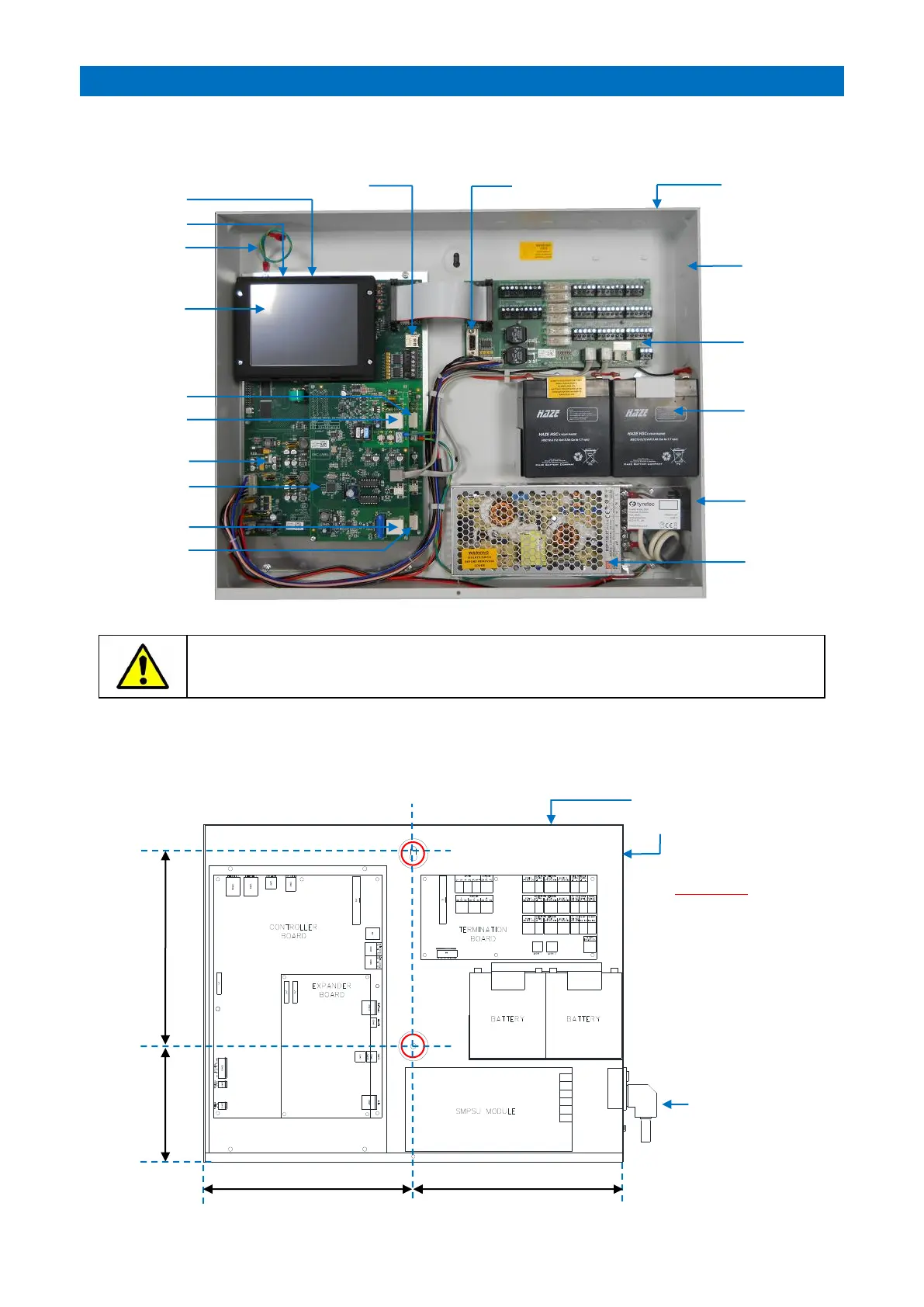
The Advent XT2 controller is housed in a wall mounted steel enclosure with integral power supply and 2 rechargeable
standby batteries. It also includes a 5.7” touch-screen for system programming and event logs.
The XT2 controller lid should only be removed during installation and service it must be screwed
shut at all other times to prevent the risk of electric shock.
Never leave a live XT2 controller unattended with the lid removed.
INSTALLATION
The Advent XT2 controller should be wall mounted in a dry, secure area which is easily accessible for termination and
future service. Fix the chassis to the wall using the two keyholes marked “A” below;
20mm Cable
Entry
Knockouts
CPU Board
5.7” TFT
Touch Screen
Mains-in IEC
Socket with
on/off Switch
27V DC 150W
SMPSU
Wall Mounted
Enclosure
(400x500x75mm)
2 x 12V 5Ah
Rechargeable
Batteries
Lid Safety
Earth Bond
Audio Expander
Board
Termination
Board
Ethernet Ports
1 GB Micro SD Card
PSTN Line 2
DECT Line 2
USB Ports
PSTN Line 1
DECT Line 1
RS 232 Port
137mm
A
A
228mm
250mm
250mm
20mm Cable Entry
Knockouts
Mains Supply
IMPORTANT
All wiring should
enter via the 20mm
knockouts provided.
Under no
circumstances
should holes be
drilled near the main
circuit board area.

Other manuals for Tynetec Advent XT2

Related product manuals