Edge trimmer -725/04 for 571
Keep your hands away from the
moving knife! Danger of injury!
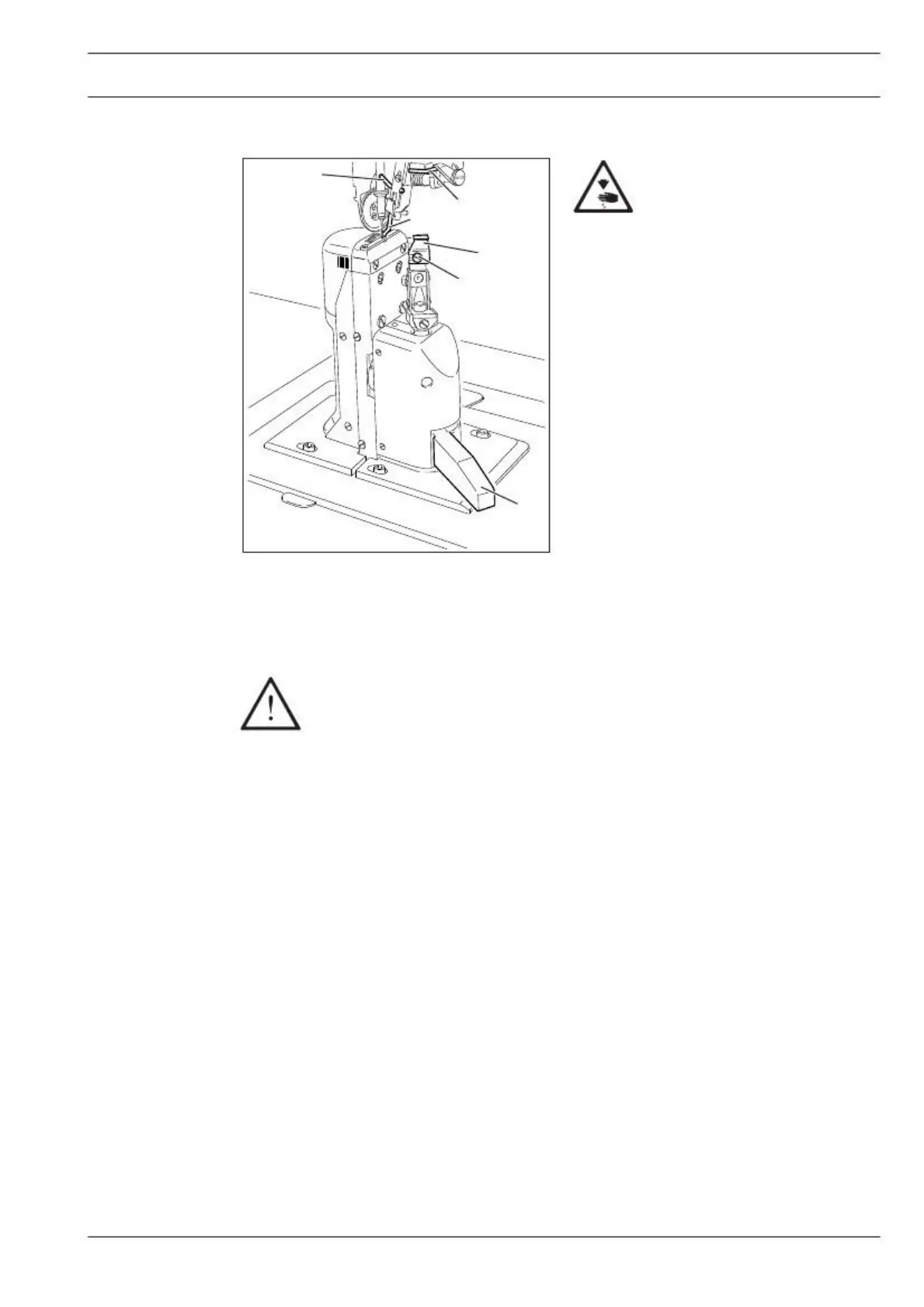
Switch on knife drive:
● Move lever 1 backwards. The knife
moves into operating position.
Switch off knife drive:
● Press lever 1. The knife swings back-
Switch on edge guide:
● Swing edge guide 2 into position by
hand and press lever 3. The edge guide 2
moves into its operating position.
Switch off edge guide:
● Raise edge guide 2 and let it click into po-
sition. The edge guide 2 is out of operation.
● Raise lever 4. The edge guide swings
backwards.
The following work may only be carried out by technical staff or by persons who
have been properly instructed.
● Switch off the machine.
● Loosen screw 5 and remove knife 6.
● Insert new knife and slightly tighten screw 5.
● Adjust the knife according to Chaper 1.05.05 Cutting stroke in the Adjustment Manual
and tighten screw 5.


 To Next Page