Installation and commissioning
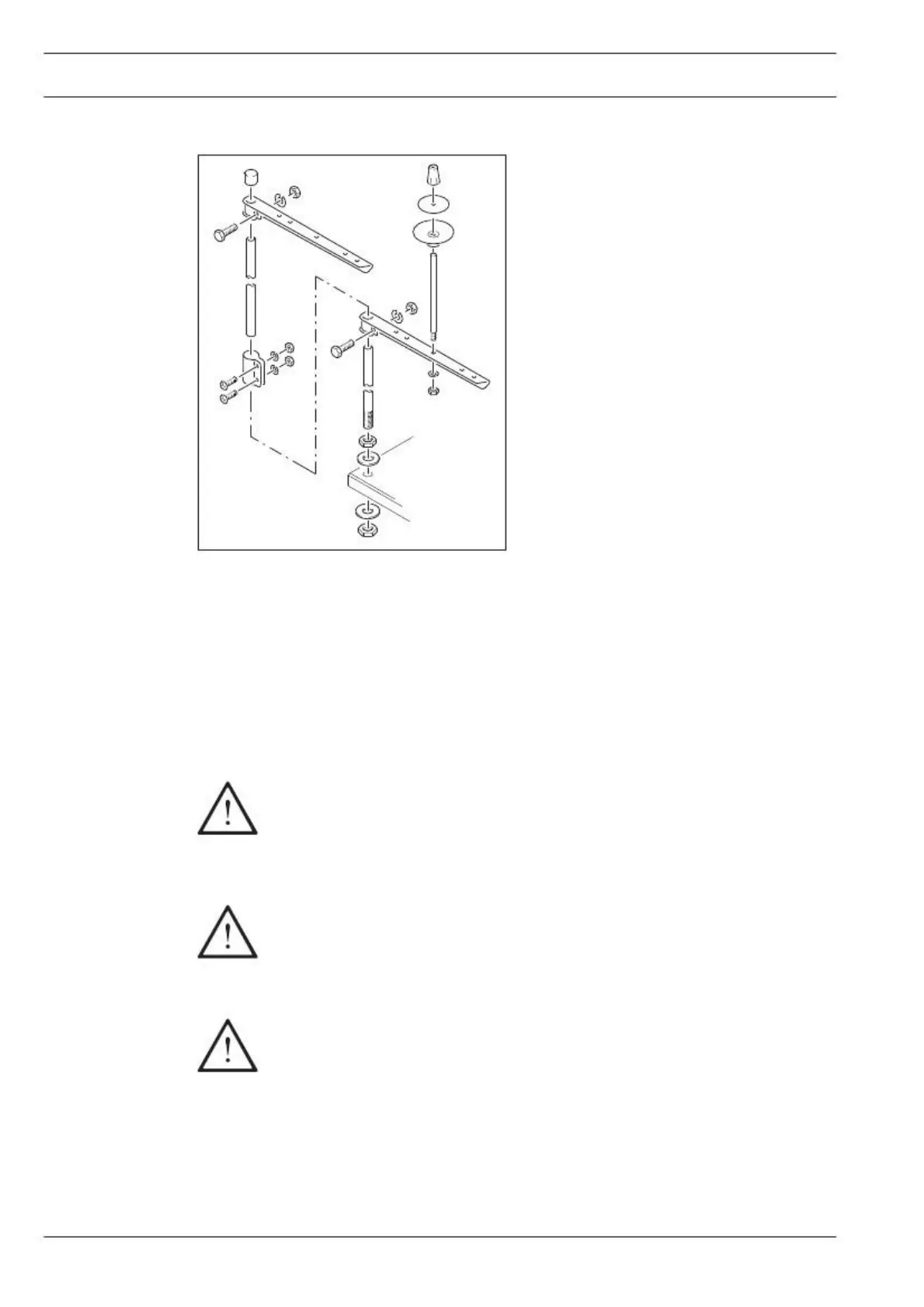
● Fit the reel stand as shown in Fig. 8-10.
● Afterwards insert the stand in the hole in
the table top and secure it with the nuts
provided.
● Check the machine, particularly the electrical wiring, for any damage.
● Clean the machine thoroughly and then oil it or fill in oil (see Chapter 10 Care and mainte-
nance).
● Have a mechanic check whether the motor of the machine can be operated with the avai-
lable power supply, and that the motor is correctly connected in the junction box.
If there are any discrepancies the machine must not be operated under any cir-
cumstances.
Before starting up the machine for the first time, have specialists check
whether parameter 799 (machine class) is set at "2, 4" or "6 " depending on the
control unit, and parameter 800 (sewing direction) is set at "1" (see Chapter
8.09 Basic position of the machine drive unit). On machines with PicoDrive
and control unit P44 PD-L it is also necessary to check whether parameter 802
on the 571 and 591 are set at "0", and on the 574 at "1". If necessary, have
these adjustments made.
The machine may only be connected to an earthed socket!
Switching the machine on/off
● Switch the machine on or off (see Chapter 7.01 On/off switch).


 To Next Page