9
UltiMaker S8 Installation and user manual
2. Introduction
In this chapter, you will be introduced to the parts and specifications of the product. Getting to
know the main components and their names is helpful during the installation and operation of the
UltiMaker S8.
2.1 Product explanation
The UltiMaker S8 is a dual-extrusion 3D printer based on fused deposition modeling (FDM) technology.
Designed for precision and efficiency, the UltiMaker S series creates 3D objects from a wide range of
polymers. Whether printing with a single material, multiple materials or colors, or combining a build material
with a dedicated support material, the S8 offers versatile capabilities for complex applications.
The S8 delivers up to four times the productivity of its predecessor while enhancing print quality. This
performance boost is achieved through a revolutionary new motion planner, high-flow cores, and an
optimized feeder system. When paired with advanced dual extrusion and an open material platform, it
enables the rapid production of intricate multi-material parts.
For streamlined workflows, the S8 integrates seamlessly with the Material Station. This automatic material
handling solution supports up to six spools, enabling quick loading and rapid material changes—even during
a print, where it automatically switches to an alternate spool if needed.
Instructions specific to the UltiMaker S8 when used with the Material Station are marked with the
Material Station icon throughout this manual.
Prepare your 3D models with UltiMaker Cura, our free slicing software that converts models into
printer-ready instructions with optimized material settings and print profiles for a variety of applications.
Additionally, the UltiMaker Digital Factory provides a cloud-based platform for monitoring print jobs and
managing your digital library, further enhancing operational efficiency.
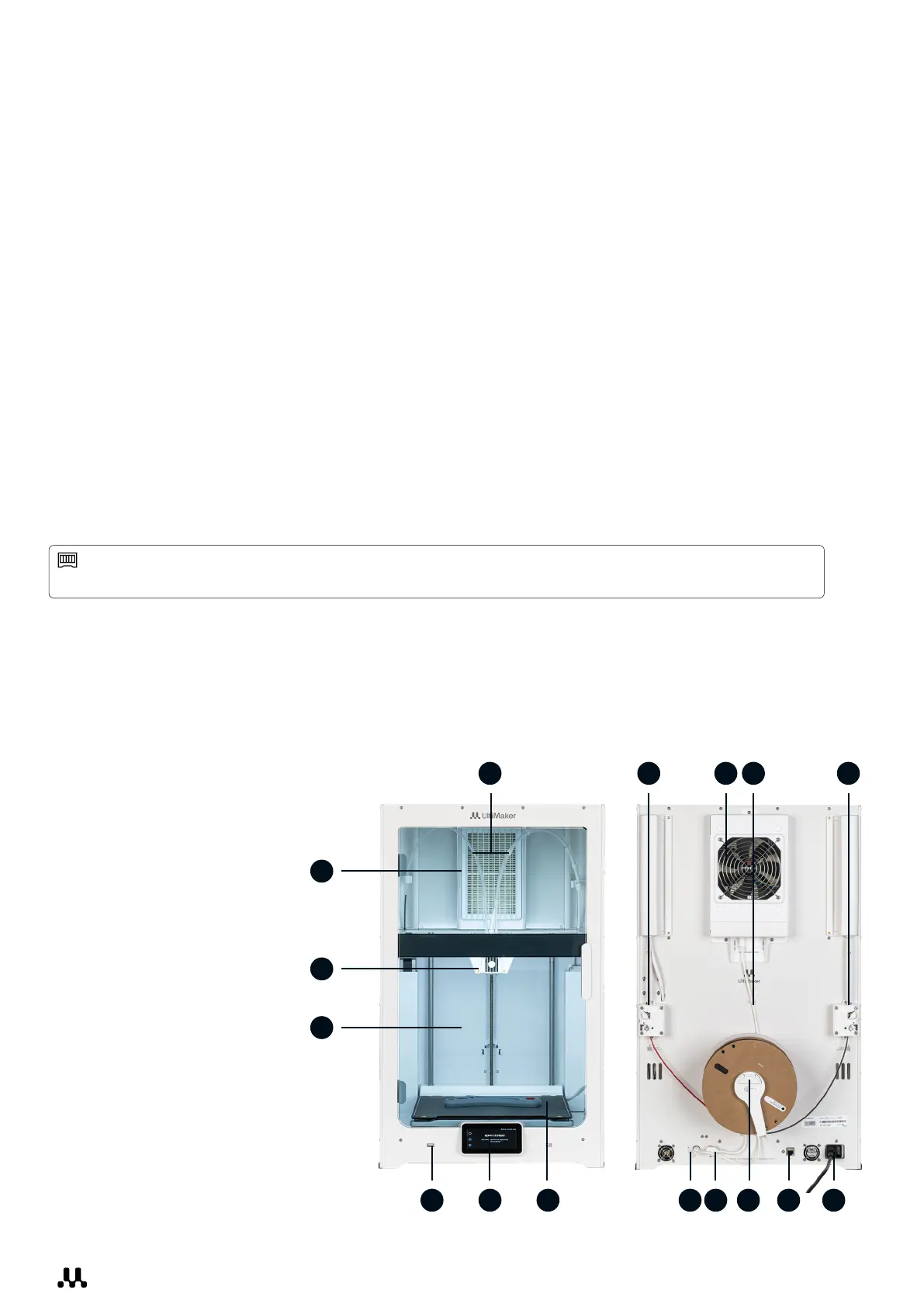
2.2 Main components
Front
1. Glass door
2. Print head
3. Air Manager filter
4. Bowden tubes
5. Z-stage with
flexible build plate
6. Touchscreen
7. USB port
Back
8. Feeder 2
9. Air Manager fan
10. Air Manager cable
11. Feeder 1
12. Power socket and switch
13. Ethernet port
14. Spoolholder
with filament guide
15. NFC port
16. UMB OUT port
1
2
3
4
7 6
8 119 10
121415165 13














 To Next Page