11
3 SETTING METHOD
11
SETTING METHOD
Chapter
3
■The injection of a power supply
On the power supply of F331.
Please check that a display comes.
■Starting of the F331 PC application software
The F331 PC application software will start by executing an EXE file.
If there is no shortcut on the desktop, please run the EXE file from the
destination folder.
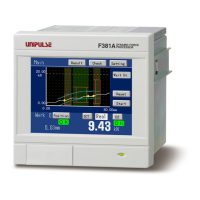
■Specification of a COM port
Please specify virtual COM port that is confirmed on "COM port" in the window menu.
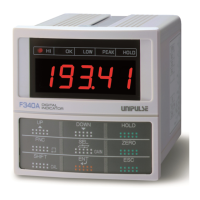
■The check of a indicating value
Check if indicating value on the F331 is displayed.
* It is a Logging screen at the first time starting.
The indicating value of the F331


 To Next Page