13
3 SETTING METHOD
13
SETTING METHOD
Chapter
3
■Option setting
3-4. Setting procedure
Setting by specific PC software.
For details, see the help of PC software.
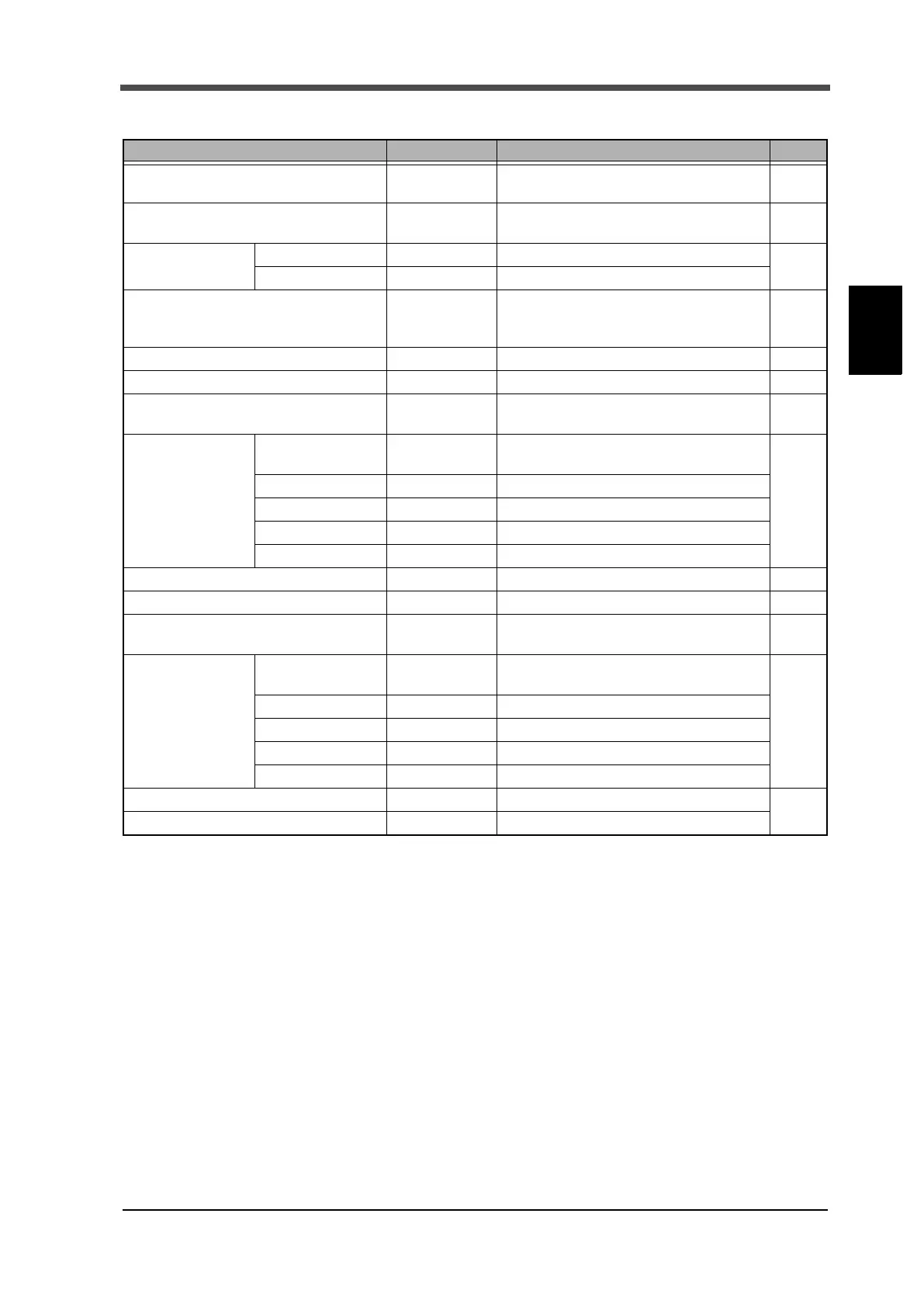
Item Initial value Setting range Page
BCD output mode
0: Linked with
indicated value
0: Linked with indicated value,
1: Not linked with indicated value
P. 2 7
BCD data update rate 0: 300
0: 300, 1: 100, 2: 50, 3: 30,
4: 10, 5: 5, 6: 3, 7: 1 [times/sec.]
P. 2 7
BCD external
output selection
Output selection 1 2: HH 0: OK, 1: NG, 2: HH, 3: HI, 4: LO, 5: LL
P. 2 7
Output selection 2 5: LL 0: OK, 1: NG, 2: HH, 3: HI, 4: LO, 5: LL
D/A output mode
0: Linked with
indicated value
0: Linked with indicated value,
1: Not linked with indicated value,
2: Zero scale, 3: Full scale
P. 3 0
D/A zero scale 0000 -9999 to +9999 P. 30
D/A full scale 1000 -9999 to +9999 P. 30
RS-485 communication mode 0: Command
0: Command, 1: Continuous1,
2: Continuous2, 3: Modbus-RTU
P. 3 3
RS-485 I/F setting
Baud rate 4: 19200
0: 1200, 1: 2400, 2: 4800,
3: 9600, 4: 19200, 5: 38400 [bps]
P. 3 3
Length of character 1: 8bit 0: 7bit, 1: 8bit
Parity bit 2: even 0: None, 1: odd, 2: even
Stop bit 0: 1bit 0: 1bit, 1: 2bit
Delimiter 0: CR 0: CR, 1: CR+LF
RS-485 ID 01 00 to 31 P. 33
RS-485 transmission delay time 00 00 to 99 [ms] P. 39
RS-232C communication mode 0: Command
0: Command, 1: Continuous1,
2: Continuous2,
P. 5 9
RS-232C I/F setting
Baud rate 4: 19200
0: 1200, 1: 2400, 2: 4800,
3: 9600, 4: 19200, 5: 38400 [bps]
P. 5 9
Length of character 1: 8bit 0: 7bit, 1: 8bit
Parity bit 2: even 0: None, 1: odd, 2: even
Stop bit 0: 1bit 0: 1bit, 1: 2bit
Delimiter 0: CR 0: CR, 1: CR+LF
Setting value LOCK (485/232) 0: OFF 0: OFF, 1: ON
P. 5 7
P. 6 5
Calibration value LOCK (485/232) 0: OFF 0: OFF, 1: ON


 To Next Page