76
4 & 8 & 16 Channel DVR Operation manual Revision 1.0
⑫ Minimizing button
⑬ Close program
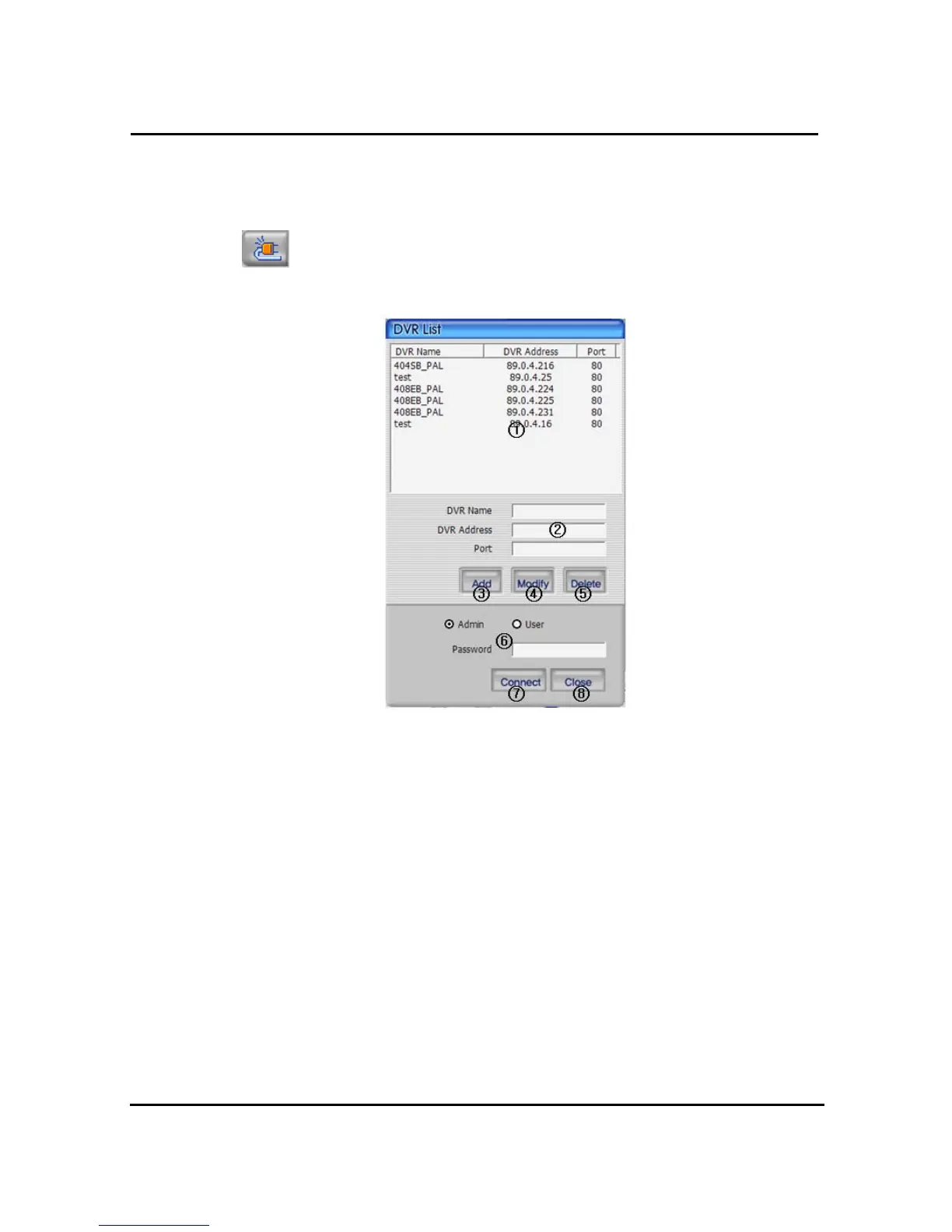
4.3.2 Connecting to DVR
Click icon to open the DVR list.
① This box allows the user to select the IP address assigned to the selected unit. This is
required for making a network connection.
② To create a new IP address & DVR selection, enter the DVR name, DVR address, and
port number.
③ To Click to add the newly entered DVR information into the DVR list
④ After selecting a DVR Name from the list and making changes, click Modify to update the
changes made to the item.
⑤ To remove an IP address/DVR Name , click and highlight the desired name, then press
the Delete button to remove.
⑥ Enter the correct password for either Admin or User for the target DVR.
⑦ Click Close to exit the DVR List
⑧ Click Connect after correct password has been entered to connect to the desired DVR.



 To Next Page