88
4 & 8 & 16 Channel DVR Operation manual Revision 1.0
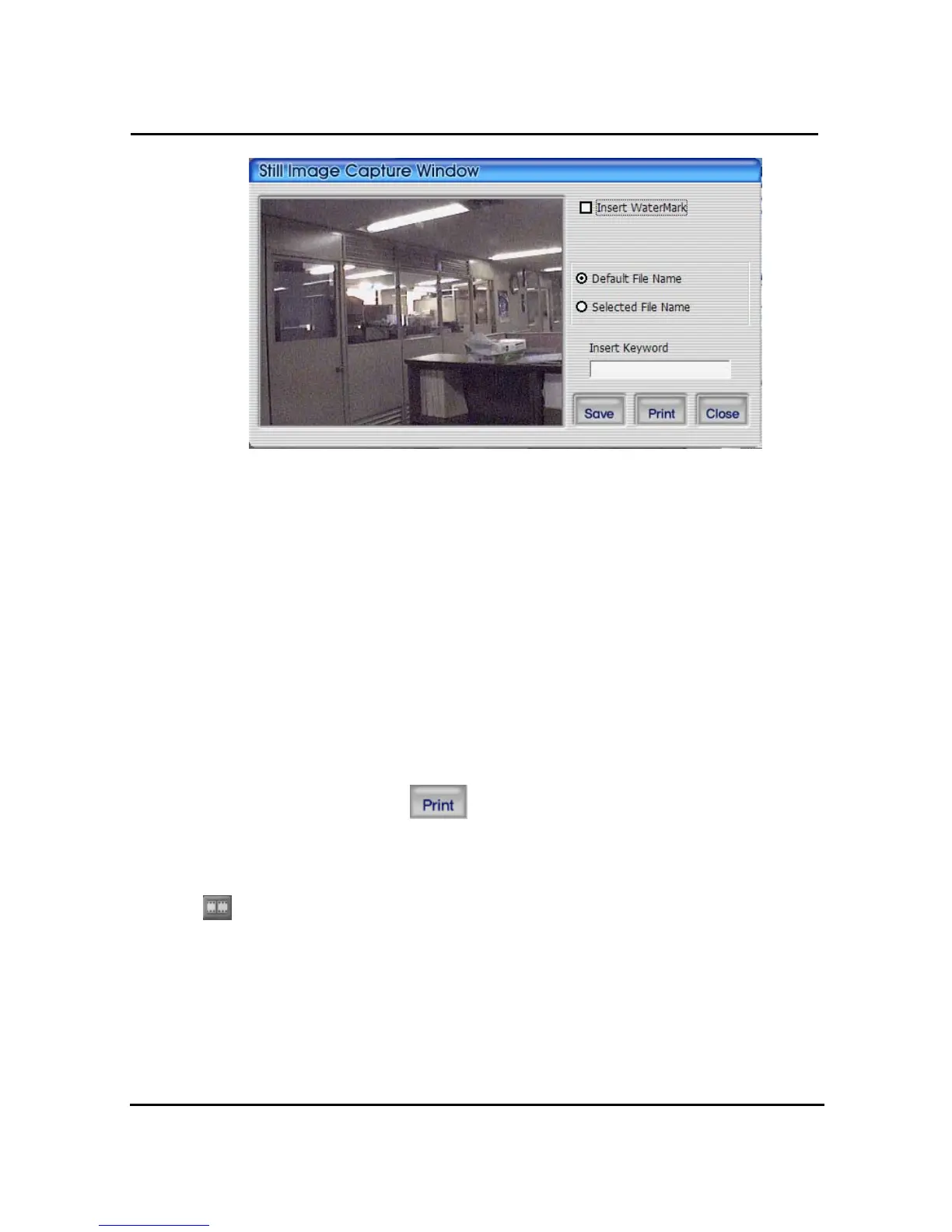
① Watermark insert : Select check box to insert watermark to still image.
② Fixed file name : It is stored still image, which was fixed by program.
③ Select file name : It stores still image with preferable name in preferable folder.
④ Keyword insert : It is able to insert keyword to do easy search in Uniplayer_RT.
Close : ⑤ To close still image .
Print : ⑥ To print captured still image.
Save : ⑦ To save still image. It is stored in the folder of still image on the screen.
4.3.12 Watermark insertion
Click the watermark checkbox then push the save button to save still image with watermark.
4.3.13 Printing still image
To print still image, please push icon in capture screen.
4.3.14 Motion picture recording
With live viewing picture, motion picture recording and saving at local PC
User can record each channel by pushing record button on top right side of channel or
pushing record button at below side of window. After pushing recording, record time setting
window will be popup. Users can change it or not.



 To Next Page