USR-DR404 user manual www.usriot.com
Jinan USR IOT Technology Limited www.usriot.com
4.2. AT command
4.2.1. Serial AT Command
UART parameters: 57600/none/8/1.
AT command can be sent by the AT command software or by programming. Take SecureCRT as an example, change
from the other mode to AT command mode there always be two steps.
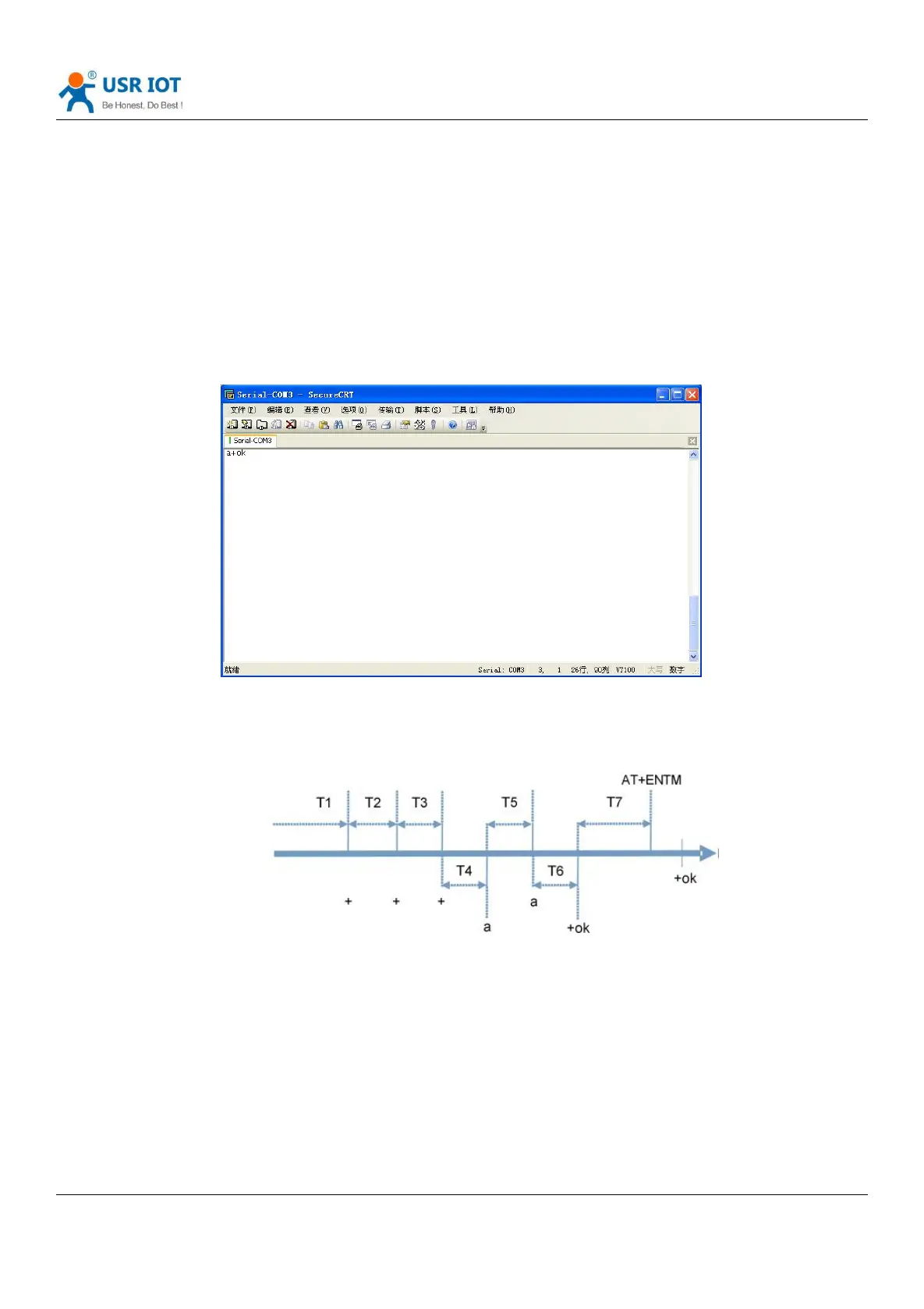
Enter “+++” on the serial port (RS485), module receives and returns an “a”;
Enter “a” on the serial port (RS485), module receives and returns “+ok”, and enter the AT command.
Diagram 45 Switch to command mode
Note: Fill “+++”and “a” need to achieve in the time to reduce the chance of entering command mode while working
normally accidentally. Detail requirement are as fellows:
Diagram 46 Switch to command mode
Time requirement:
T1>the interval of serial port package
T2<300ms
T3<300ms
T5<3s
Change transparent transmission mode , HTTPD Client mode to AT command mode :
1. Serial device send “+++”to module continuously. Module received ‘+++’ then returned an “a” .



 To Next Page