Connector pin-out:
n Pin 1: Not used
n Pin 2: Not used
n Pin 3: Not used
n Pin 4: Not used
n Pin 5: Not used
n Pin 6: GND
n Pin 7: TXD (to RXD of camera)
n Pin 8: RXD (from TXD of camera)
Caution:
Check Cat-5 cables for continuity before using them. Using the wrong pin-out may damage the camera
system and void the warranty. Pro tip: Label your cables.
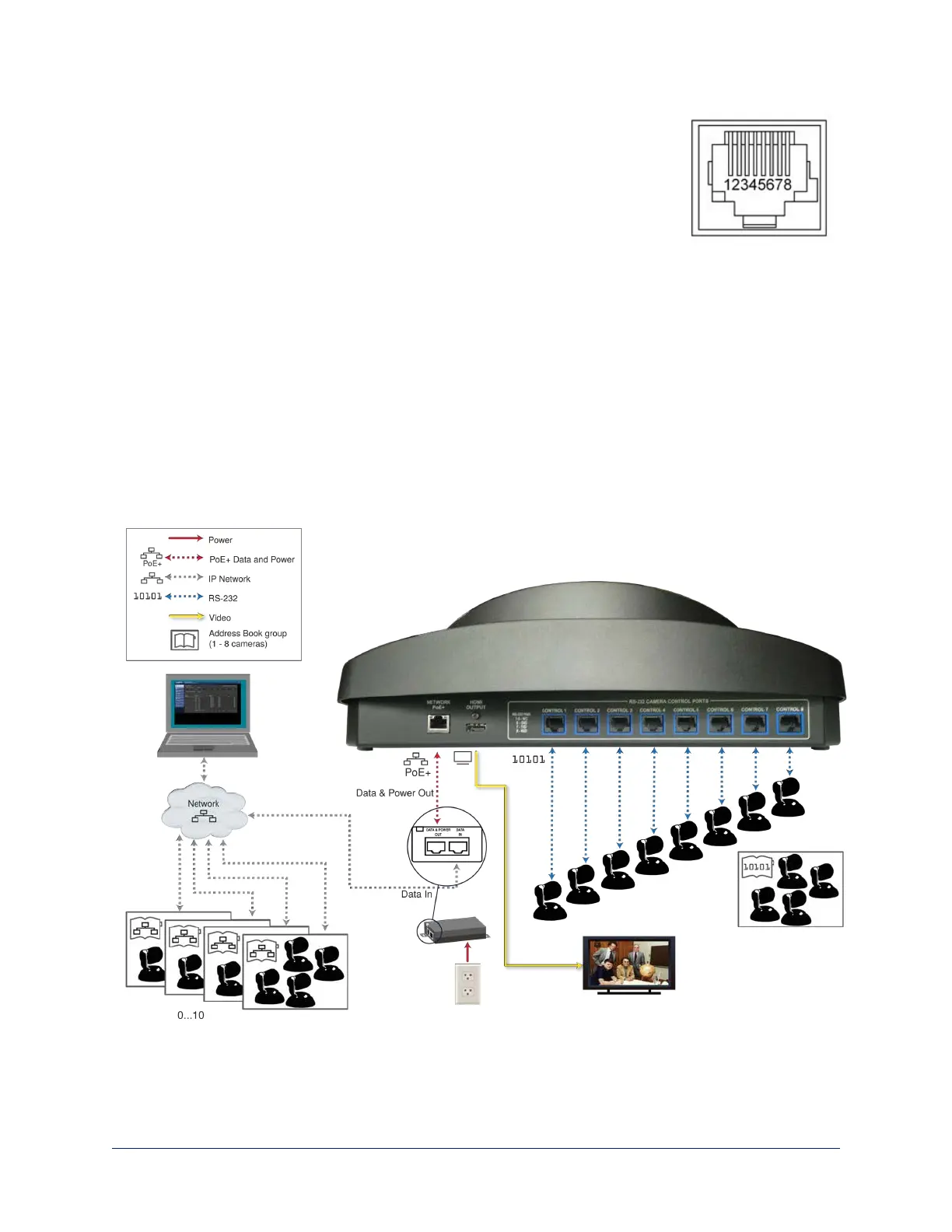
Connecting the Controller
Set up all cameras and make all physical connections first. You will be able to add network-controlled
cameras after the cameras and controller are fully operational.
In this example, cameras are directly connected to the RS-232 ports, and the controller is set up to manage
several address book groups of cameras remotely via the IP network. A display connected to the courtesy
HDMI port allows the operator to monitor the camera currently selected, if it is an IP streaming camera. The
mid-span power injector provides power and network connectivity.
6
Integrator's Complete Guide to PCC Premier Precision Camera Controller



 To Next Page