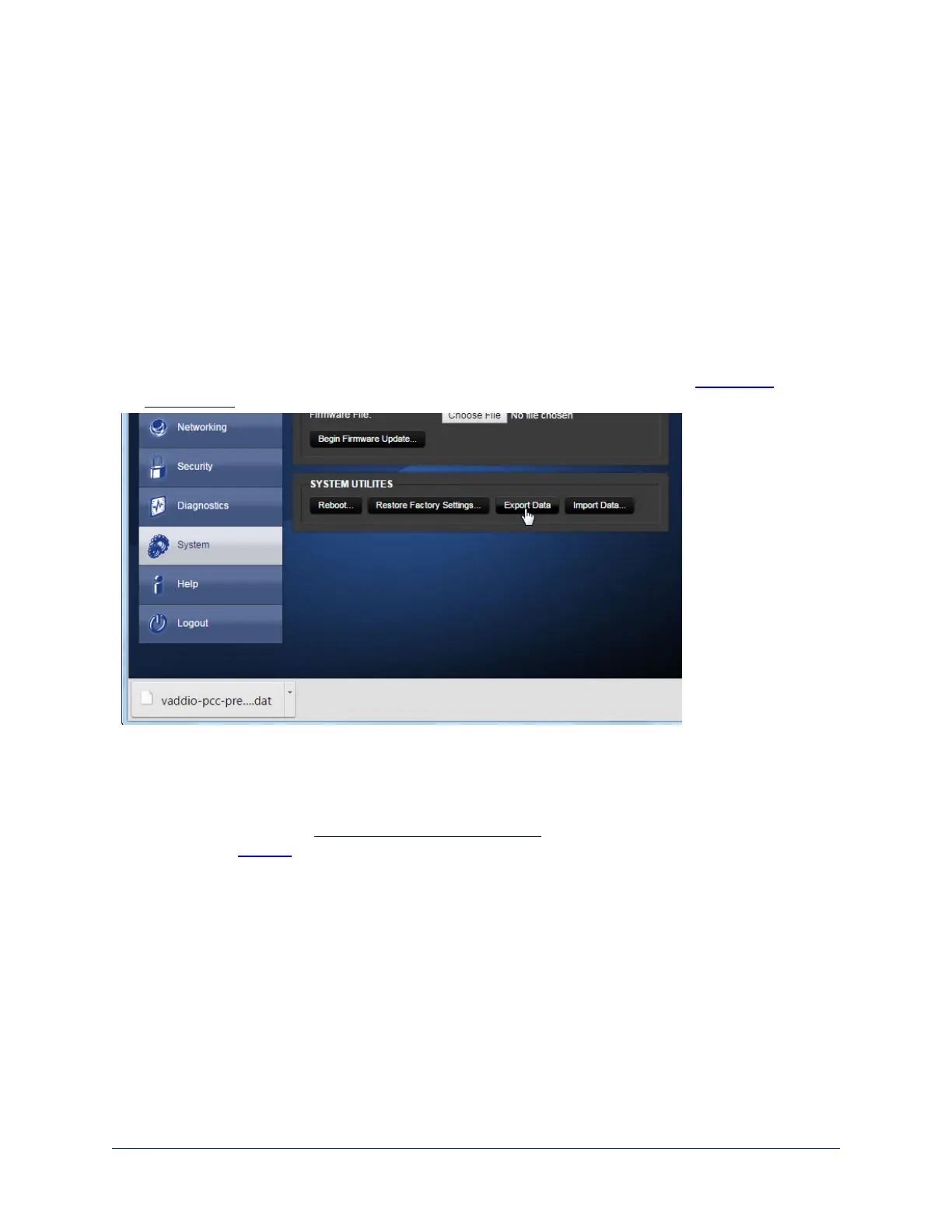
Backing Up or Copying a Configuration: Exporting Data
Web interface, System page
If your organization uses several PCC Premier camera controllers, you may choose to configure one of
them, verify that the configuration is good, and then copy it to the camera controllers.
Note
Currently, the camera controller cannot import a .dat file that was exported from a different version of
software than the controller is on. Example: You cannot currently import a 1.0.0 configuration to a 1.1.0
controller, or vice versa.
1. To save a copy of the camera controller's current configuration, click Export Data. The file downloads to
your default file download location. The filename is the camera controller's hostname followed by the
.dat file extension. If you only need to back up the configuration, you're done.
2. If you need to copy the configuration to other PCC Premier camera controllers, see Importing a
Configuration.
Restoring Factory Defaults
Web interface, System page
Restoring factory settings will overwrite anything you have added or customized, such as IP cameras and
address book groups. (If you export a known good configuration from this camera controller or another PCC
Premier, you can import it again after restoring factory settings.)
To restore the original factory settings:
1. Click Restore Factory Settings. A confirmation message informs you that the action cannot be undone.
This is your cue to make sure you have successfully exported the configuration.
2. When you click Continue, the camera controller reboots and the web interface presents a message that
the device has been rebooted.
This operation logs you out and resets the admin password to its factory default value of password.
39
Integrator's Complete Guide to PCC Premier Precision Camera Controller



 To Next Page