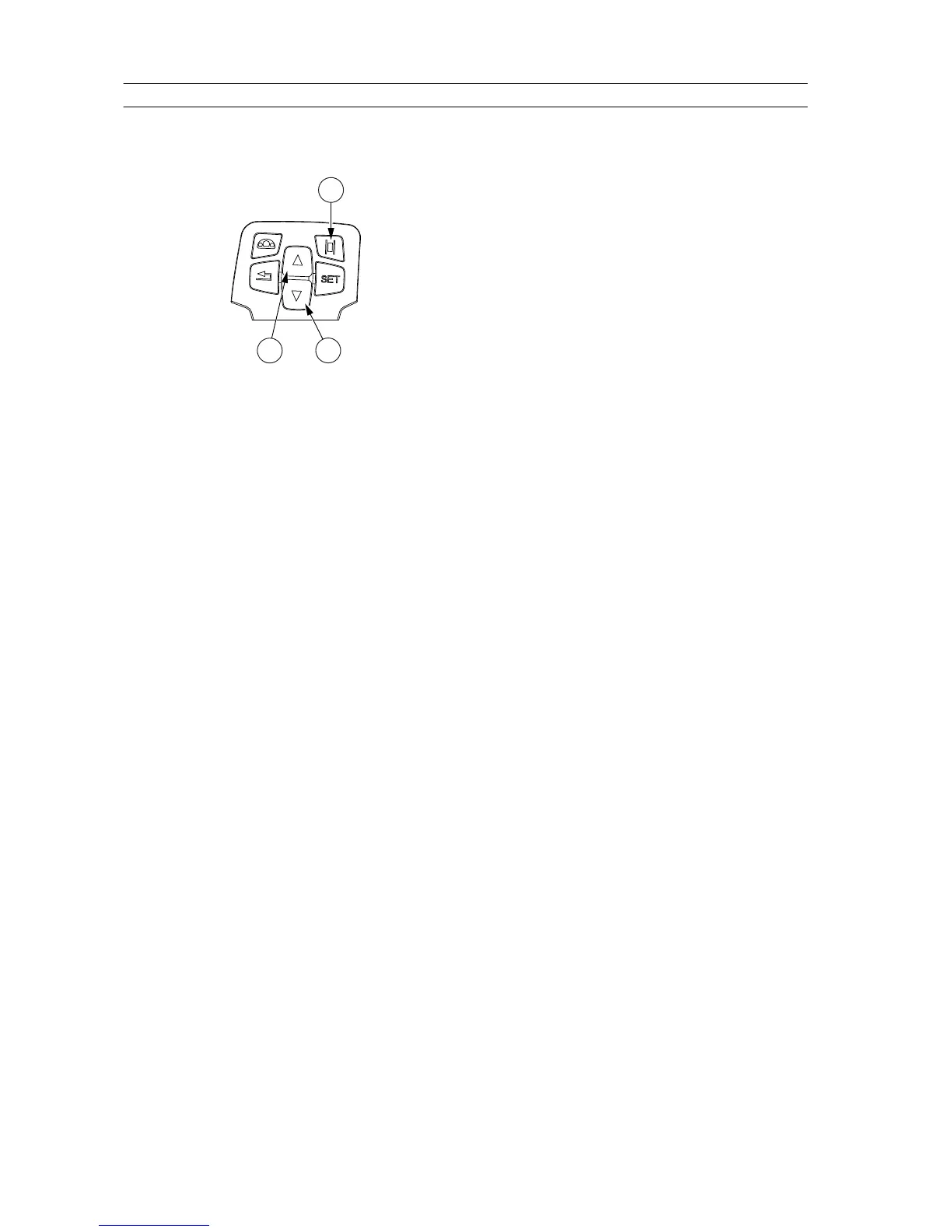
3.11.2.4 Changing general information section views
You can scroll the function views by pressing the up and down arrows in the
control panel.
GUID-E4D55525-0AF6-46EB-B1FF-7CDE5701AD0D
1. A-pillar display selection
2. Arrow up
3. Arrow down
1. To operate the A-pillar display with the control panel, press the A-pillar
display selection button.
2. Press the up and down arrows in the control panel to scroll between the
function views.
The views are organised in the following order:
1. Rear PTO / Front PTO / Driving Speed / Temperature (the highest priority
is shown)
2. Driving Speed / Temperature (the highest priority is shown)
3. Rear PTO (fixed view)
4. Front PTO (optional equipment) (fixed view)
5. Temperature (fixed view)
When both the rear power take-off and front power take-off are in use, the
rear power take-off speed is shown on the A-pillar display.
The basic mode shows the outdoor temperature when the tractor does not
move. When the driving speed is greater than 0.3 km/h, the speed is shown
instead of temperature.
The last used display mode is saved when you turn off the power.
3. Operation
- 162 -



 To Next Page