3.17.2.4 Stopping rear power take-off temporarily
You can stop the rear power take-off (PTO) temporarily in the following ways:
• By using the switch for rear PTO.
• By using the speed control knob for rear PTO.
• By using the rear PTO on/off push button (optional) on the rear mudguard.
WARNING: When you do not need the PTO, keep the PTO switch in
the N position.
WARNING: Use the PTO speed control knob for the actual
disengagement and engagement of the PTO. For example, when
leaving the cab, turn the knob to the N position, except when using the
PTO on/off push button on the mudguard (optional).
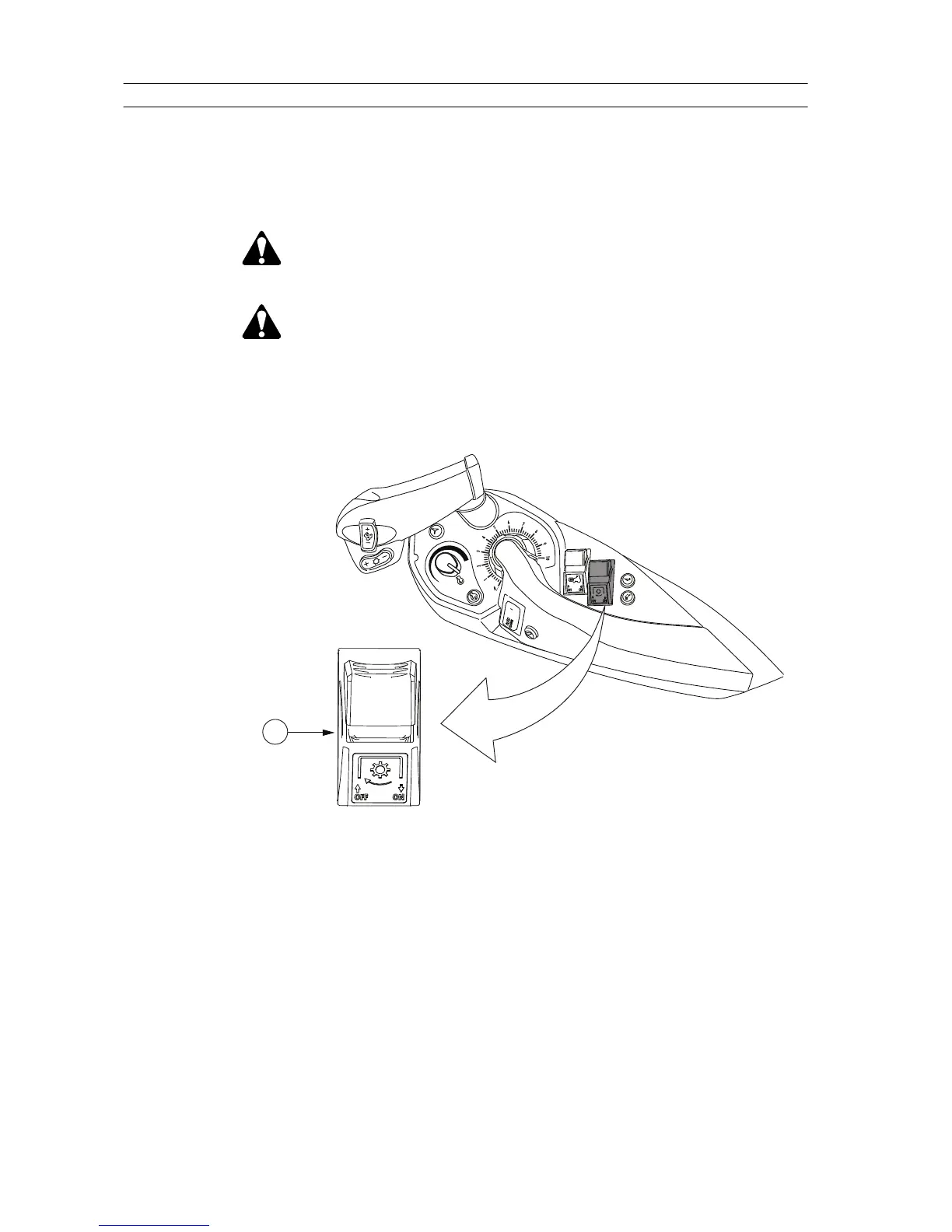
• Press down the switch for rear PTO and push it forward.
GUID-1F3C8457-93B5-4937-B524-A362B42389C4
1. Switch for rear PTO
• If the PTO is in use, so that the indicator light on the proline instrument
panel is lit, you can stop the PTO also by pressing the switch and pulling
it backward.
• Turn the PTO speed control knob to the N position to disengage the PTO.
This is useful when you must stop the PTO fast, for example in an
emergency.
• Press the rear PTO on/off push button on the rear mudguard once.
After this, the rear PTO on/off push button operates as a start button when
pressed for more than 3 seconds.
3. Operation
- 210 -






 To Next Page