GUID-F7FDA353-7370-4A14-90F4-292028A04B95
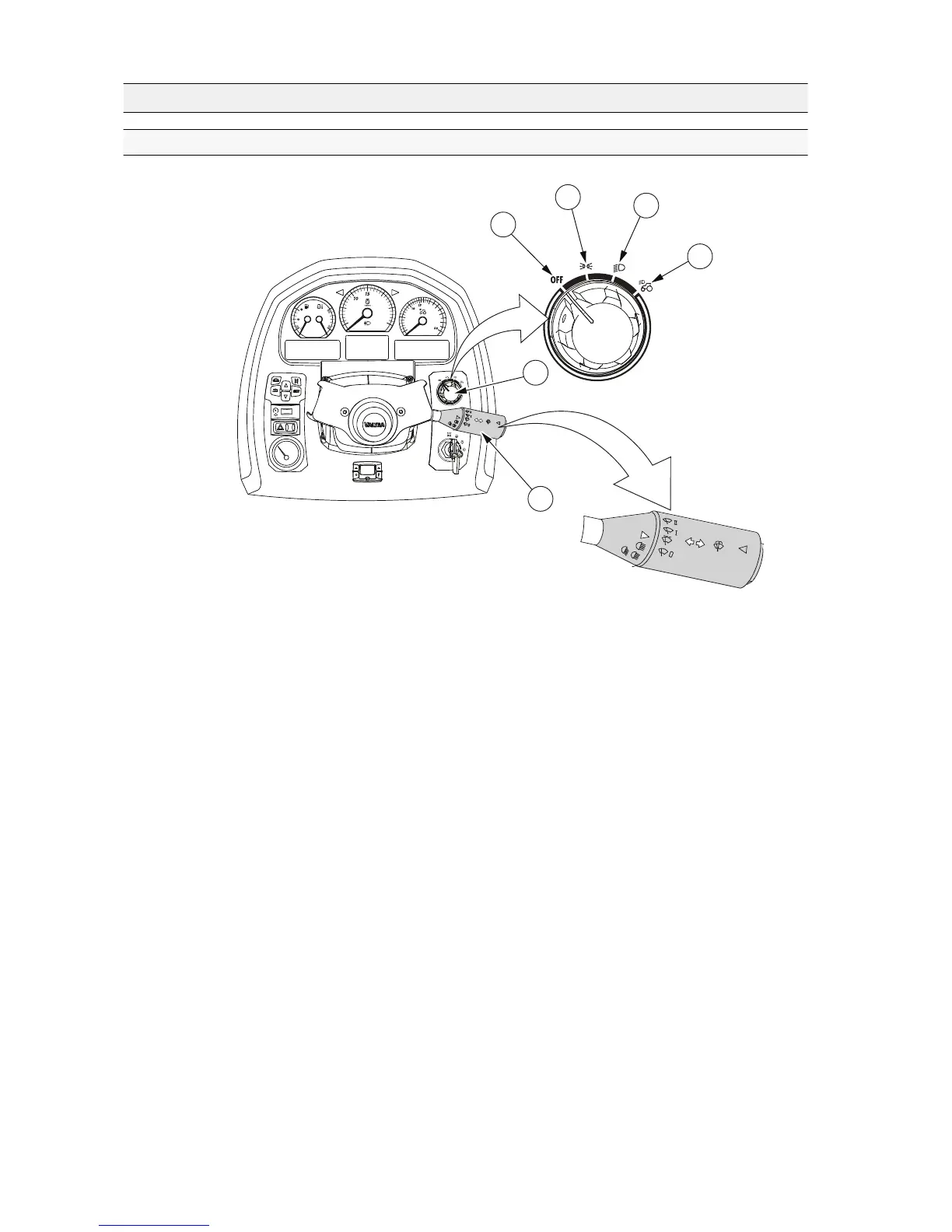
1. Rotary light switch
2. Off position
3. Parking lights
4. Headlights
5. Upper headlights
6. Multifunction lever
• Turn the light switch to the parking lights position to use the parking lights.
• Turn the light switch to the headlights position to use the headlights.
Working lights operate only when the parking lights or headlights are
switched on.
• If the tractor is equipped with upper headlights (optional), turn the light switch
to the far right position to use them.
NOTE: Your tractor has a safety circuitry for lights, meaning that if the fuse of
the light switch has burned and the lights are switched on, the front working
lights are forced on.
NOTE: The main power is not switched off automatically if the lights are left
on with the light switch. This feature is needed if the tractor has to be left on
the road, for example.
NOTE: The main power is not switched off automatically if the hazard
warning flasher is switched on.
3. Operation
- 82 -







 To Next Page