OTDR Series e-Manual, D07-00-076P-RevC00 Page 14 of 107
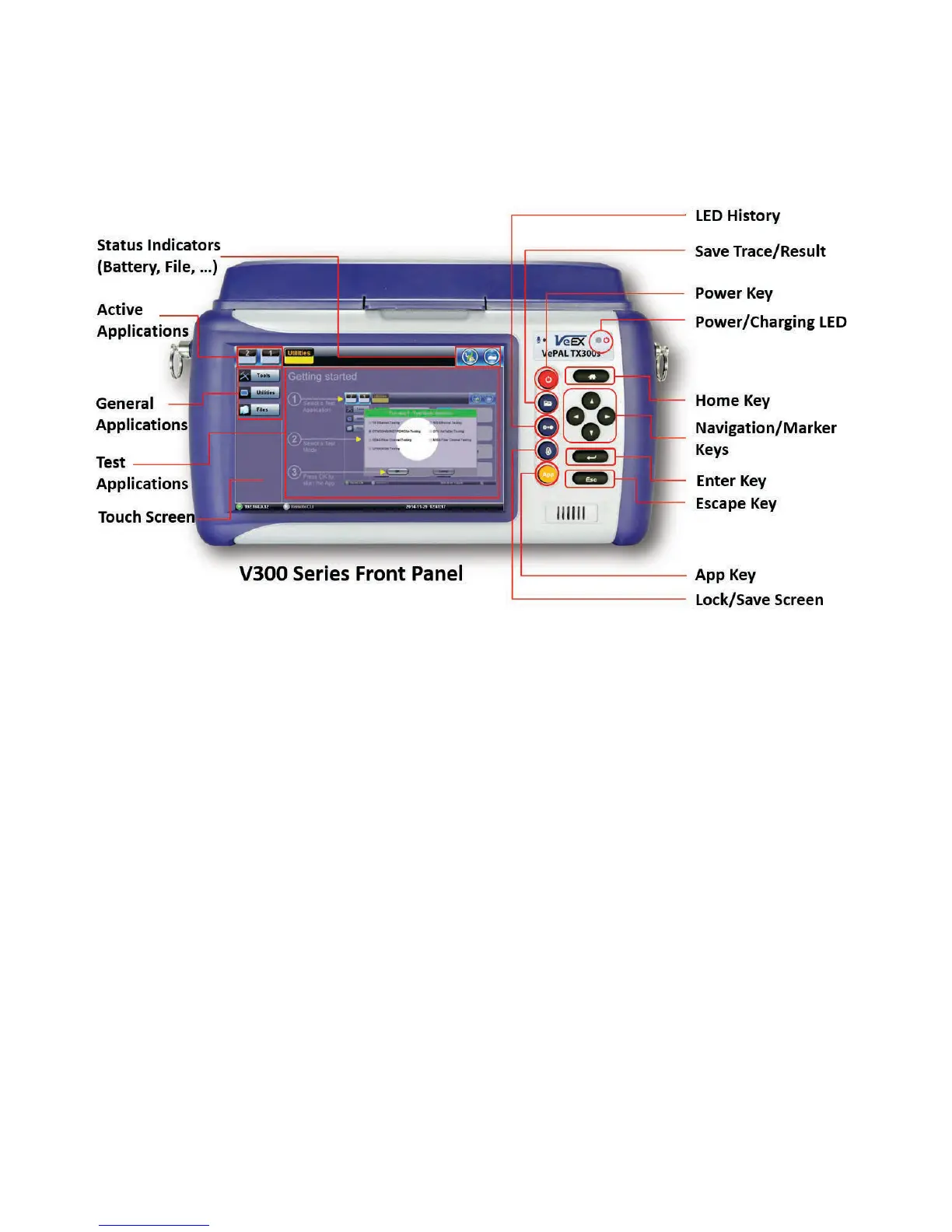
5.2 Front Panel Layout
The picture below depicts the TX300s. Layout will vary depending on FX150, FX300, MTTplus,
or RXT platforms.
5.2.1 LED Indicators
Power/Charge LED - indicates battery charging is in progress. LED turns off when battery is
fully charged.
Note: The device is powered from the built-in Li-Ion battery and can be operated with the AC/
DC adaptor plugged in.
5.2.2 Rubber Keypad
• Home Key: Resets user interface to Main menu
• Navigation/Marker Keys: Used to move markers or navigate menus (in the event
touch screen is disabled for any reason) Enter Key: Enters the desired value or selects
active menu, check box or radio button
• Escape Key: Exits the menu
• App Key: Toggles between active test applications (OTDR, OLS, OPM, VFL)
• Lock/Save Screen Key: Locks the touch panel or saves the screen (bmp) depending
on setting defined in Utility menu
• LED History Key: Resets LED condition (depends on test application)
• Save Trace/Result Key: Saves test result file (OTDR, OPM, Ethernet, Fiberscope -
depends on active application and unit configuration)



 To Next Page