OTDR Series e-Manual, D07-00-076P-RevC00 Page 19 of 107
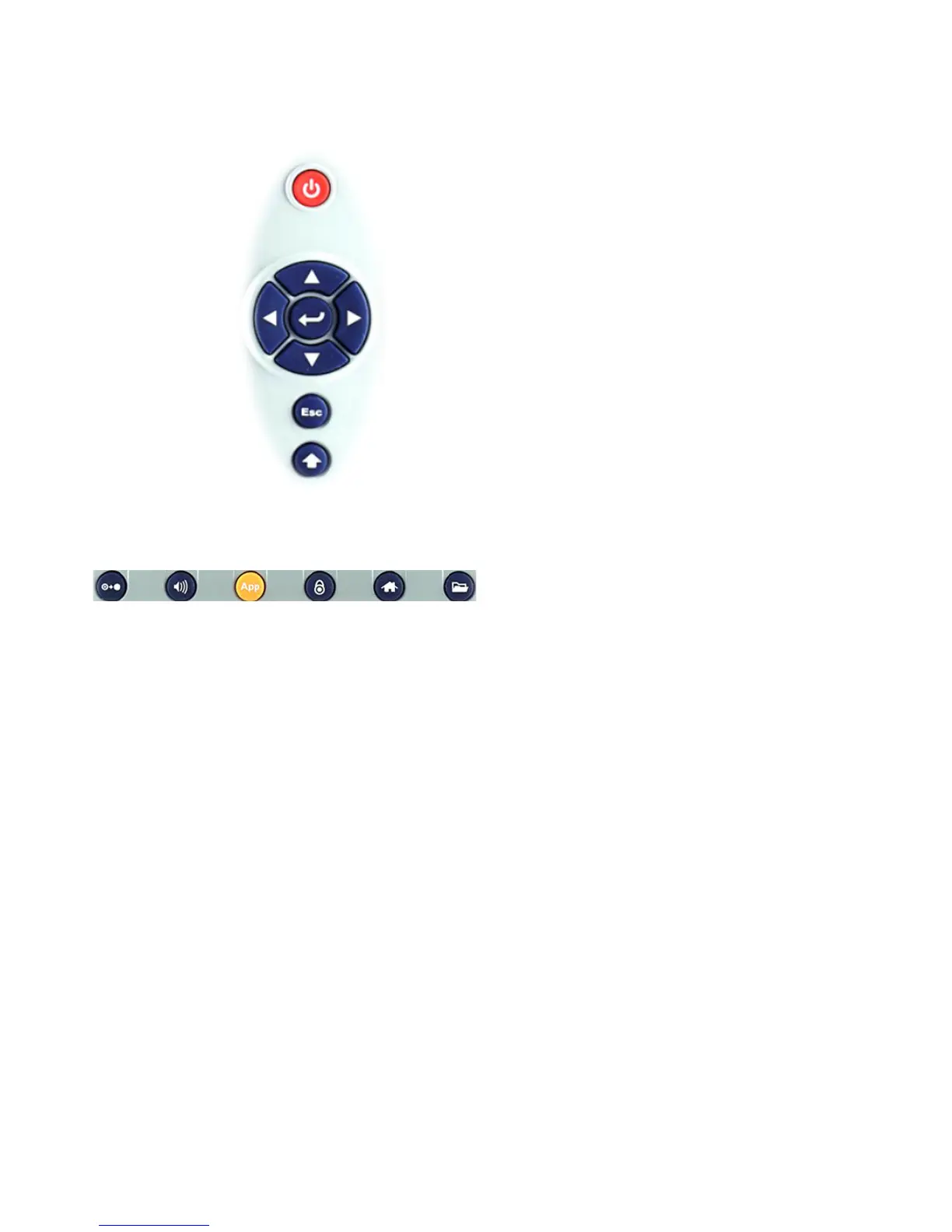
5.4.1 RxT Front Panel
• Power: Press for 2 seconds to turn
the test set ON or OFF (prevents
accidental ON/OFF)
• Cursor Keys: Application
dependent; May offer alternative
GUI Navigation to touch screen
(e.g. while wearing gloves in cold
weather)
• Enter: Application dependent
• Escape: Application dependent
• Alt Alternate function: Links the
buttons to the GUI soft Function
Keys (MTT Emulation Mode only)
• Clear History: Resets blinking
LED reminders of past Errors or
Alarms. Test results are not
affected. (not used in OTDR)
• Volume and Brightness Control:
(it also acts as the MTT F1 key,
when the Alt key is active) Brings
up the Sound and screen
Brightness controls; Use cursor
buttons to adjust the levels
• Test Application Selector (it also
acts as the MTT F2 key, when the
Alt key is active): Quickly switches
back and forth between the active
Test Application and RXT platform.
Utilities functions; Active test is not
affected.
• Lock/Unlock Touch Screen: Can
also be programmed to capture
Screen Shots (>Utilities
>Settings>Global>Save Settings)
• Home: Quickly bring users back to
the Main Menu
• Save Test Results: Saves the
current Test Results with
customized or auto naming format



 To Next Page