OTDR Series e-Manual, D07-00-076P-RevC00 Page 51 of 107
6.8.11 Fiber Scope Image Management Software (VS-500 and DI-1000 only)
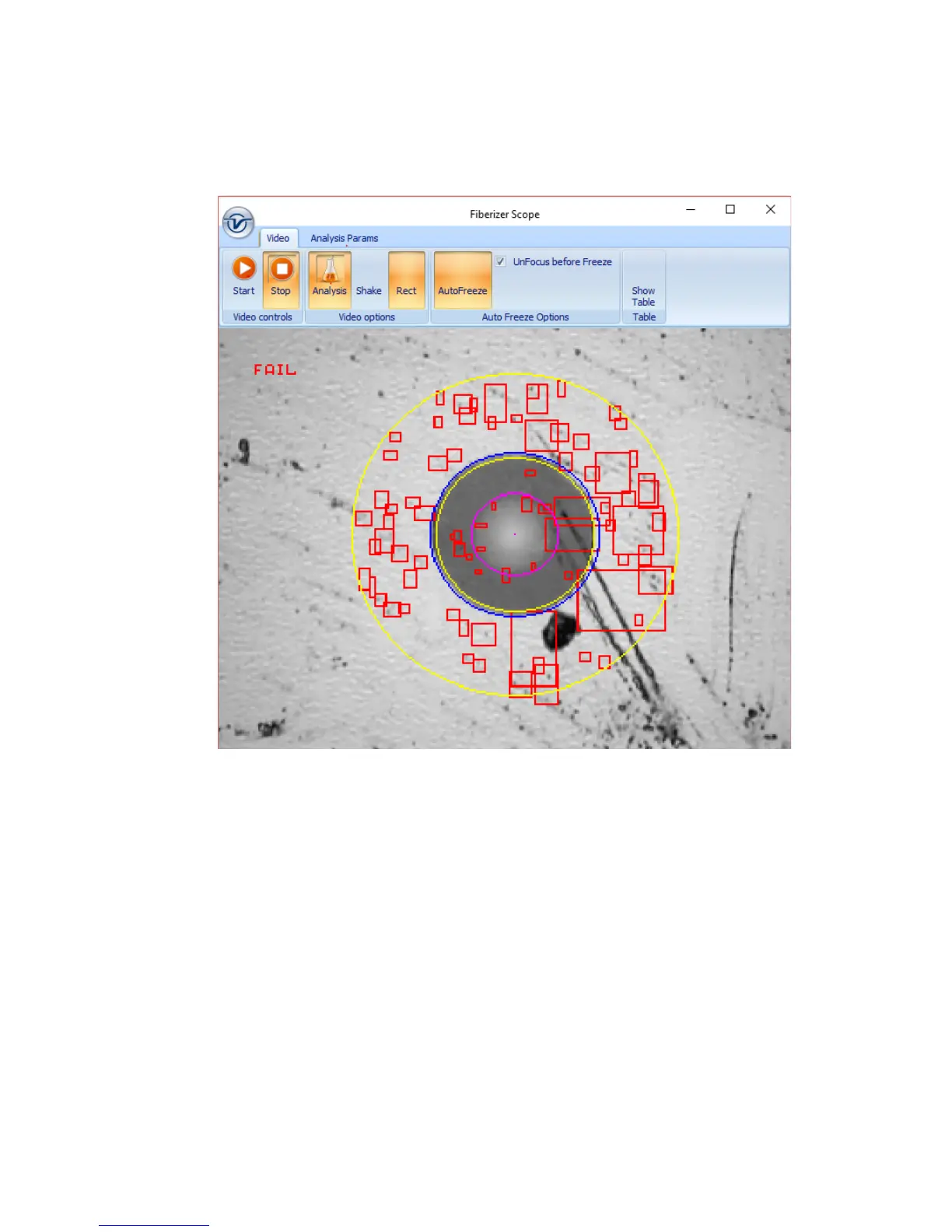
Detailed PC-based Fiber Inspection Monitor & Analysis: Compatible with DI-1000 Fiber Scope
• IEC 61300-3-35 Profiles
Analysis Profile Parameters:
• AnalysisParam1: SMF UPC >45 dB
• AnalysisParam2: SMF APC
• AnalysisParam3: SMF PC RL>26 dB
• AnalysisParam4: MMF PC
Video Mode:
• Start: Activate Real Time viewing mode
• Stop: Halt Real time viewing mode and display last image
• Analysis: Turn ON/OFF Auto IEC Analysis when image is in Focus
• Shake: Turn ON/OFF Shake function to facilitate auto-freeze and analysis when image
is unsteady
• Rect: Toggle between dot or rectangular marking of events


 To Next Page