6.0 Utilities
28 1210 QuickStep Programming User Manual, Ver 5.0 Ver-Mac - May 2011
6.1 Radar
[ ] Enter > Main Menu > [F4] Utilities > [F1] Radar
The combination of a PCMS plus a speed radar device, monitors traffic
speeds. When the speed detected by the radar falls between set limits, the
radar interrupts the normal message sequence and displays a radar
message on the message board. The same radar message also displays on
the handheld controller.
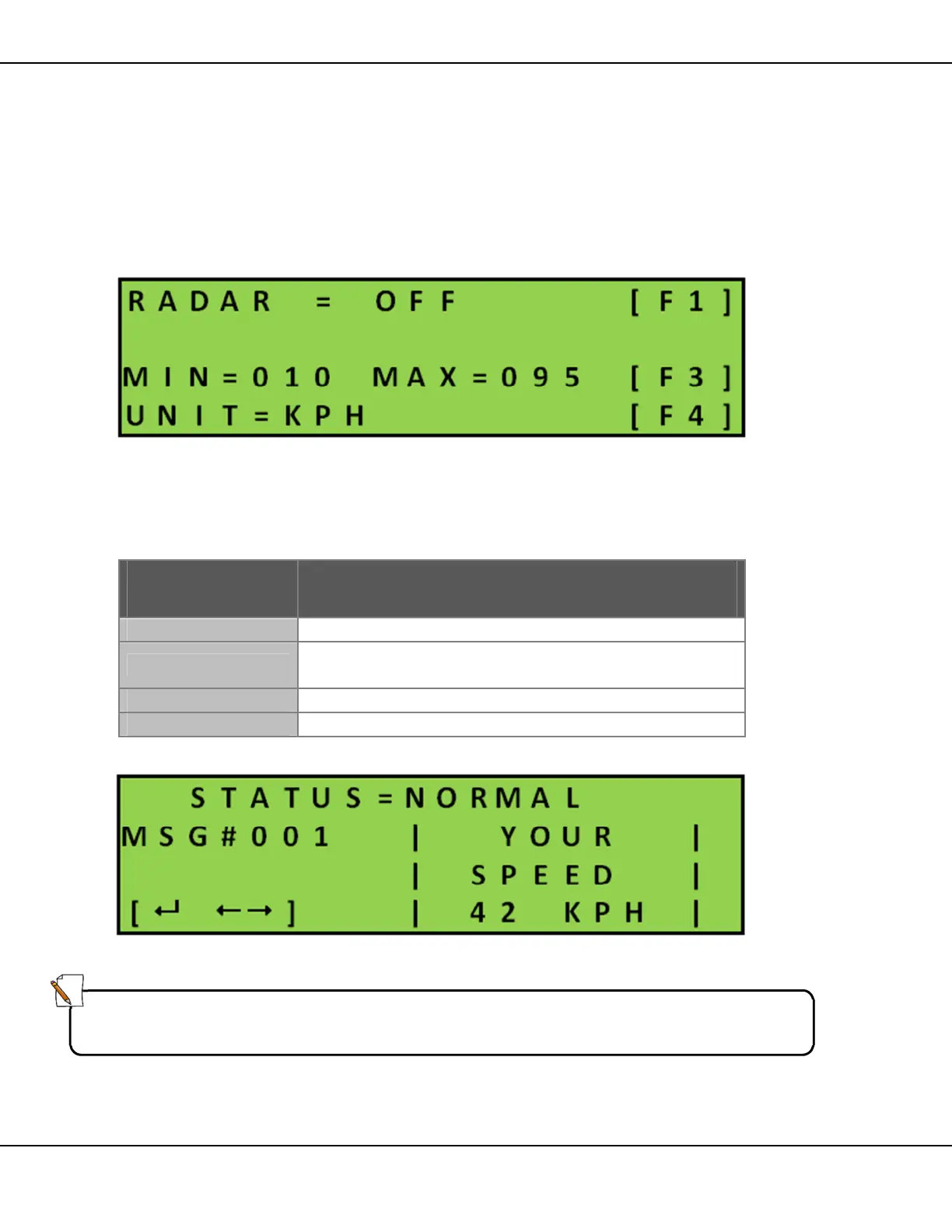
Figure 29 – Radar Configuration Screen
The Radar menu allows you to activate the radar, define the lower and
upper speed limits and select the unit of speed measurement.
Key Function
Toggles the radar between ON, OFF.
[F3]
Defines the minimum and maximum speed limit for
readings to display on the message board.
Toggles the unit of speed between MPH and KMH.
Saves the settings and returns to the Utilities menu.
Table 9 – Radar Keys
Figure 30 – Example of the Radar Message
Note:
You cannot change the radar message. The software generates the message
automatically according to the controller language and speed unit settings.



 To Next Page