27
UM150 User’s Manual
27
UM150 User’s Manual
The “Set Options” Button & Its Dialog
The Connect Tab
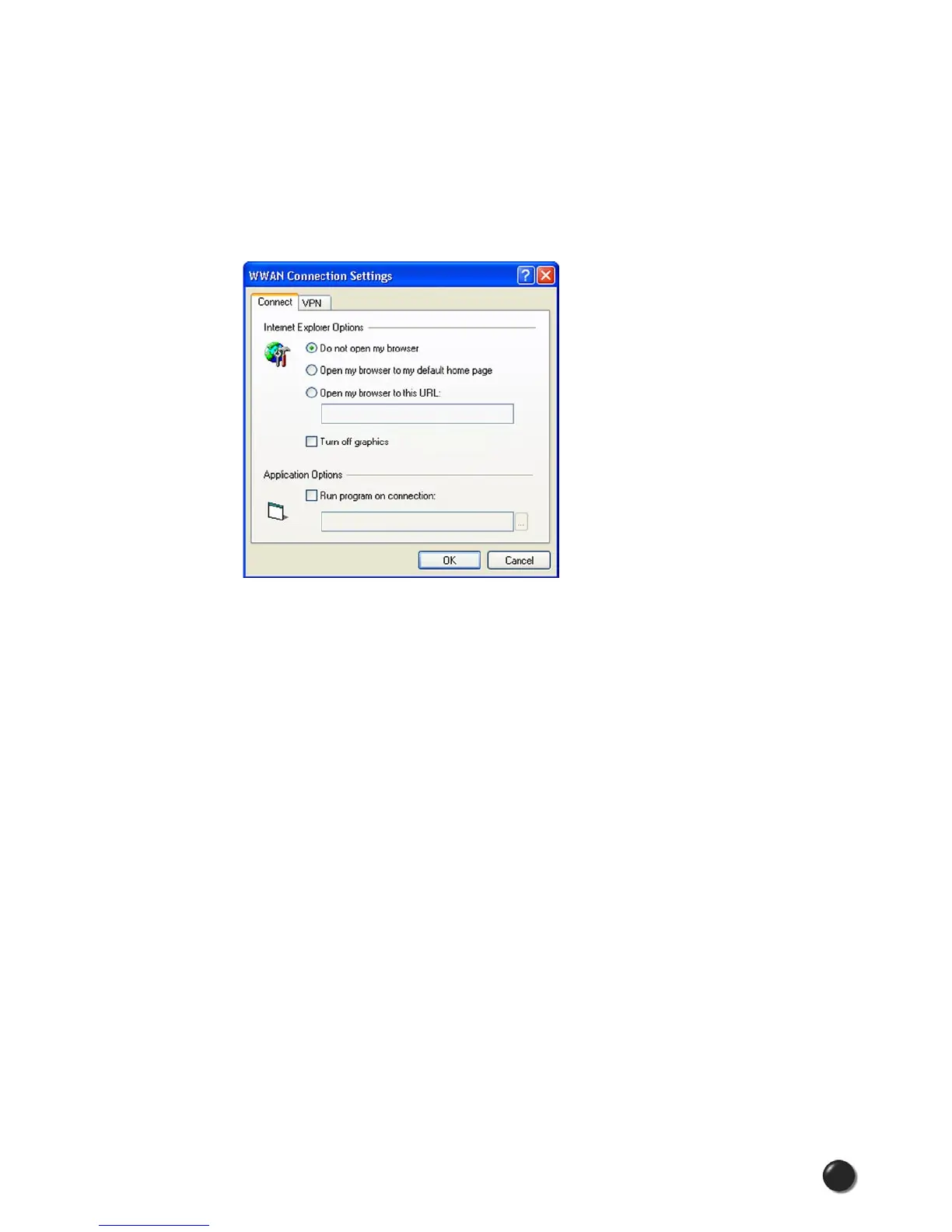
When you select the “Set Options” button from the screen above, the
following options will appear (“Tools,” “Preferences,” “WWAN tab,” “Set
Options...”):
Do not open my browser: With this option selected, when you connect to a
WWAN network, VZAccess Manager will not automatically launch your default web
browser.
Open my browser to my default home page: With this option selected, when you
connect to a WWAN network (VZGlobal, BroadbandAccess or NationalAccess),
VZAccess Manager will automatically launch your default web browser and your
home page will load.
Open my browser to this URL: With this option selected, when you connect to
a WWAN network (VZGlobal, BroadbandAccess or NationalAccess), VZAccess
Manager will automatically launch your default web browser but do it in such a way
that the URL you specify will load instead of your home page.
Turn off graphics: If you select this it will turn off graphics in Internet Explorer.
With these options off, web pages will load faster but you will have to right click
and select “show picture” for any pictures you want to see. With the added
performance of the Venturi compression software when using BroadbandAccess
or NationalAccess, most users prefer to see graphics, so the default setting for this
option is unchecked.


 To Next Page