64
UM150 User’s Manual
64
UM150 User’s Manual
To use the Verizon Wireless Send Mail Server, you will edit your existing Mail
account settings and change the outgoing mail server you are currently using. In
place of your existing Send Mail Server, enter smtp.vzwmail.net, select “My server
requires authentication” and using the 10 digit mobile number you used to establish
your profile on www.vtext.com, enter the 10 digit mobile number@vzwmail.net (i.e.
6145551212@vzwmail.net) for the Send Mail Server user name. For the password,
use the password you established for www.vtext.com. You will also be able to use
this server when connected to the Internet from various providers eliminating the
need to change this setting when you switch from being connected to the Internet
through Verizon Wireless and by various other means. If you need to know where
these settings normally are in your e-mail client, check with your e-mail provider.
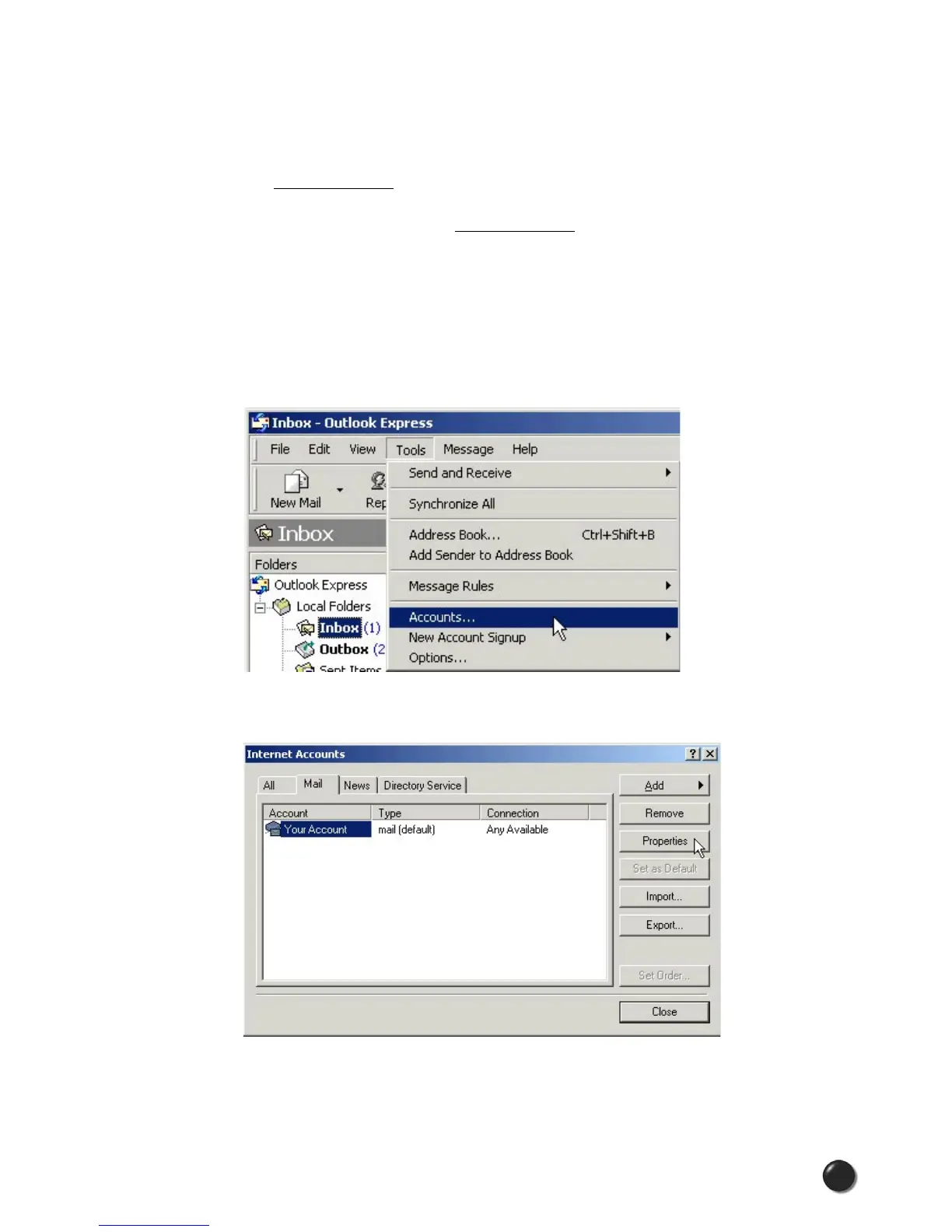
For your convenience the settings for Outlook Express® are as follows:
STEP 1: Select “Tools,” “Accounts.”
STEP 2: Select your default account, then “Properties.”



 To Next Page