65
UM150 User’s Manual
65
UM150 User’s Manual
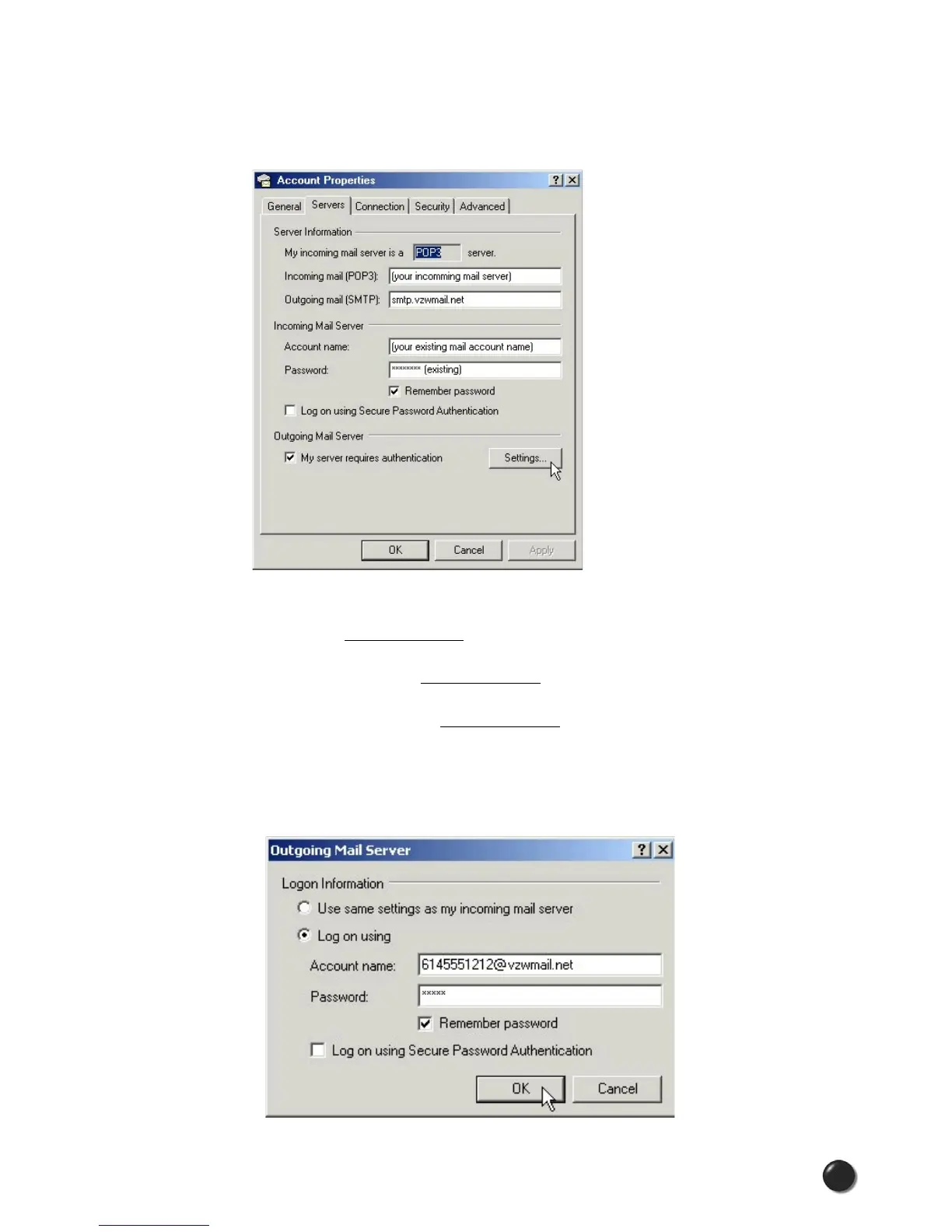
STEP 3: Select the “Servers” tab. In the “Outgoing mail (SMTP):” field enter “smtp.
vzwmail.net” without quotes. In the “Outgoing Mail Server” section at the bottom,
select “My server requires authentication,” then select “Settings.”
STEP 4: Select “Log on using,” then using the 10-digit mobile number you used to
establish your profile at www.vtext.com, enter the 10-digit mobile number@vzwmail.
net for the account name (i.e. 6145551212@vzwmail.net). For the password, enter
the password you established on www.vtext.com. Select “Remember password.”
Select “OK,” “Apply,” “OK,” “Close” to get back to the Outlook Express® main screen.
It may take up to two hours for your www.vtext.com credentials to be valid on the
smtp.vzwmail.net server. Once they are valid, you should be able to send mail using
the Verizon Wireless Send Mail Server (also referred to as a SMTP - Simple Mail
Transport Protocol Server), when you are connected to the Internet, wirelessly or
via other means.



 To Next Page