Chapter 13 Bluetooth option
Transferring the Platform interface on a laptop PC via Bluetooth
User Manual 76100000200 Rev. 001 123
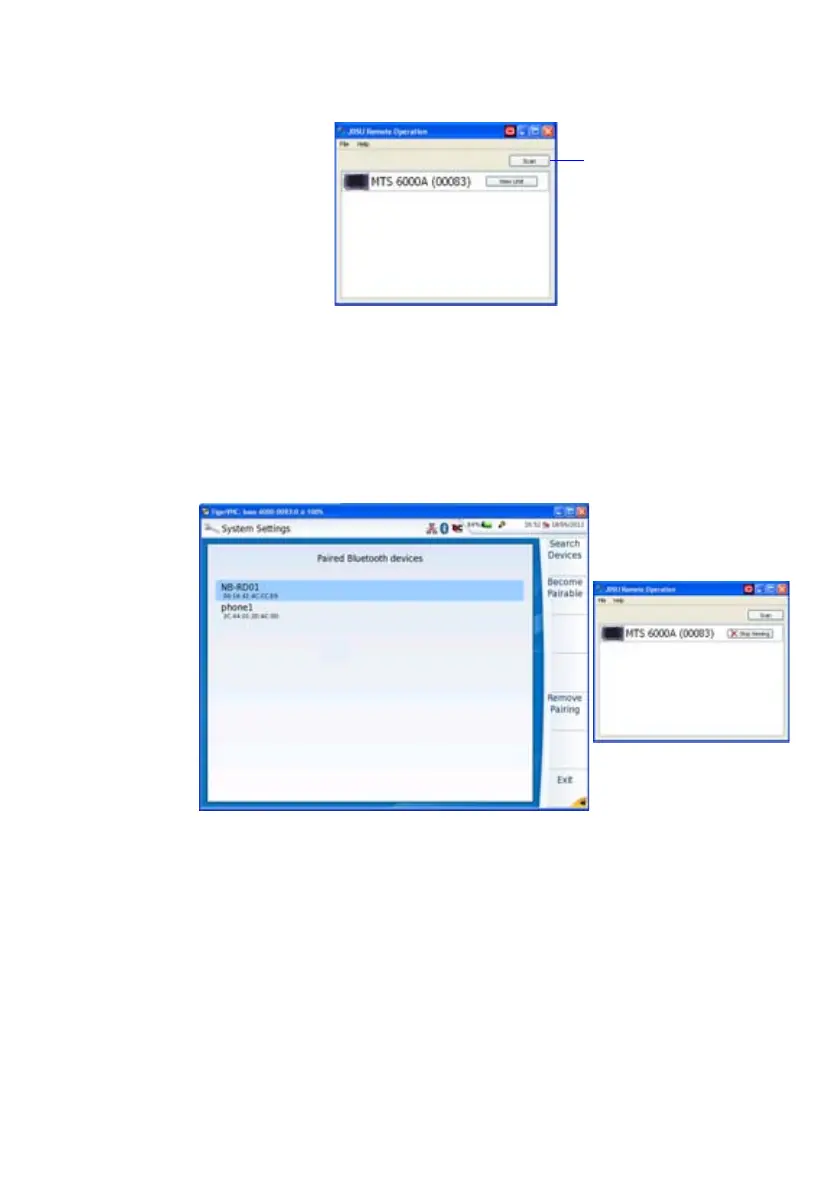
1 Click on View Unit button to remote the screen on PC.
The current screen of the 6000A V2 Platform
displays on a new
window on the PC.
In the small window next to VNC window (see Figure 85 on
page 123), the button View Unit becomes Stop Viewing.
See “Virtual control buttons bar” on page 68 and “Equivalence between
the keyboard and 6000A V2 Platform” on page 68 to get information on
use of PC to work on 6000A V2 Platform.
Closing the remote screen and the application
To stop using the remote screen on PC:
1 In the small window available with the VNC window (see Figure 86
on page 123) click on Stop Viewing button.
The VNC window closes.
Fig. 85 6000A V2 Platform detected via Bluetooth on PC
Fig. 86 Remote screen on PC
Launch a new
Scan to detect
new unit(s)





 To Next Page