51
The parameters can be adjusted via 3 user interfaces:
■
HMI programming unit of the heat pump control unit
■
ViGuide app
■
All ViGuide web applications: ViGuide Plus, ViG-
uide Pro, ViGuide Business
For further information on ViGuide: www.viguide.info
■
Depending on the system equipment and which user
interface is selected, not all parameters may be
available.
■
Some parameters are set during commissioning with
the help of the commissioning assistant.
■
The factory settings and setting ranges for the
parameters may vary for different heat pumps and
system configurations.
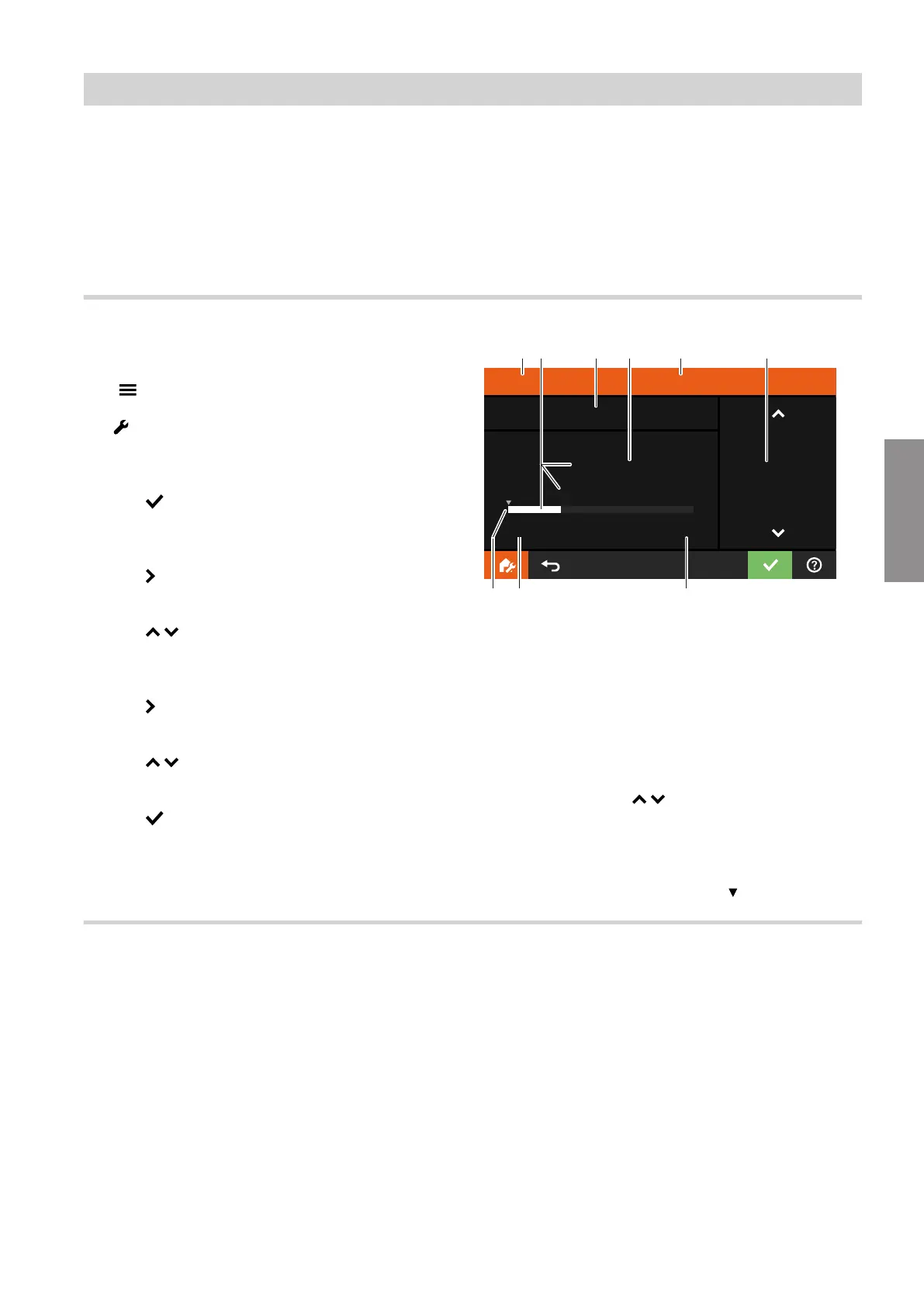
Setting parameters on the HMI programming unit
Tap the following buttons:
01. " "
02. "Service"
03. Enter password "viservice".
04. Use to confirm.
05. "System configuration"
06. Use to select the required parameter group, e.g.
"DHW".
07. Use / to select the required parameter cate-
gory, e.g. "Domestic Hot Water Setpoint Meta-
data".
08. Use to select the required parameter, e.g.
"504.1 Low".
09. Use / to select the required value, e.g.
"30 °C".
10. Use to confirm.
Domestic Hot Water Setpoint Metadata - Low
504.1
30.0
°C
300
Min
10.0
Max
95.0
30.0
EC D FB
H G
A
10.0
K
Fig. 18
A
Parameter category
B
Set value
■
Display with decimal point
and
■
Display with light-coloured bar
C
Number of parameter
D
Unit for selected value
E
Name of parameter
F
Adjust value with /
■
Display without decimal point
■
Step for temperatures: 0.1 °C
G
Upper limit of the setting range
H
Lower limit of the setting range
K
Factory setting highlighted with
Setting parameters via the ViGuide app
Carry out the following steps:
1. Launch the ViGuide app.
2. Activate the service level.
3. Add/change system setup.
4. Select the required parameter group, e.g. "DHW".
5. Select the required parameter category, e.g. "504
Domestic hot water setpoint metadata".
6. Select the required parameter, e.g. "504.1 Low".
7. Select the required value, e.g. "30 °C".
8. Confirm with "OK".
System configuration
Setting parameters
6218234
Parameter





 To Next Page