Chapter 1: Memory Array Hardware Installation
10
Violin 6000 Series Memory Array Installation Guide
535-0045-00 Rev 02
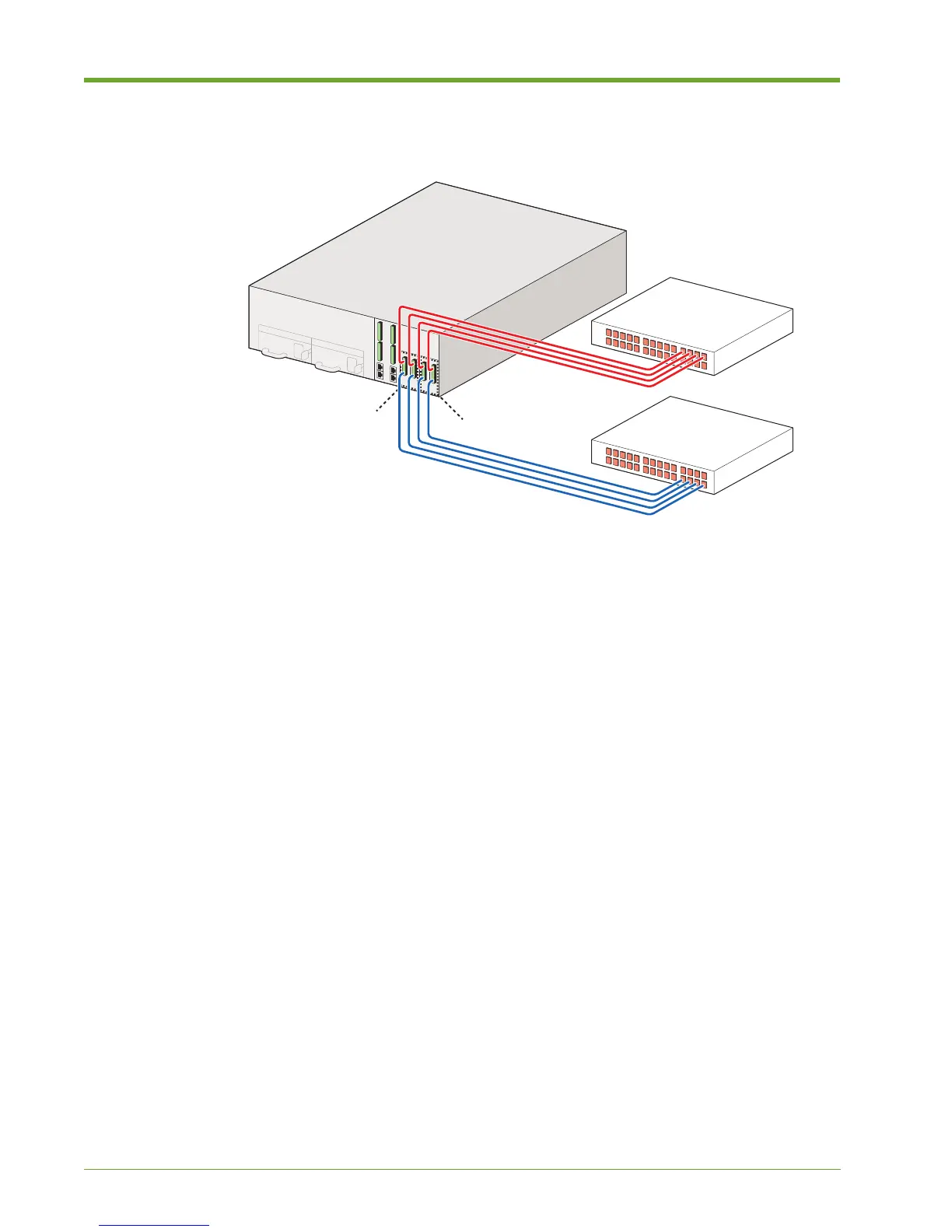
Figure 1.2 shows the supported cable configuration when setting up a high-availability (HA) system.
This is the only supported HA configuration for the 6000 Series Memory Array. Memory Gateway A
manages connectivity through NIC slots A and B; Memory Gateway B manages connectivity
through NIC slots C and D.
Memory Gateways can use up to eight ports of 8 Gbps FC or 10GbE to connect to network
switches. InfiniBand ports on the Memory Array should be connected to InfiniBand switches in a
high-availability configuration.
Understanding Port Numbering
When connecting the interface cables in a SAN-attached configuration, it is important to know the
ports from which LUNs are exported from the Violin Web interface. Figure 1.3 shows the slot and
port numbers for Fibre Channel cards installed in the system, along with the representative CLI
values for each port. If there are more than two ports per card, the numbers increase from top to
bottom on the card.
Figure 1.2 High-availability SAN-attached via Dual Internal Memory Gateways
Fibre Channel
or InfiniBand Switch
Memory Array
Memory Gateway B
(NIC slots C and D)
Memory Gateway A
(NIC slots A and B)
D C B A
Fibre Channel
or InfiniBand Switch



 To Next Page