16
Mode – Light signaling mode. Select one of five modes: Light Off, Light On, Flash 1 (slow flash), Flash 2 (fast flash) and
Strobe. Select the preferred mode using the Up/Down arrow keys.
Color – Select the corridor light lens color. There are 5 basic (Amber, Green, Blue, White & Red) and 4 user-
programmable colors to choose from. Select the preferred color using the Up/Down arrow keys.
Brightness – Setup the corridor light brightness for this event. Use the Up/Down arrow keys to select one of 9 brightness
levels.
Lens – The VNS2720 equipped with four independent lenses that each can be activated with a specific color and mode.
This field let the user select a specific lens (or ALL to apply to all lenses) to be controlled with this event. Use
the Up/Down arrow keys to select 1-4 lens number or ALL for all lenses.
Timeout – Set the length of time the corridor light will stay on after activation. Enter 5 digits number to setup the
timeout total number of seconds or ‘00000’ when no timeout is required (corridor light will stay on until turned
off by another event).
Tone – Select a tone alert mode, to provide audible indication when the corridor light is activated or deactivated. Use
the Up/Down arrow keys to select one of 9 tone alert modes or None to disable.
Name – A descriptive title/name for the event that will help identify it from other events. Type in the description and hit
[Enter] to move to next field.
Auto – Enable/disable the event activation style. If enabled, the event will be initiated instantly, (when activated)
without any additional user input or confirmation. If the Auto mode is disabled, the user will be able to
temporarily change the corridor light lens, mode, color and confirm the activation, before any data is being
transmitted.
TX Channel – Select the transmitter RF channel for this event, if other than the default channel, in cases where the
VS4820 base station operates on more than one frequency.
Use the Left/Right arrow keys to navigate between the fields. Use [F5] to save any changes, [F9] to delete the event (if
editing an existing event) and hit the [ESC] key to exit the screen back to the previous menu.
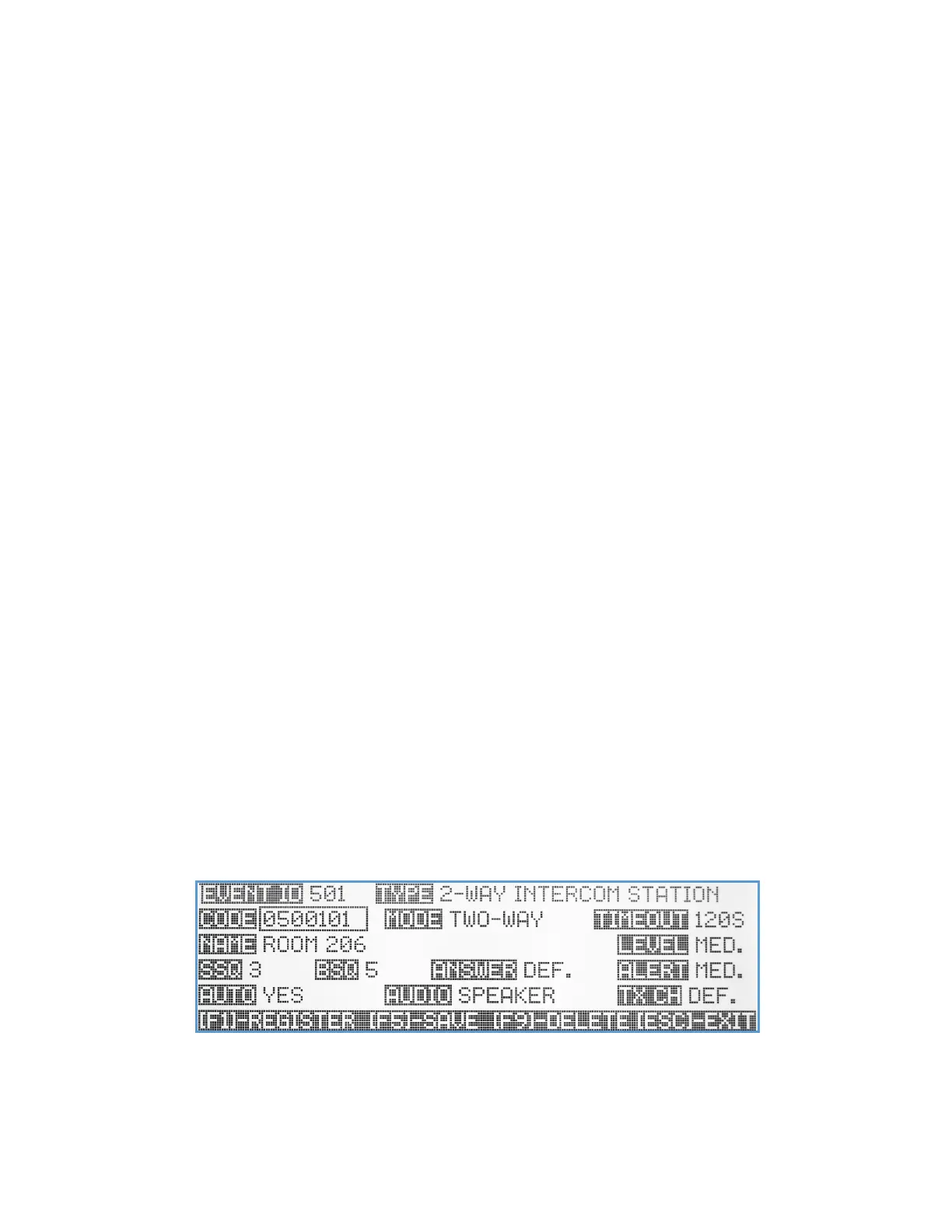
Two-Way Intercom Station Event
The VS4820 base station can communicate with wireless intercom stations such as the VNS2410, VNS2420 & the
VNS2216, to provide 2-way voice communication across commercial facilities. The Two-Way Intercom Station event type
let users register each intercom station into the system database and configure how they will interact and communicate
with the base station. Before programming of intercom stations can be done, the user must enable the Two-Way
Intercom option in the System Configuration menu.
Code – Each wireless intercom station has a unique 7-digit access code that helps the VS4820 to recognize incoming calls
and initiate a call to specific station. This code can be entered in two ways:
1. Use the keyboard numeric keys to enter/edit the intercom access code as provided by administrator.



 To Next Page