26
user can activate analog time syncs by using the [Fn]+{F11] key combination from the Main Paging Screen. In
that case, the VS4820 will send a time sync transmission every minute (unless stopped with [Fn]+[F12] keys)
until 2 AM, when it will set itself back to nighttime syncs only.
Digital Sync - Setup the time synchronization mode for Visiplex wireless digital clocks and LED message boards. The user
can select Enabled or Disabled for this field. If enabled, the VS4820 will send a time synchronization
transmission every hour at the top of the hour. In addition, the user can initiate a digital time sync using the
[Fn]+{F11] key combination from the Main Paging Screen (the VS4820 will schedule a time sync at the top of
the next minute).
Use Cell/GPS Time – If the VS4820 equipped with the LTE Modem or GPS receiver, it could synchronize its clock time to
one of these accurate clock sources. Select Enabled will to activate this feature.
Use the Left/Right arrow keys to navigate between the fields. Use [F5] to save any changes and hit the [ESC] key to exit
the screen back to the previous menu.
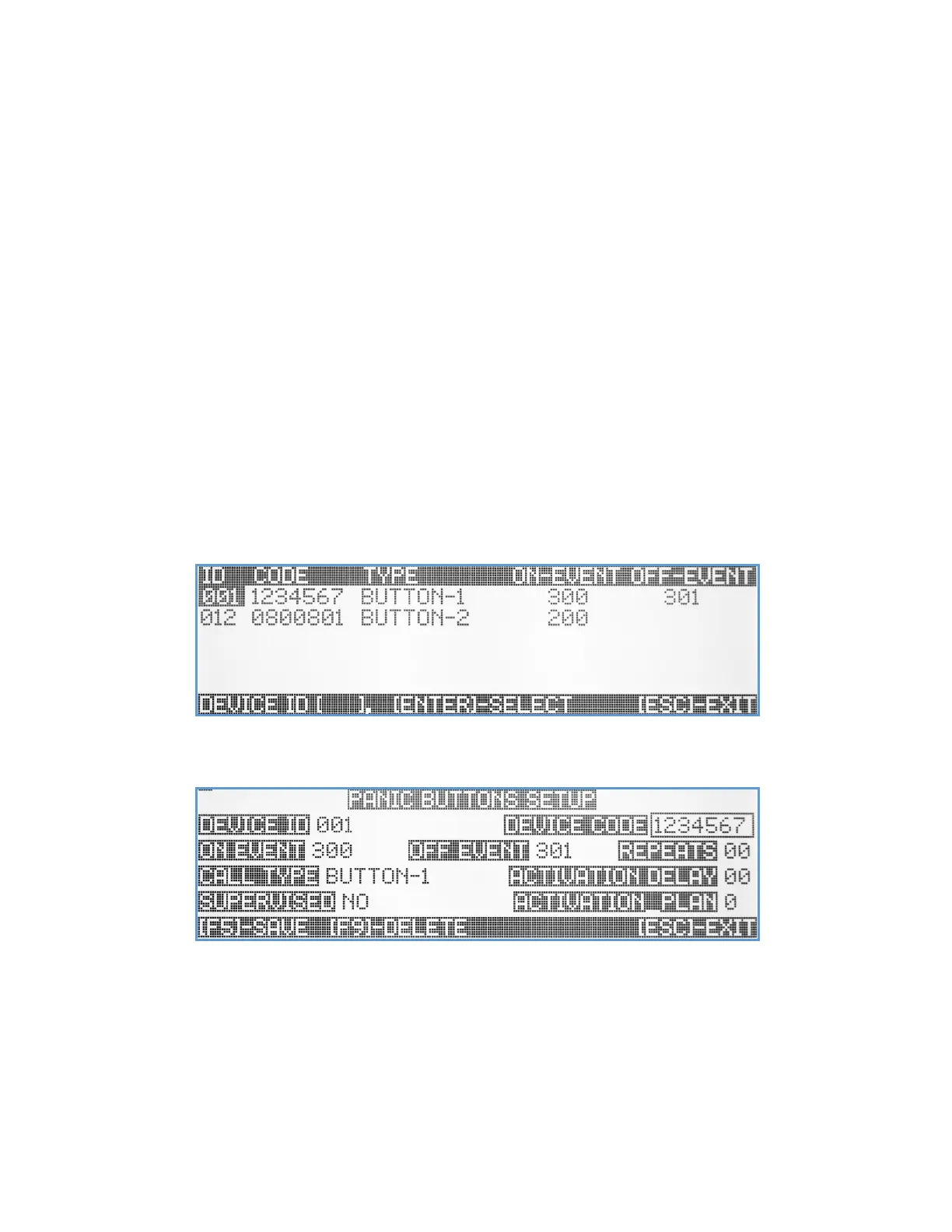
Panic Buttons Setup
The VS4820 can be programmed to receive calls from Visiplex wireless portable/wearable and wall-mounted panic
buttons. This submenu provides the user with the ability to configure how the VS4820 will respond when receiving a call
from each panic button. Make sure to activate the Panic Buttons Alert option from the System Configuration submenu
to enable reception of panic buttons calls. When selected, the Panic Buttons Setup screen will open with a list of all
previously programmed panic buttons.
Use the Up/Down arrow keys to select a panic button record to edit or enter a 3-digit ID number (001-199) into the
Device ID field, to create a new record. The VS4820 can monitor and respond to a maximum of 200 panic buttons.
Device ID – A 3-digit device ID number as selected from the previous screen.
Device Code – A 7-digit unique device identification code. It can be entered manually or automatically. To automatically
program the device id, hit the Register[F1] key, activate panic button and the wirelessly received device code
will be registered into the field.
On Event – A 3-digit event ID that will be activated when the panic button sends activation call. Enter ‘000’ to disable.
Off Event – A 3-digit event ID that will be activated when the panic button sends call cancel. Enter ‘000’ to disable.



 To Next Page