25
Keyboard Tone – Enable or disable the keyboard key confirmation tone.
Handset Speaker Level - Set up the handset (if available) speaker level. The level can be set to Mute, Low, Medium,
High, and Maximum.
Pre-Page Delay – Enable or disable a short delay before sending the event data. Needed when working with some
brands of old pagers. Disabled by default.
Listen Before Transmit – Enable or disable monitoring the TX RF signal before transmission. Needed when more than
one base station is using the same transmit frequency, to avoid RF interference between them.
Alarm External PTT – Enabled or disable using alarm input 1 as a Push to Talk input, when using the AUX IN as source for
paging audio. Needed when using weather or 2-way radios to interface with the VS4820 base station.
Voice PTT Mode – Enable or disable using the microphone PTT to control the transmitter during voice paging. When
disabled, the transmitter will transmit constantly until the event is ended.
Secure Data Mode – A feature that can scramble all VS4820 paging data with a user selected digital code (001-299), for
improved security and eliminating the possibility of another VS4820 base station, using the same frequency,
activating local wireless devices. If used, the selected code must be set in all local system wireless devices,
otherwise data transmissions from the VS4820 will be ignored. The user can enter a 3-digit event number or
‘000’ to disable this feature (default mode).
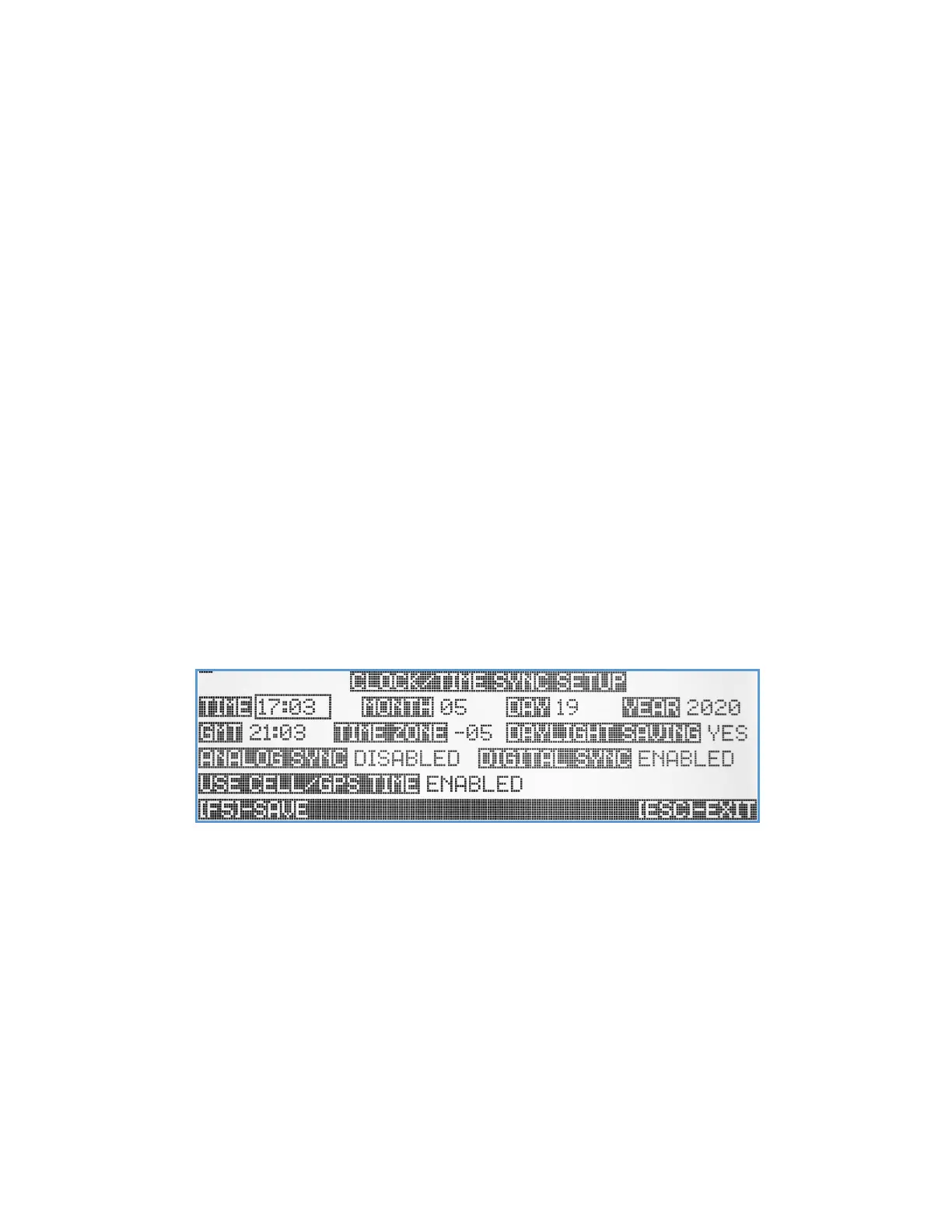
Clock/Time Sync Setup
The VS4820 can send periodic synchronization to Visiplex analog & digital clocks, to sync all to one accurate time source.
The Clock/Time Sync Setup submenu lets the user setup the VS4820 clock time & date, configure the wireless time
synchronization functions and select how the unit internal clock will be synchronized. Use the Up/Down/Left/Right
arrow keys to navigate between the screen items.
Time – Manually setup the local time. If needed to update, type in the local time in 24 hours format, otherwise hit the
Right arrow key to move to the next field.
Month, Day, Year – Manually setup of the local date. Use the Up/Down arrow keys to set the right date.
GMT Time – System calculated GMT time from the local time and the time zone fields.
Time Zone – Setup the local time zone. Use the Up/Down arrow keys to select the local time zone.
Daylight Saving – Setup the local Daylight Saving mode. Select Yes or No. Note: If the VS4820 is set to get time updates
from local cell tower (when equipped with LTE modem option), always set the Daylight Saving mode to No.
Analog Sync – Setup the time synchronization mode for Visiplex wireless analog clocks. The user can select from SLOT 1,
SLOT 2, SLOT 3 or Disabled (default mode). If analog synchronization mode is enabled (any slot), the VS4820
will broadcast time synchronization transmissions for few minutes around 2 AM, every night. If enabled, the



 To Next Page