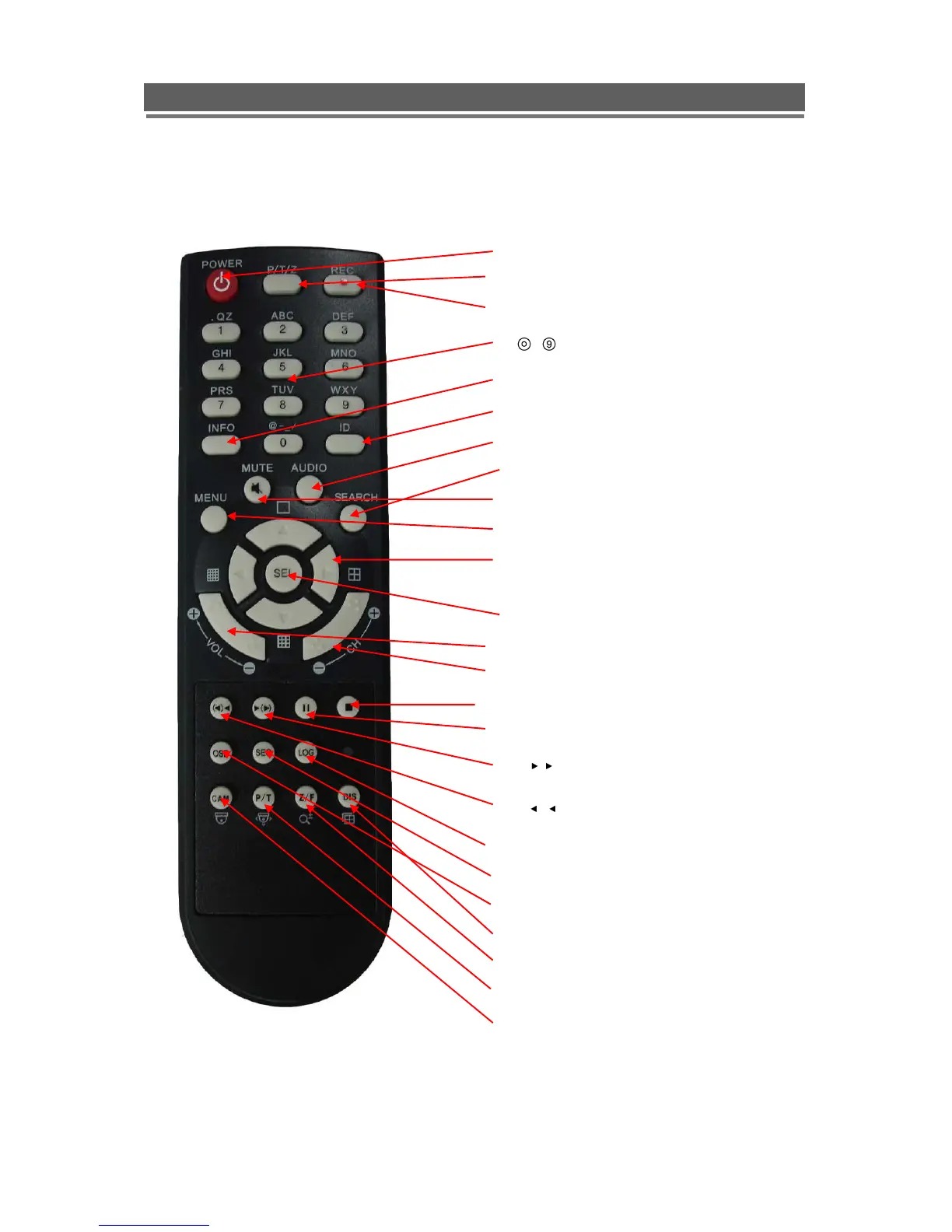
1. Power: Power ON/OFF
2. PTZ: Not used
3. Rec: Start & Stop Recording
4. ~ : Camera selection and titling
5. INFO: Direct access system Info.
6. ID: use for selecting DVR IR address
7. AUDIO: Audio channel switching
8. SEARCH: Entering search
9. MUTE: Audio Mute
10. MENU: Entering system menu
11. ARROW & SPLIT: Menu navigation or split
screen selection keys
12. SEL: Enter key in menus
13. VOL”+,-“: Up, down volume
14. CH “+,-“: Up, down channel(s)
15. █: Stopping playback
16 II : Pause
17. ( ) : Play(or fast forward)
18. ( ): Reverse play
19. LOG: Direct access Log list
20. SEQ: Hot key Spot SEQ
21. OSD: Operating OSD ON/OFF
22. DIS: Channel Division
23. Z/F: Zoom/& Focus
24. P/T: Pan & Tilt
25. Cam: camera selection for PTZ control



 To Next Page