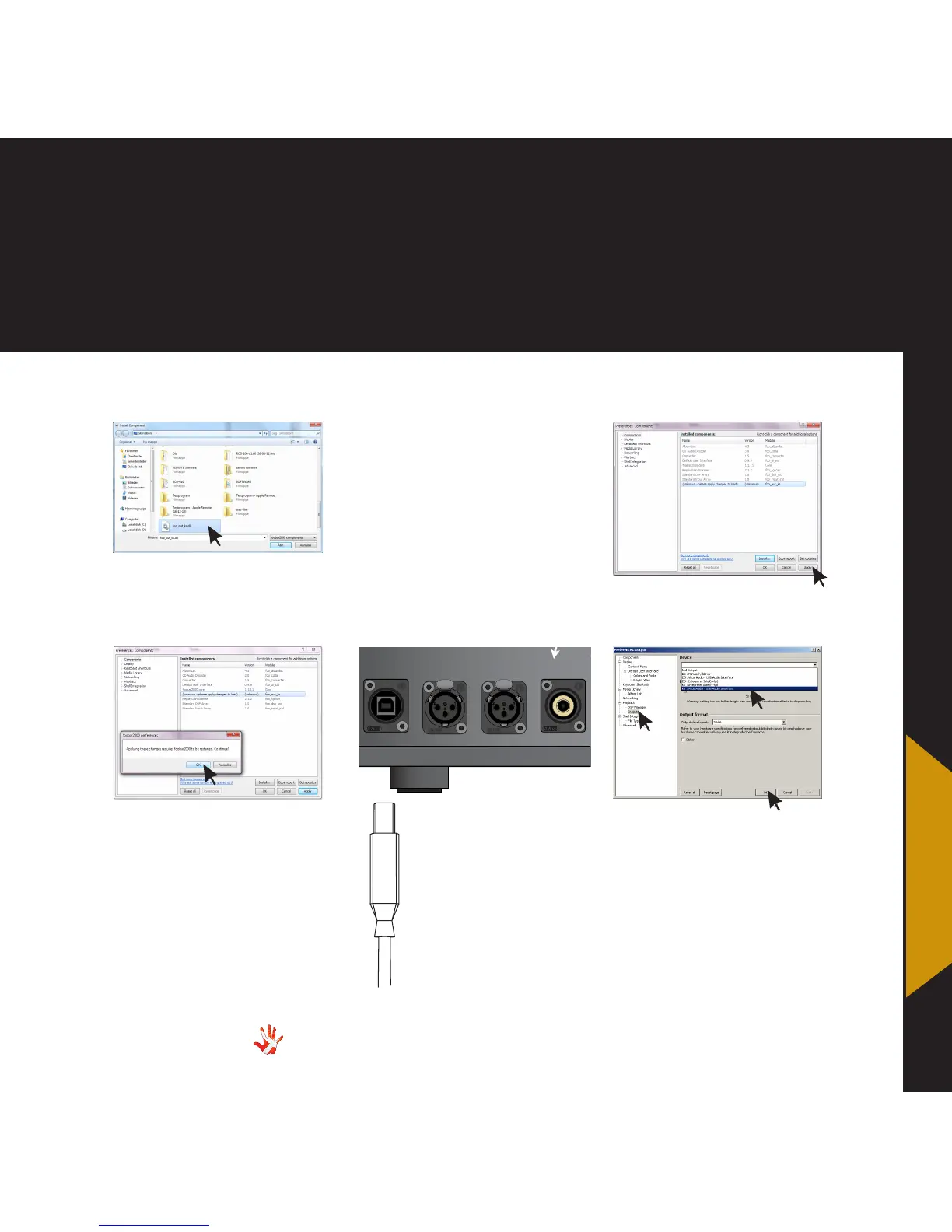
7. examples installing software
8 Foobar2000.
Press apply
9 Foobar2000.
Press OK
10 Foobar2000.
Go to 1. File > Preferences
2. Playback > Output
Pick KS: Vitus Audio-USB
Audio Interface
from the list of devices.
3. Press OK
Music played in Foobar2000
will now be send to the MP-
D201.
10 Connect.
Connect the MP-D201
and the computer.
Turn the MP-D201 on.
Now we can set the
output to send through
the USB port.
7 Foobar2000.
Go to the component and
select it.
Denmark
Master piece Series
CD-Transport - MP-D201
Warning
Risk of electrical shock
DO NOT OPEN
No user serviceable parts inside
Warning
To prevent re and shock
hazard, do not expose this device
to rain and moisture
Input 1 Input 2 Input 3 Input 4
Analog Output Right Analog Output Left
Input 5
NEUTRIK
PUSH
NEUTRIK
PUSH
1
3
2
Sometimes Foobar2000 can
not “see” the component. You
can then type the component
name:
foo_out_ks.ddl
and
then press open.
Alternatively you can close
Foobar2000 and go to
C/Programs/foobar2000/
components. Then you can
drag and drop the component,
from the location where
you extracted it to, into the
components folder.
7. examples



 To Next Page