SUPREMA - OPERATION & SERVICE MANUAL
Suprema - Operation & Service 02-2012 Page 3 of 58
scrolling from menu
to menu.
adjusting settings
within a menu.
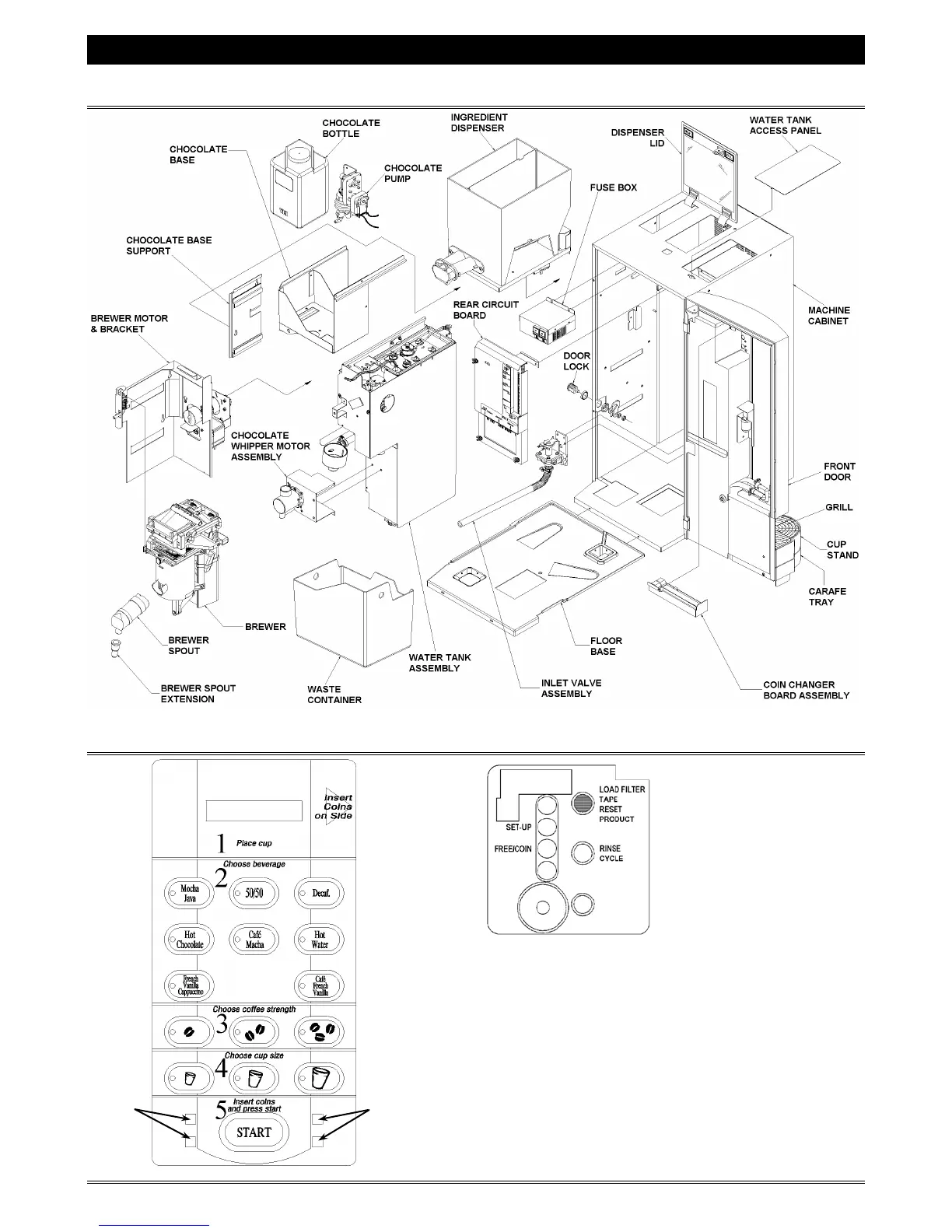
OVERVIEW OF SUPREMA COMPONENTS
SELECTION PANELS & INTERIOR DOOR PANELS
SET-UP - Provides access to
the programming and to the
configuration of the machine.
FREE/COIN - Toggles the
machine from "
FREE" mode to
"COIN" mode. Red indicator
LED will be lit when the
machine is in "
FREE" mode.
OPEN BREWER / RESET PRODUCT - This button is red
to simplify identification for the caretaker. It opens the
brewer to perform maintenance.
RINSE CYCLE - Provides access to the rinse cycles for
the brewer and chocolate components.
Suprema Interior Door Panel



 To Next Page