DRIVER SUPPORT
}}
* Option/accessory.
285
–
With the symbol/function (4) displayed,
press the steering wheel button
(1).
> Adaptive cruise control starts and the cur-
rent speed is stored, which is shown in
figures in the centre of the speedometer.
The time interval is only
adjusted to the vehicle ahead
by the ACC when the distance
symbol shows two vehicles.
At the same time a speed
range is marked.
The higher speed is the
stored/selected speed and the
lower speed is that of the vehi-
cle ahead (target vehicle).
Related information
•
Adaptive Cruise Control* (p. 281)
Managing speed with Adaptive
Cruise Control
The adaptive cruise control (ACC
38
) can be set
to different speeds.
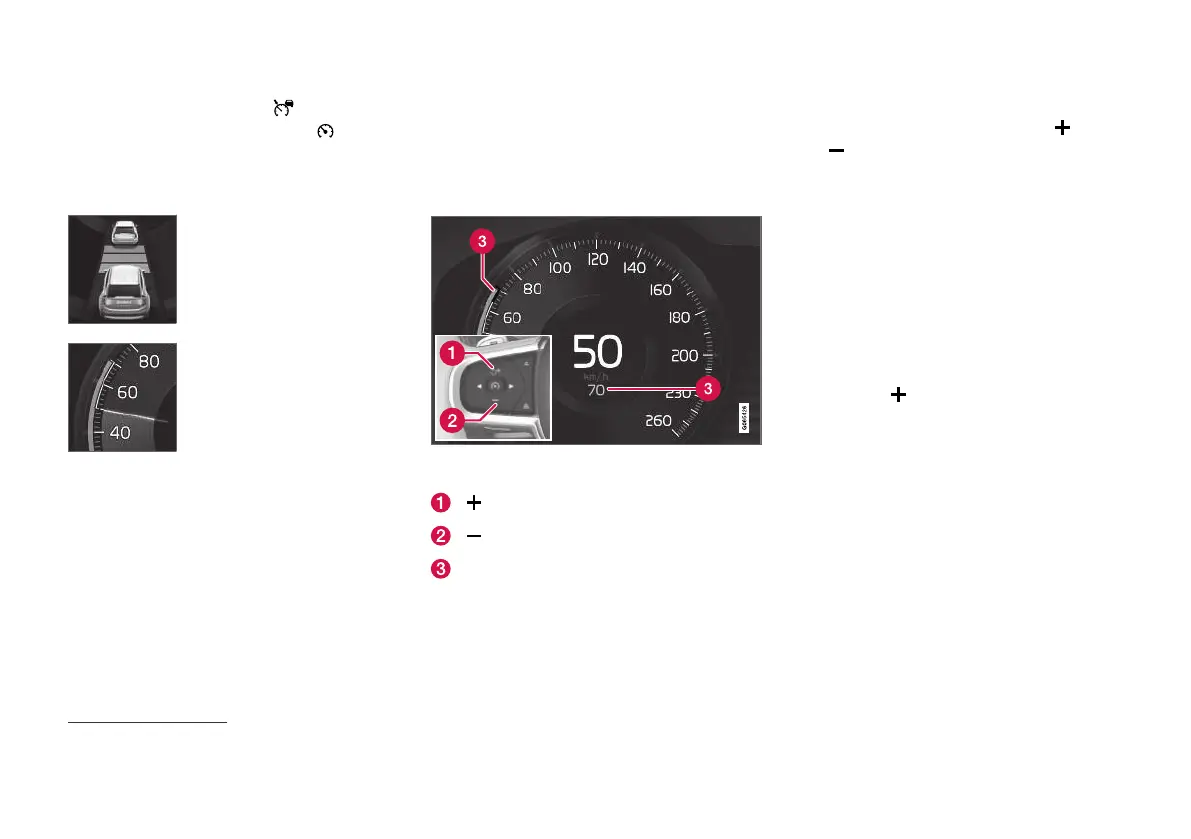
Setting/changing the stored speed
NOTE: The illustration is schematic - details may vary
depending on car model and market.
: Increases the stored speed.
: Reduces stored speed.
Stored speed.
–
Change the set speed with short or long
presses on steering wheel button
(1) or
(2):
•
Short press: Each press changes the
speed in increments of +/- 5 km/h
(+/- 5 mph).
•
Press and hold: Release the button when
the speed indicator (3) has moved to the
desired speed.
•
The speed set after the last button press is
stored in the memory.
If the driver increases the car’s speed using the
accelerator pedal before pressing the steering
wheel button
, the speed stored will be the
car’s speed when the button is depressed, provi-
ded the driver’s foot is on the accelerator pedal at
the moment when the button is depressed.
A temporary increase in speed with the accelera-
tor pedal, e.g. during overtaking, does not affect
the setting - the car returns to the last stored
speed when the accelerator pedal is released.
38
Adaptive Cruise Control



 To Next Page