||
DRIVER SUPPORT
* Option/accessory.
344
Related information
•
Activate/deactivate Cross Traffic Alert
(p. 344)
•
Limitations of Cross Traffic Alert (p. 344)
•
Recommended maintenance for Cross
Traffic Alert (p. 345)
•
Messages for Cross Traffic Alert (p. 347)
Activate/deactivate Cross Traffic
Alert
The driver can select to switch off the warning
in the function CTA
81
- subfunction auto brake
cannot be switched off and continues to be
active. Proceed as follows:
Press the Cross Traffic Alert
button in the centre display
function view.
•
GREY button indication - warning signal and
indication on display for CTA is deactivated.
•
GREEN button indication - CTA is activated.
CTA is activated automatically each time the
engine is started.
Related information
•
Cross Traffic Alert* (p. 343)
Limitations of Cross Traffic Alert
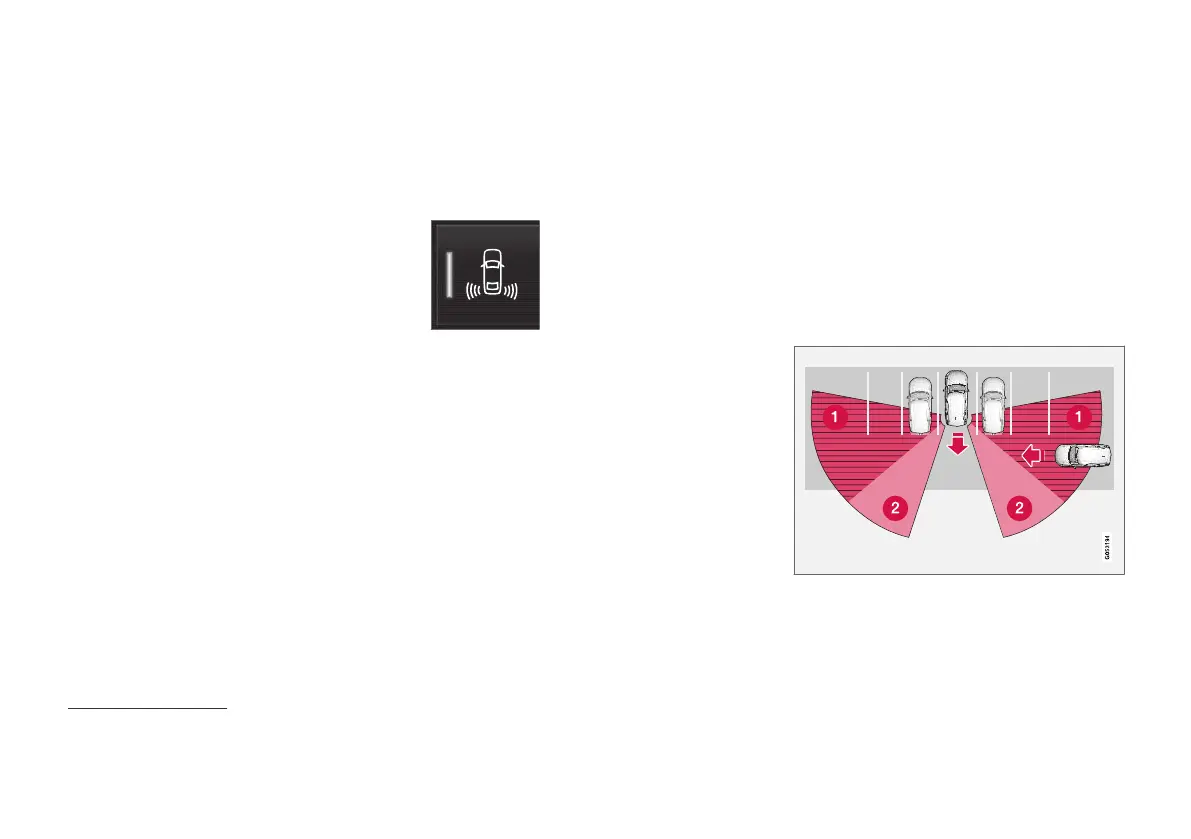
The CTA
82
function with auto-brake may have
limited functionality in certain situations.
CTA does not perform optimally in all situations
but has some limitations. For example, the CTA
sensors cannot "see" through other parked vehi-
cles or obstructing obstacles.
Here are some examples of situations where
CTA’s "field of vision" may be already limited and
approaching vehicles cannot therefore be
detected until they are very close:
The car is parked deep inside a parking slot.
81
Cross Traffic Alert
82
Cross Traffic Alert



 To Next Page