DRIVER SUPPORT
304
Deactivating/activating Pilot Assist
Pilot Assist can be temporarily deactivated so
that it is set in the standby mode and can be
reactivated later.
Deactivating and setting Pilot Assist in
standby mode
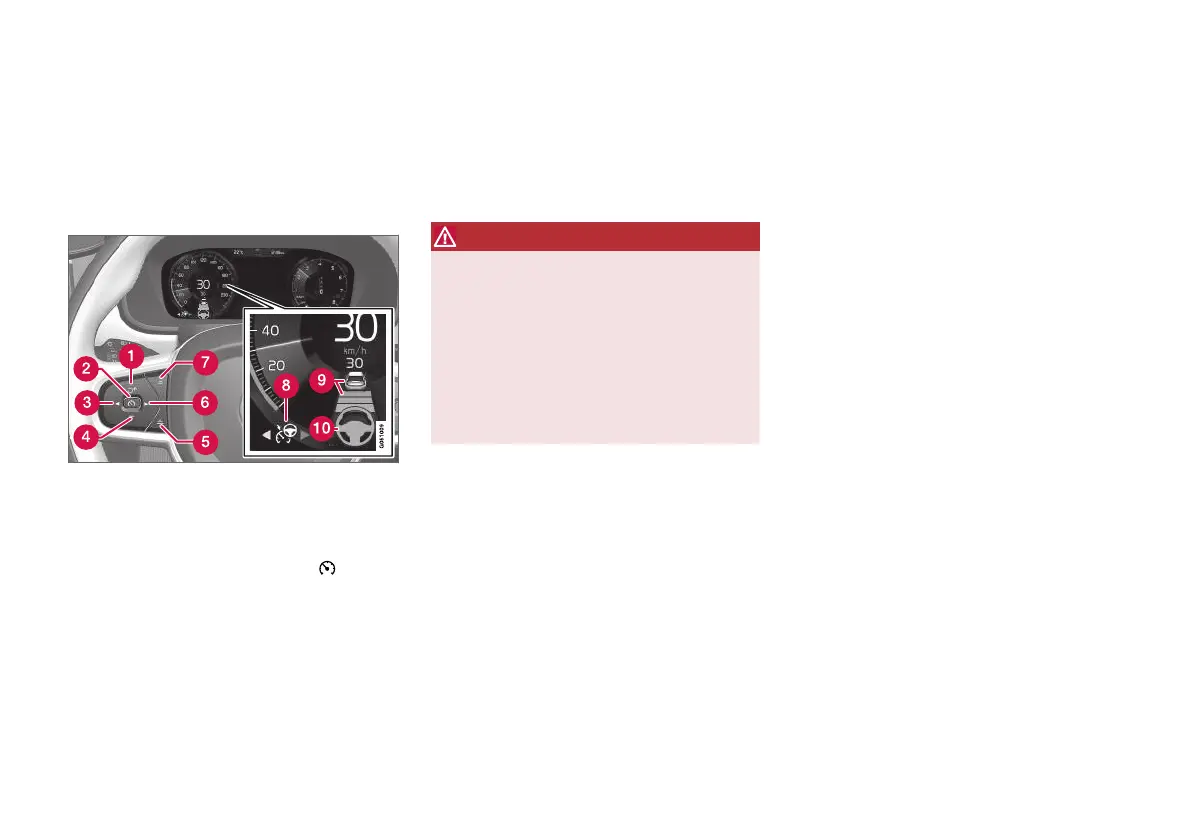
NOTE: The illustration is schematic - details may vary
depending on car model.
To temporarily switch off Pilot Assist and set it in
standby mode:
–
Press the steering wheel button (2).
> Pilot Assist is set in standby mode - the
symbol (8) in the driver display changes
colour from WHITE to GREY and the
stored speed in the centre of the speed-
ometer changes from BEIGE to GREY.
...or...
–
Press the steering wheel button ◀ (3).
> Pilot Assist is switched off and changes
to the Adaptive cruise control in active
mode.
WARNING
•
With Pilot Assist in standby mode, the
driver must intervene and steer, regulat-
ing both speed and distance to the vehi-
cle ahead.
•
When Pilot Assist is in standby mode and
the car comes too close to a vehicle
ahead, the driver is warned of the short
distance by the Distance Warning func-
tion instead.
Standby mode on driver intervention
Pilot Assist is temporarily deactivated and set in
standby mode if:
•
the foot brake is used.
•
the gear selector is moved to N position.
•
the direction indicators are used for longer
than 1 minute.
•
the driver maintains a speed higher than the
stored speed for longer than 1 minute.
•
the clutch pedal is depressed for
approx. 1 minute - applies to cars with man-
ual gearbox.
A temporary increase in speed with the accelera-
tor pedal, e.g. during overtaking, does not affect
the setting - the car returns to the last stored
speed when the accelerator pedal is released.
When the direction indicators are used, Pilot
Assist steering assistance is temporarily disen-
gaged. When this is no longer the case, steering
assistance is automatically reactivated if the
lane's side markings can still be detected.



 To Next Page