DISPLAYS AND VOICE CONTROL
90
Application menu in driver display
Application menu (app menu) in the driver dis-
play provides quick access to commonly used
functions for certain apps.
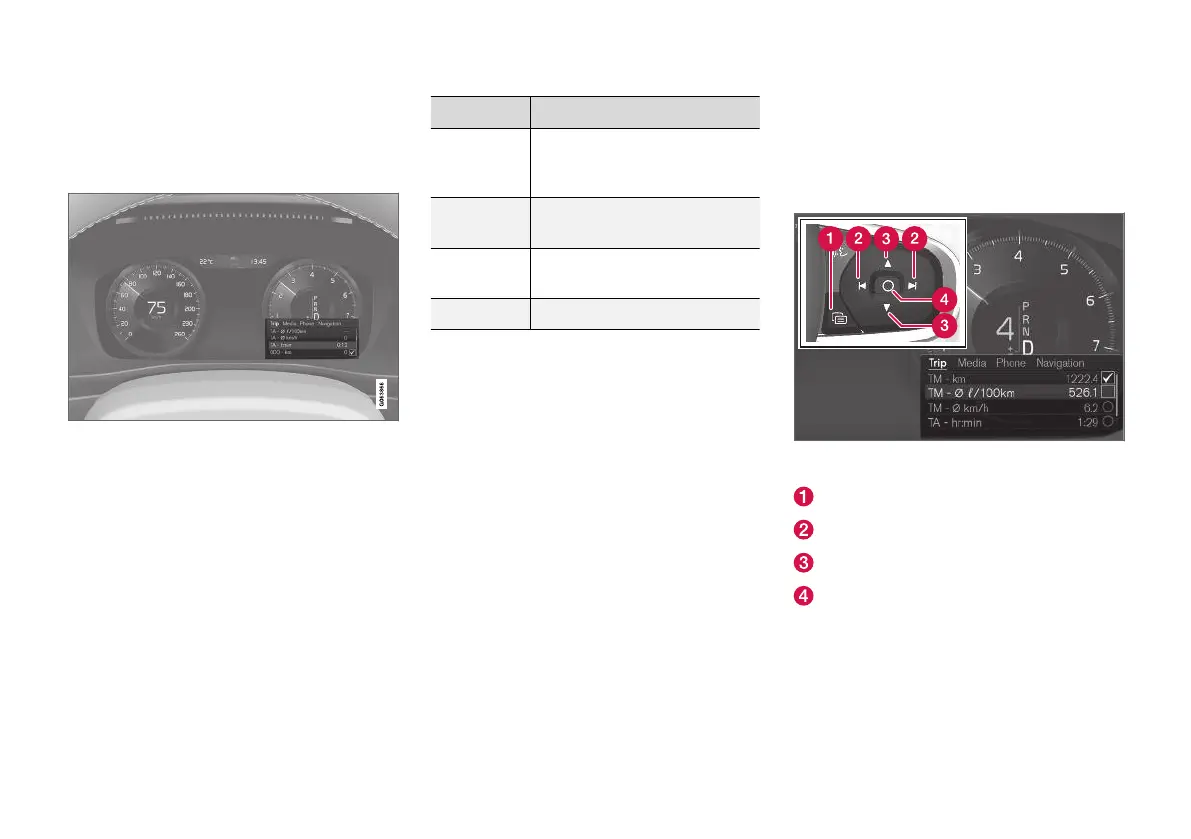
The app menu in the driver display can be used instead
of using the centre display. The figure is schematic - the
layout may vary.
The app menu is shown in the driver display and
is controlled using the steering wheel's right-
hand keypad. The app menu makes it easier to
switch between different apps or functions within
the apps without having to let go of the steering
wheel.
App menu functions
Different apps give access to different types of
functions. The following apps and their associ-
ated functions can be controlled from the app
menu:
App Functions
Trip com-
puter
Selection of trip meter, selec-
tion of what to show in the
driver display, etc.
Media
player
Selection of active source for
the media player.
Phone Calling a contact from the call
list.
Navigation Guide to destination, etc.
Related information
•
Driver display (p. 75)
•
Overview of centre display (p. 95)
•
Handling the application menu in the driver
display (p. 90)
Handling the application menu in
the driver display
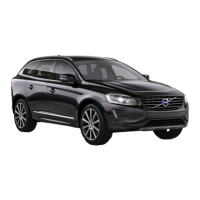
The application menu (the app menu) in the
driver display is operated with the steering
wheel's right-hand keypad.
The app menu and the steering wheel's right-hand key-
pad.
Open/close
Left/right
Up/down
Confirm



 To Next Page