DRIVER SUPPORT
}}
* Option/accessory.
287
NOTE
•
The higher the speed the longer the cal-
culated distance in metres for a given
time interval.
•
Only use the time intervals permitted by
local traffic regulations.
•
If the adaptive cruise control does not
seem to respond with a speed increase
when activated, it may be because the
time window to the vehicle ahead is
shorter than the set time window.
WARNING
•
Only use a time window that suits the
current traffic conditions.
•
The driver should be aware that short
time windows limit the amount of time
available to react and take action if an
unexpected traffic situation arises.
Select how ACC shall maintain the
distance* to the vehicle ahead
The driver can select different driving styles for
how the Adaptive cruise control should maintain
the preset time interval to the vehicle ahead.
Selection is made via the drive mode control
DRIVE MODE.
Select one of the following options:
•
Eco - ACC focuses on optimal fuel economy,
which means longer time interval to the vehi-
cle ahead.
•
Comfort - ACC focuses on following the set
time interval to the vehicle ahead as
smoothly as possible.
•
Dynamic - ACC focuses on following the set
time interval to the vehicle ahead more
closely, which in certain cases may mean
heavier acceleration and braking.
See further information in the "Drive modes" sec-
tions.
Supplementary information can also be found in
the sections "Managing speed for the cruise con-
trol" and "Drive mode ECO".
Related information
•
Adaptive Cruise Control* (p. 281)
Deactivating/reactivating Adaptive
Cruise Control
The Adaptive cruise control (ACC
41
) can be
temporarily deactivated so that it is set in the
standby mode and can later be reactivated.
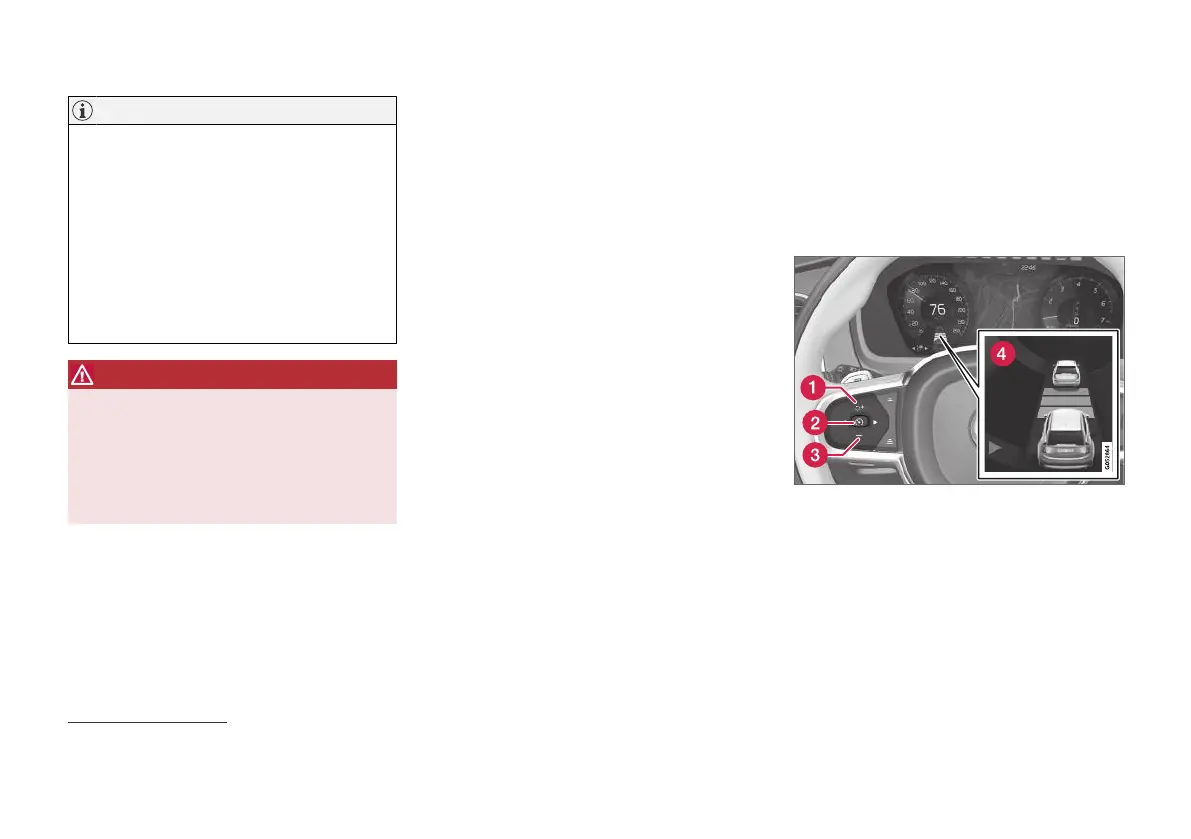
Deactivate Adaptive Cruise Control and
set it in standby mode
NOTE: The illustration is schematic - details may vary
depending on car model.
41
Adaptive Cruise Control


 To Next Page