18
How to install the display unit
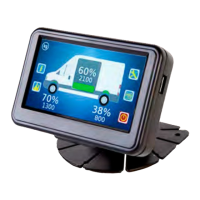
A single display unit is installed in the cab of the vehicle to display the sensor information. The
display unit has a single port that connects to both the power supply on the vehicle and the
junction box, via the external domain cable.
The external domain cable starts in the cab of the vehicle and is routed to the power supply and
junction box.
1. Route the power cables on the display unit cable from the location of the display unit in the cab
to the appropriate connection point for the power supply in the vehicle
2. Route the external domain cable on the display unit cable from the the location of the display
unit in the cab to the location for the junction box
• Avoid running cables on or near sharp objects
• Keep cables away from hot components such as exhausts and engines
Use cable protector to protect the cable at positions where it may be exposed to damage
It is recommended that you follow existing cable routes and ensure that the cable is able to
plug into the rear of the display unit after it has been mounted
3. Mount the dashboard mount to the vehicle. Mount it to a position that does not obscure the
drivers line of sight when driving the vehicle. Ensure that the display unit cable can be routed
to the back of the display unit
VanWeigh
®


 To Next Page