SmartBoard
4
Operation and Functions
37
This function can be used to adjust the main menu and other configurations (e. g.
the number of pole wheel teeth) to the current system configuration, when, for ex-
ample, the SmartBoard is fitted intro a different trailer or a system is not applicable.
For further information see chapter 4.6.2 "Configuration of the main menu",
page 39.
Information Description Note
Automatic configu-
ration of the main
menu
Adjusting the main menu to
the current system configura-
tion
Ignition (terminal 15) must be
switched on and the trailer
vehicle must be supplied
with power.
4.5 Output of messages
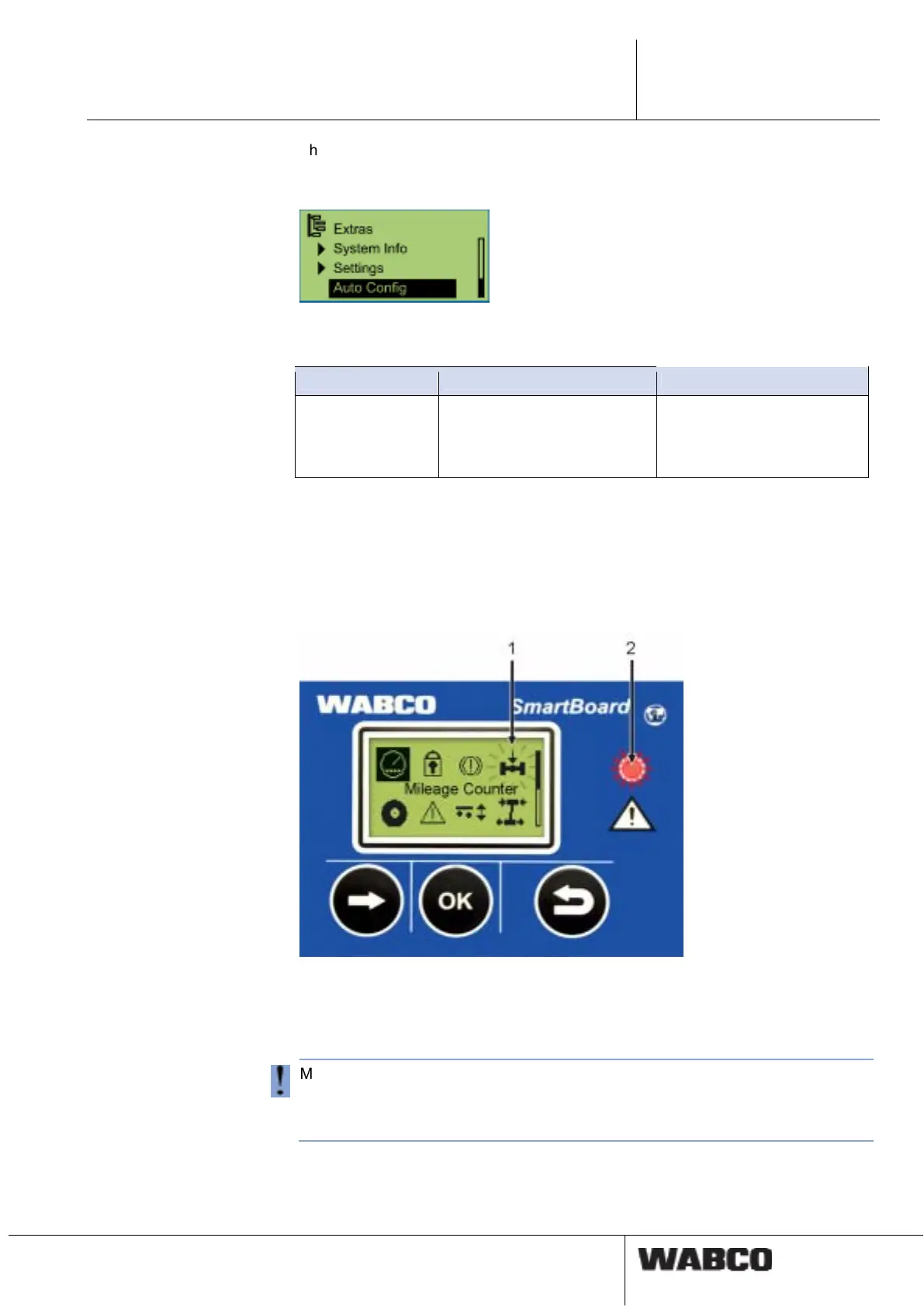
The SmartBoard outputs messages optically.
• The corresponding menu item flashes in the display.
• The warning LED flashes according to the message type.
fig. 4-5: Output of messages
1 Flashing menu item (e. g., for overloading in this case)
2 Red flashing warning LED
Messages are only output via warning LEDs and flashing menu items if the "Event
LED" functions is activated (see page 33).
The warning LED is deactivated once a speed of 10 km/h is reached. It is activated
again once the speed drops below 8 km/h.
Messages are outputted for the following functional groups:
• Brake lining wear (end point indication BVA)
One or more than one brake linings have reached their wear limit.



 To Next Page