2787-2146 (/0000-00x0)Configuration
44 Product manual | Version: 1.2.2
Power Supply Pro 2
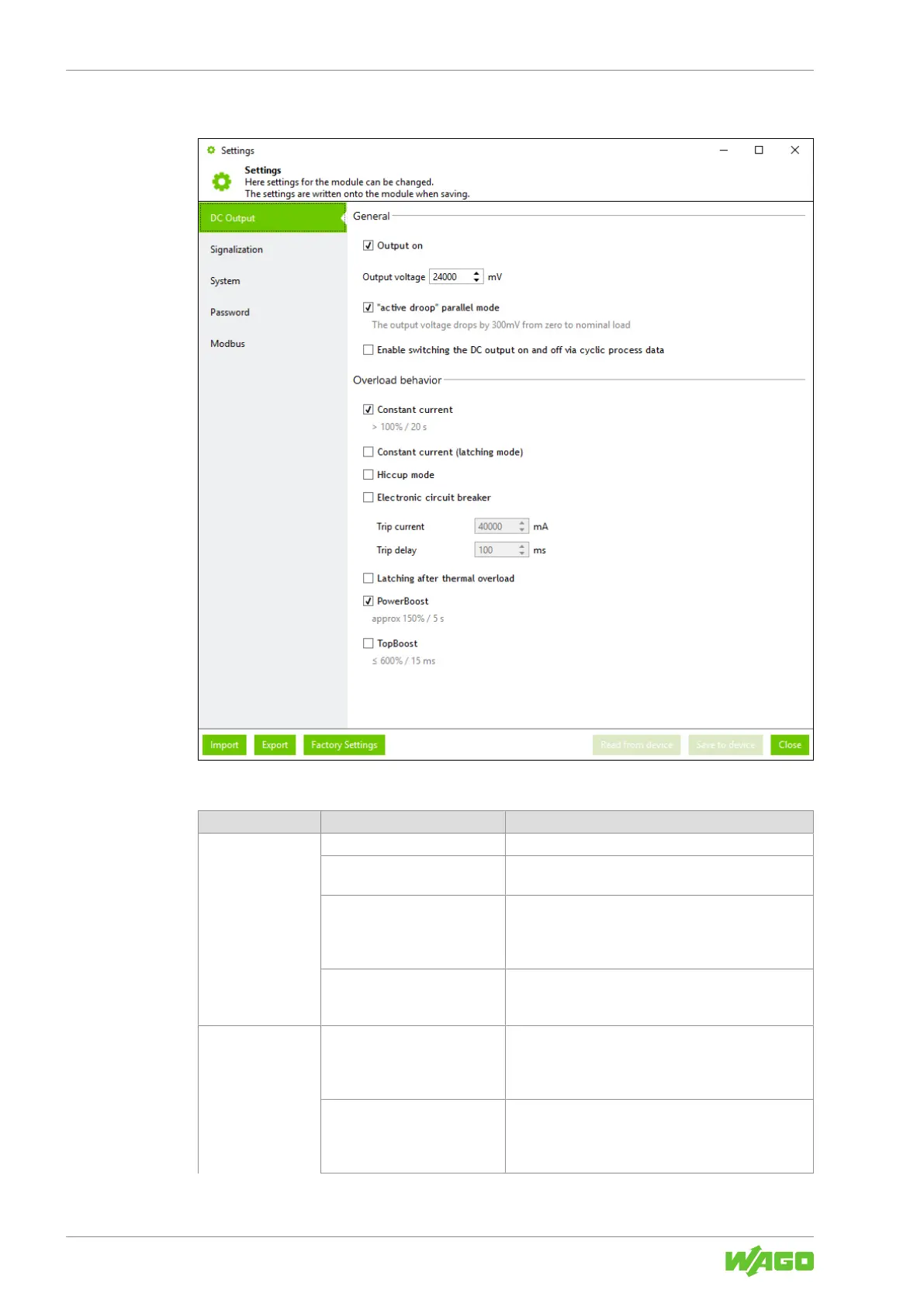
DC Output
Figure26: Dialog: Settings – DC Output
Table55: Dialog: Settings – DC Output
Section Parameters Description
General Output on If this checkbox is selected, the DC output is activated.
Output voltage Here you can enter the output voltage (unit: mV) that is
present when the output is active.
“active droop” parallel mode If this checkbox is selected, the “Active Droop” parallel
switching mode is active. In this mode, a smooth char-
acteristic curve ensures better current sharing for par-
allel operation of power supplies.
Enable switching the DC out-
put on and off via cyclic
process data
If this checkbox is selected, the DC output can be
switched on and off via cyclic process data.
Overload behavior Constant current If this checkbox is selected, the “Constant Current”
overload behavior is enabled. You can find more infor-
mation in section 8“Constant Current” Mode
[}65].
Constant current (latching
mode)
If this checkbox is selected, the “Constant Current with
Latching Shutdown” overload behavior is enabled. You
can find more information in section 8“Constant
Current with Latching Shutdown” Mode [}65].



 To Next Page