EasyManua.ls Logo

Wang 200 Series - 1640 Controller (200 DPI) Installation

Default Icon
122 pages
Print Icon
To Next Page IconTo Next Page
To Previous Page IconTo Previous Page
Loading...
5
.6
~n~~l~io~ONTROLLER
(200
DPI)
5. 6. 1
1640
Controller
(200
DPI) Installation
NOTE
Series
280
Professional Computers
requires
CPU
board E-Rev 9 or
higher
and
an
EMM
board E-Rev 4 or
higher
for
this option.
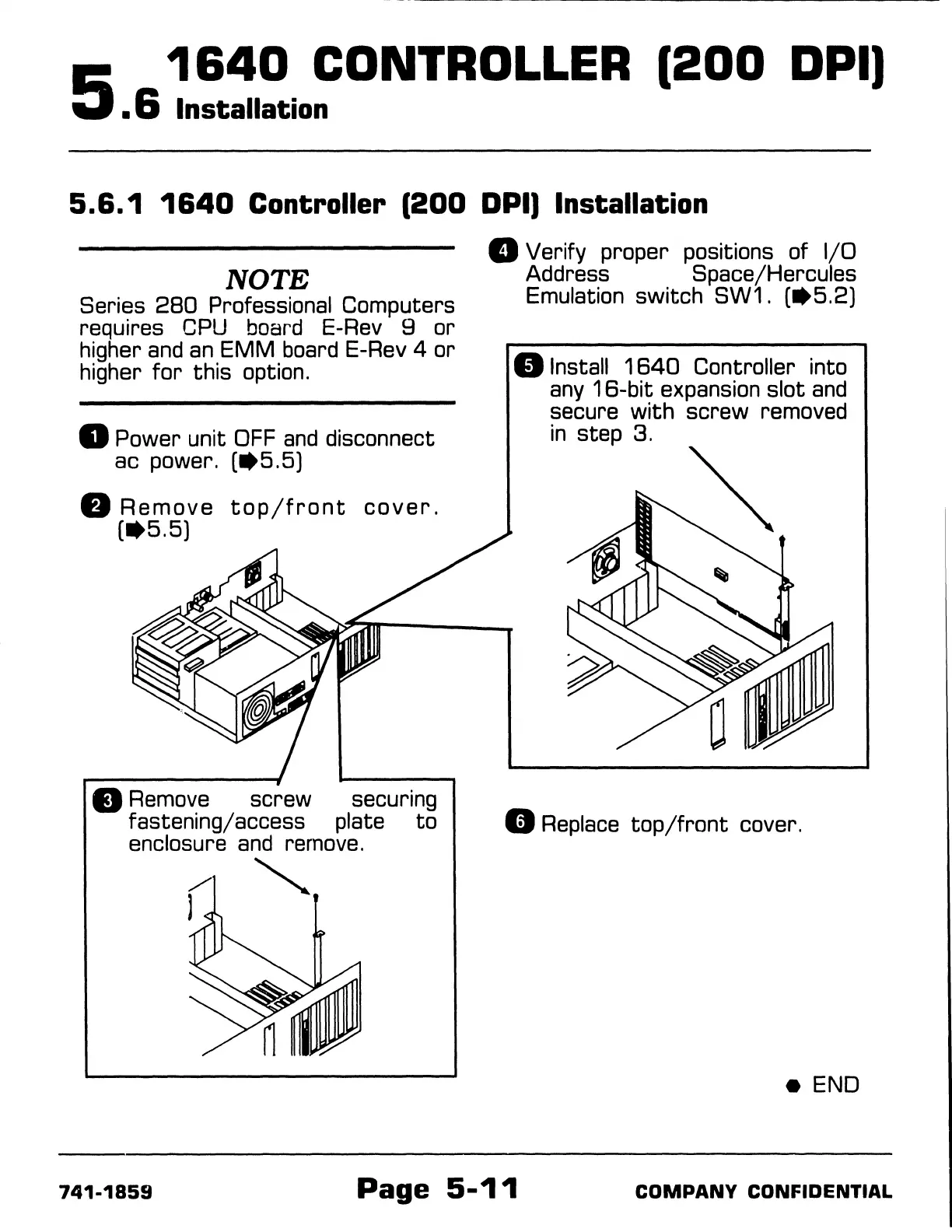
D Power unit
OFF
and
disconnect
ac power.
(•5.5)
fJ
Remove
top/front
cover.
(
..
5.5)
8 Remove screw securing
fastening/access plate
to
enclosure
and
remove.
"'
D Verify proper positions of
1/0
Address Space/Hercules
Emulation switch SW1.
(•5.2)
8 Install
1640
Controller into
any
16-bit
expansion slot
and
secure
with
screw removed
in
step 3.
Cl
Replace
top/front
cover.
e
END
741-1859
Page
5-11
COMPANY
CONFIDENTIAL

Table of Contents

Related product manuals