IP Scan Tool
18
This document contains confidential and proprietary information of Weldex Corporation.
NETWORK INSTALLATION & SETUP
Configuring Network Settings Using IP Scan Tool
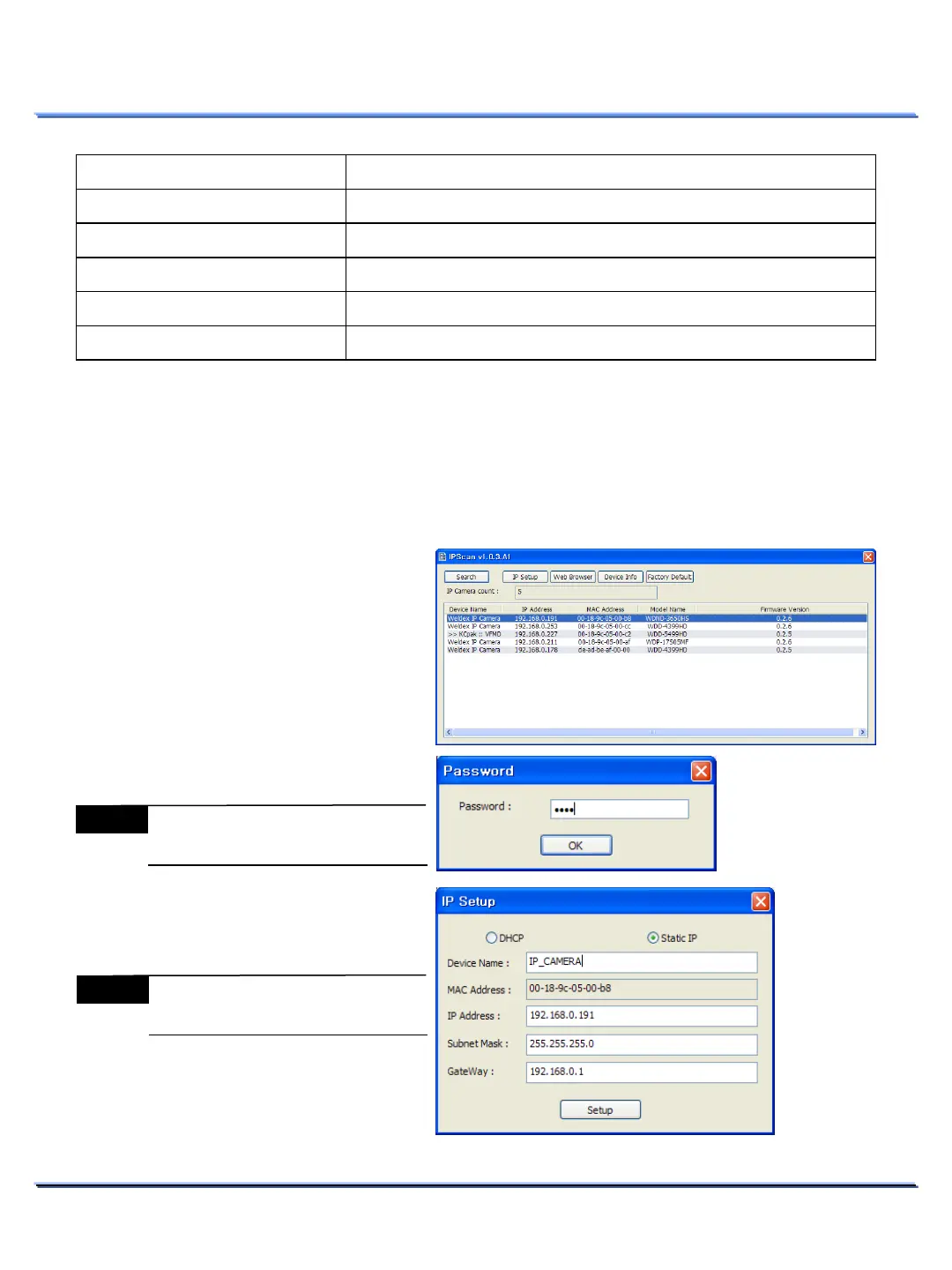
Run ‘IPScan.exe’ executable file and click [Search]. Network connected Weldex cameras will be listed
in the window.
Item Function
Device ID
Displays device ID of the camera.
IP Address
IP address of the camera.
MAC Address
MAC address of the camera.
Model Name
model number of the camera.
Firmware Version
Displays firmware version of the camera.
1. Select the camera to be configured by
clicking on your mouse.
2. Click on the [IP Setup] button to
access the IP setup window for the
selected camera.
3. You will be prompted to enter the
admin’s password
4. Make the desired changes to the IP
settings and click [Setup] to save
changes.
Note
MAC Address cannot be changed
Note
Default admin password is
[admin]



 To Next Page