EasyManua.ls Logo

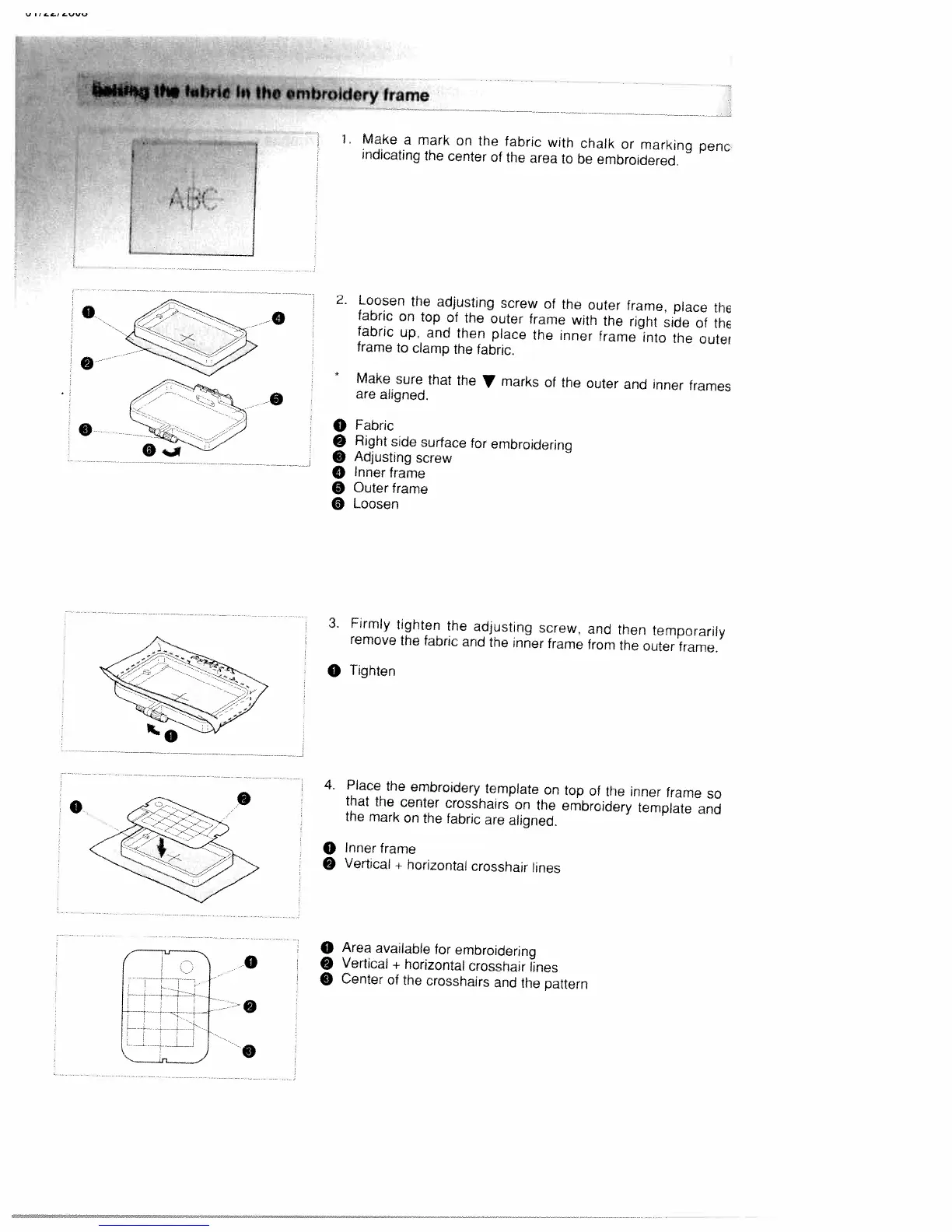
White W3300 - Fitting the Fabric in the Embroidery Frame; Align and Clamp Fabric

Default Icon
73 pages
Print Icon
To Next Page IconTo Next Page
To Previous Page IconTo Previous Page
Loading...
F
I
AR
[
mbroktery
frame
i
Make
a
mark
on
the
fabric
with
chalk
or
marking
penc
indicating
the
center
of
the
area
to
be
embroidered.
O
Fabric
O
Right
side
surface
for
embroidering
9
Adjusting
screw
o
Inner
frame
o
Outer
frame
o
Loosen
O
Inner
frame
9
Vertical
+
horizontal
crosshair
lines
o
Area
available
for
embroidering
0
9
Vertical
+
horizontal
crosshair
lines
o
Center
of
the
crosshairs
and
the
pattern
0
0
0
2.
Loosen
the
adjusting
screw
of
the
outer
frame,
place
the
fabric
on
top
of
the
outer
frame
with
the
right
side
of
the
fabric
up.
and
then
place
the
inner
frame
into
the
outer
frame
to
clamp
the
fabric.
*
Make
sure
that
the
marks
of
the
outer
and
inner
frames
are
aligned.
0
S
0
3.
Firmly
tighten
the
adjusting
screw,
and
then
temporarily
remove
the
fabric
and
the
inner
frame
from
the
outer
frame.
0
Tighten
4.
Place
the
embroidery
template
on
top
of
fhe
inner
frame
so
that
the
center
crosshairs
on
the
embroidery
template
and
the
mark
on
the
fabric
are
aligned.
0
0

Table of Contents

Related product manuals