EasyManua.ls Logo

White W3300 - Embroidering From a Specific Starting Point; Align Presser Foot with Mark; Changing the Pattern Direction

Default Icon
73 pages
Print Icon
To Next Page IconTo Next Page
To Previous Page IconTo Previous Page
Loading...
UI
/
£11
WOO
embroidering
from
a
specific
starting
point
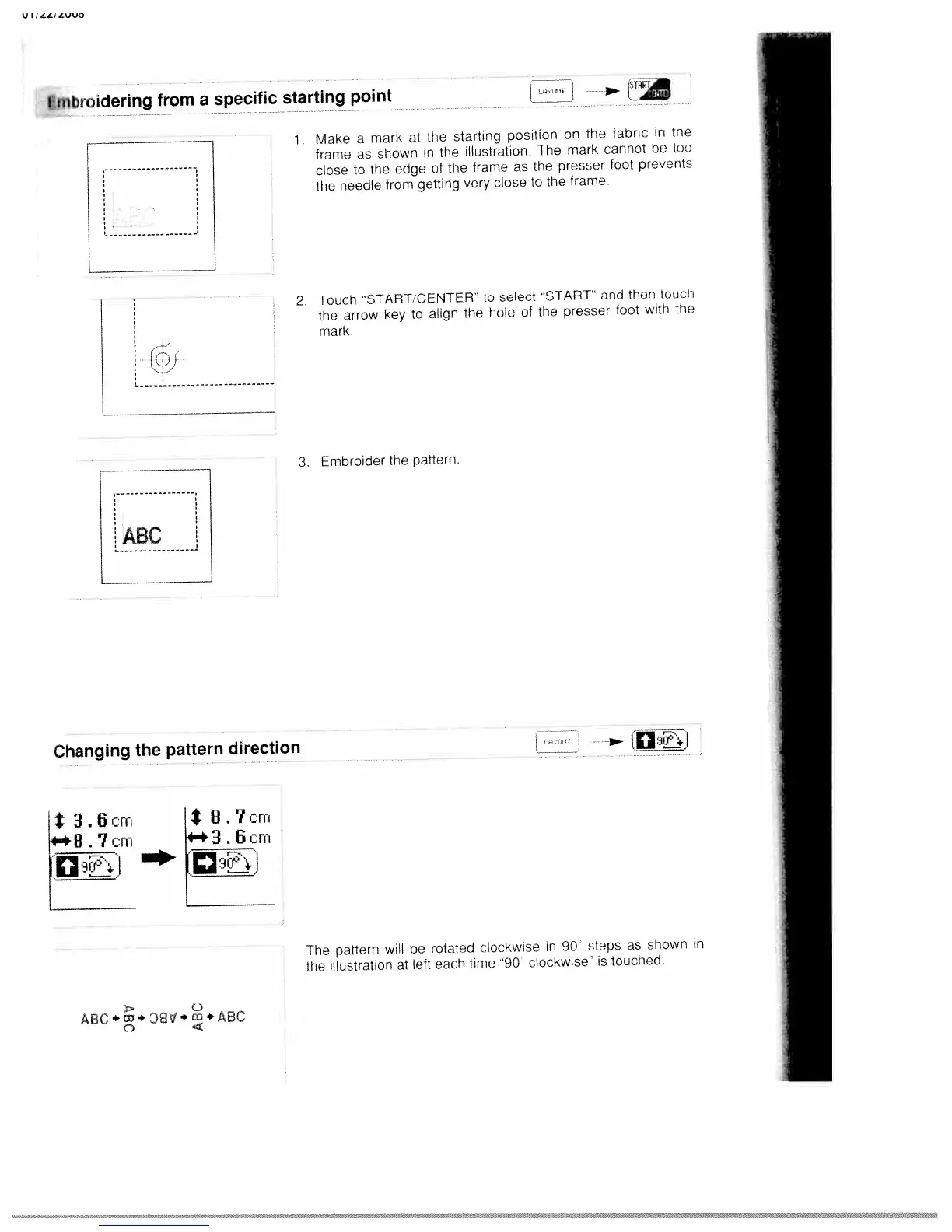
1,
Make
a
mark
at
the
starting
position
on
the
fabric
in
the
frame
as
shown
in
the
illustration
The
mark
cannot
be
too
close
to
the
edge
of
the
frame
as
the
presser
foot
prevents
the
needle
from
getting
very
close
to
the
frame.
2.
Touch
START
CENTER
to
select
START
and
then
touch
the
arrow
key
to
align
the
hole
of
the
presser
foot
with
the
mark.
3.
Embroider
the
pattern.
Changing
the
pattern
direction
jt
3.6crri
7cm
The
pattern
will
be
rotated
clockwise
in
90
steps
as
shown
in
the
illustration
at
left
each
time
‘90
clockwise”
is
touched
F
S
8.7cm
3
.
6
cm
C)
ABC.w.D8’I.c,A8C
CD
4

Table of Contents

Related product manuals