EasyManua.ls Logo

White W3300 - Checking the Characters Input; Changing the Color of Single Characters

Default Icon
73 pages
Print Icon
To Next Page IconTo Next Page
To Previous Page IconTo Previous Page
Loading...
01,22/2008
Checking
the
characters
input
1i
Ii
frJ
[iexi]
ircni
-
r
1
11
c
-.
I
Ii
•_‘
iJ1TllmnTJ
a
I
1ULT
tHE
PIEi
[
kLrF
flbiIl!TIiI
WWJ1’1UJ’
!
C,
i
lviii
jk
[if11T1fTj[k1T11illifjfTI
t
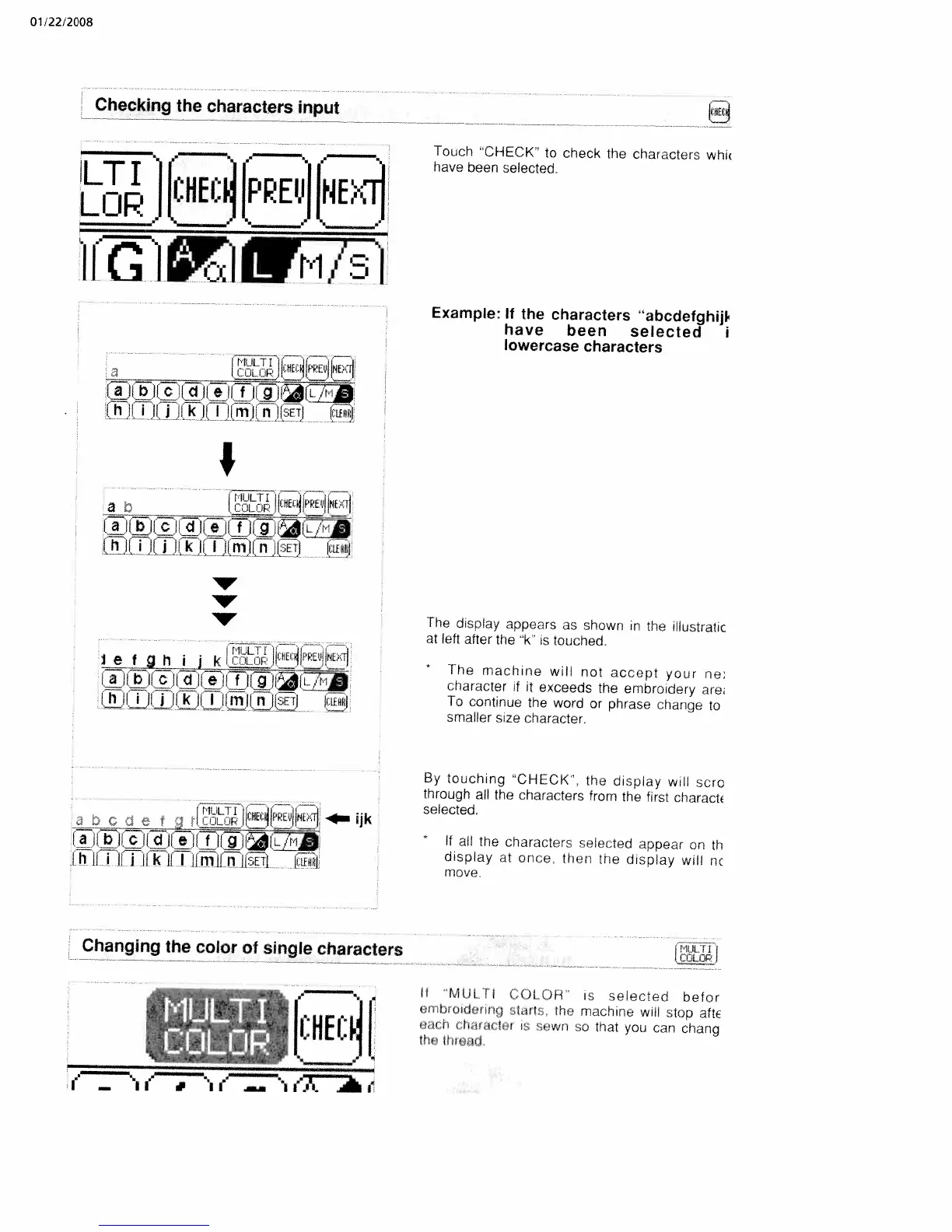
Touch
CHECK’
to
check
the
characters
whu
have
been
selected.
Example:
If
the
characters
“abcdefghijl
have
been
selected
i
lowercase
characters
The
dsplay
appears
as
shown
in
the
illustratic
at
left
after
the
‘k
is
touched,
*
The
macnine
will
not
accept
your
ne
criaracter
if
it
exceeds
the
embroidery
are
To
continue
the
word
or
phrase
change
to
smaller
size
character.
By
touching
“CHECK”,
the
display
will
sore
through
all
the
characters
from
the
first
charact
selected.
*
If
all
the
characters
selected
appear
an
th
display
at
once,
then
toe
display
will
nc
move
Changing
the
color
of
single
characters
i”IÜL
i
If
MUL
[I
C
OLOR
is
selected
befor
crib
oidcrinq
tart
the
machine
will
stop
abE
‘d(
0
i
tien
0
‘ewii
o
tnat
you
can
chang
I0I
tIt’Tkj

Table of Contents

Related product manuals