EasyManua.ls Logo

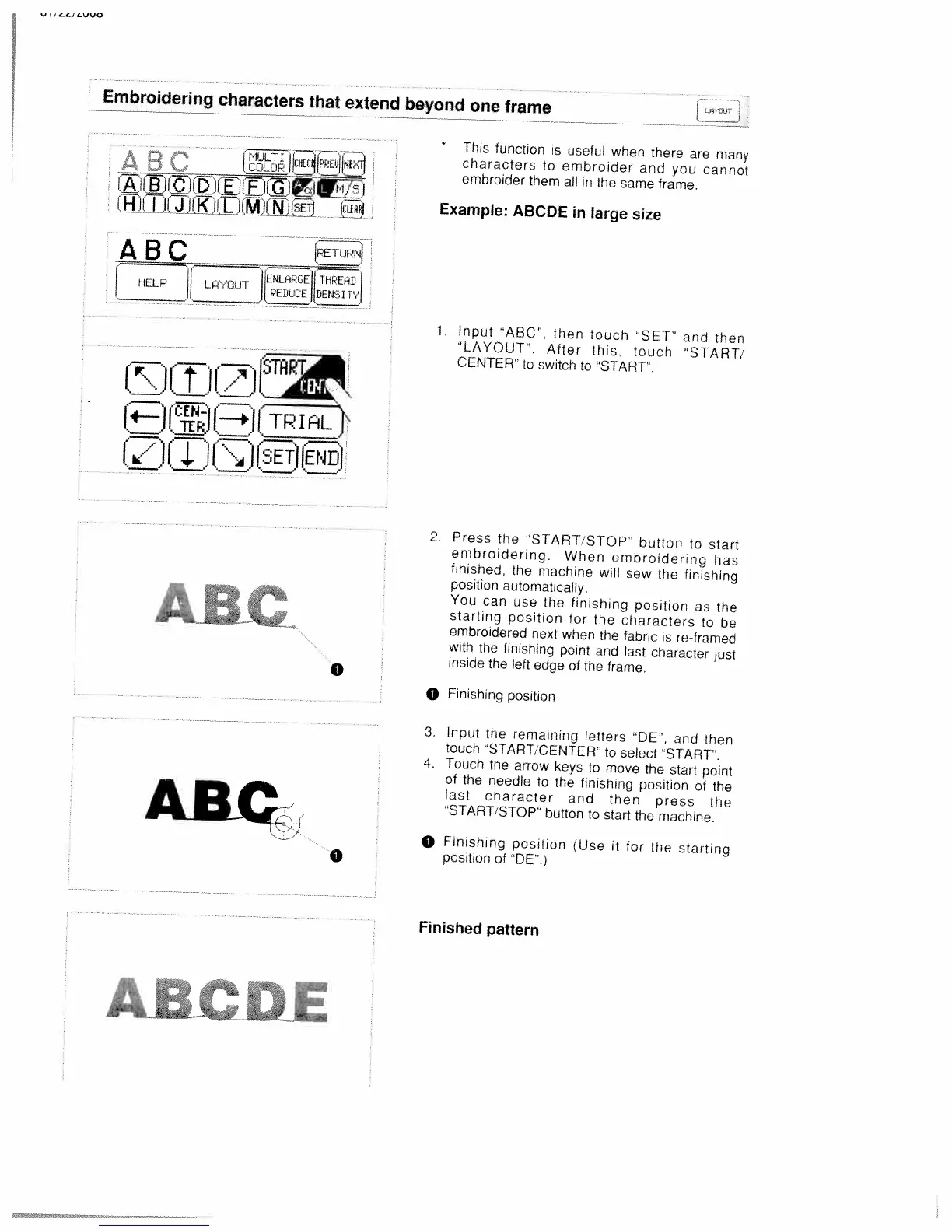
White W3300 - Embroidering Characters That Extend Beyond One Frame; Input and Embroider Long Characters

Default Icon
73 pages
Print Icon
To Next Page IconTo Next Page
To Previous Page IconTo Previous Page
Loading...
Embroidering
characters
that
extend
beyond
one
frame
C
1ULTI]1(.l[
—ijJ
iHjUJCJJJ1LJjLWj)
*
This
function
is
useful
when
there
are
many
characters
to
embroider
and
you
cannot
embroider
them
aN
in
the
same
frame.
Example:
ABCDE
in
large
size
ABC
ETUP
ENLnPGEII
THPEHIJ
I
HELP
JI..OIJT
lcE11sIT
(D
(I]
(LJ
T\
.—
,—.
.—.
1zi
1J
1:ii
I
TRIAL
._s
iJ
L4J
1.J
[SETJ
ABC
AB
0
0
1.
Input
ABC,
then
touch
‘SET’
and
then
“LAYOUT.
After
this,
touch
“START
CENTER
to
switch
to
START.
2.
Press
the
“START
STOP
button
to
start
embroidering.
When
embroidering
has
finished,
the
machine
will
sew
the
finishing
position
automatically.
You
can
use
the
finishing
position
as
the
starting
position
for
the
characters
to
be
embroidered
next
when
the
fabric
is
re-framed
with
the
finishing
point
and
last
character
just
inside
the
left
edge
of
the
frame.
O
Finishing
position
3.
Input
the
remaining
letters
“DE’.
and
then
touch
“START,
CENTER
to
select
“START.
4.
Touch
the
arrow
keys
to
move
the
start
point
of
the
needle
to
the
finishing
position
of
the
last
character
and
then
press
the
“START/STOP
button
to
start
the
machine.
O
Finishing
position
Use
it
for
the
starting
position
of
“DE”.)
Finished
pattern

Table of Contents

Related product manuals